
You’ve done the hard part already. You built the offer, set up the page, posted a few times, and told yourself you’d “figure out ads later.”
Then later showed up.
Now you’re staring at Facebook’s ad options, wondering whether this is a button click or a rabbit hole that eats your weekend and your budget. That’s a normal place to be. Most small business owners don’t need more theory. They need a practical answer to how do you post ads on Facebook without wasting money.
The good news is that posting ads on Facebook is not one thing. It’s two different paths. One is fast and lightweight. The other gives you control. If you pick the wrong path, you’ll either outgrow it fast or overcomplicate a basic promotion.
Your First Steps into Facebook Advertising
A common scenario looks like this.
You run a local service, a small online shop, or a side hustle. One post finally gets traction. A few likes, a comment, maybe a message. Then Facebook puts that tempting blue button under it: Boost Post.
That button feels like the answer. Sometimes it is. Sometimes it’s the fastest way to spend money on the wrong goal.
If your goal is simple, like getting more eyes on a post that’s already working, boosting can be enough. If your goal is leads, bookings, or sales, you’ll usually want Ads Manager instead. That’s where Facebook stops being “promote this post” and starts becoming a real ad platform. Facebook remains a huge ad channel. In 2025, average Facebook ad CTR reached 2.59% across industries, with $0.70 CPC for traffic and $1.92 CPC for leads according to ElectroIQ’s Facebook ad statistics roundup. Those aren’t guarantees for your campaign, but they do show why even lean operators keep testing Facebook.
The simplest way to think about it
- Boost Post fits content amplification.
- Ads Manager fits business outcomes.
That’s the split.
If you’re also trying to keep your organic posting consistent, it helps to get your normal publishing workflow organized before layering paid distribution on top. This guide on scheduling Facebook posts is useful for that.
Some businesses should also skip the learning curve and get help setting up the account structure from day one. If you’re in that camp, professional Meta Advertising services can be a useful benchmark for what a more structured setup looks like.
Practical rule: Don’t start by asking “How much should I spend?” Start by asking “What action do I want from this ad?”
Choosing Your Path Boost Post vs Ads Manager
If you only remember one thing from this article, remember this: the tool should match the job.
Facebook gives you two doors into paid promotion. They look similar from the outside, but they’re built for different kinds of work.
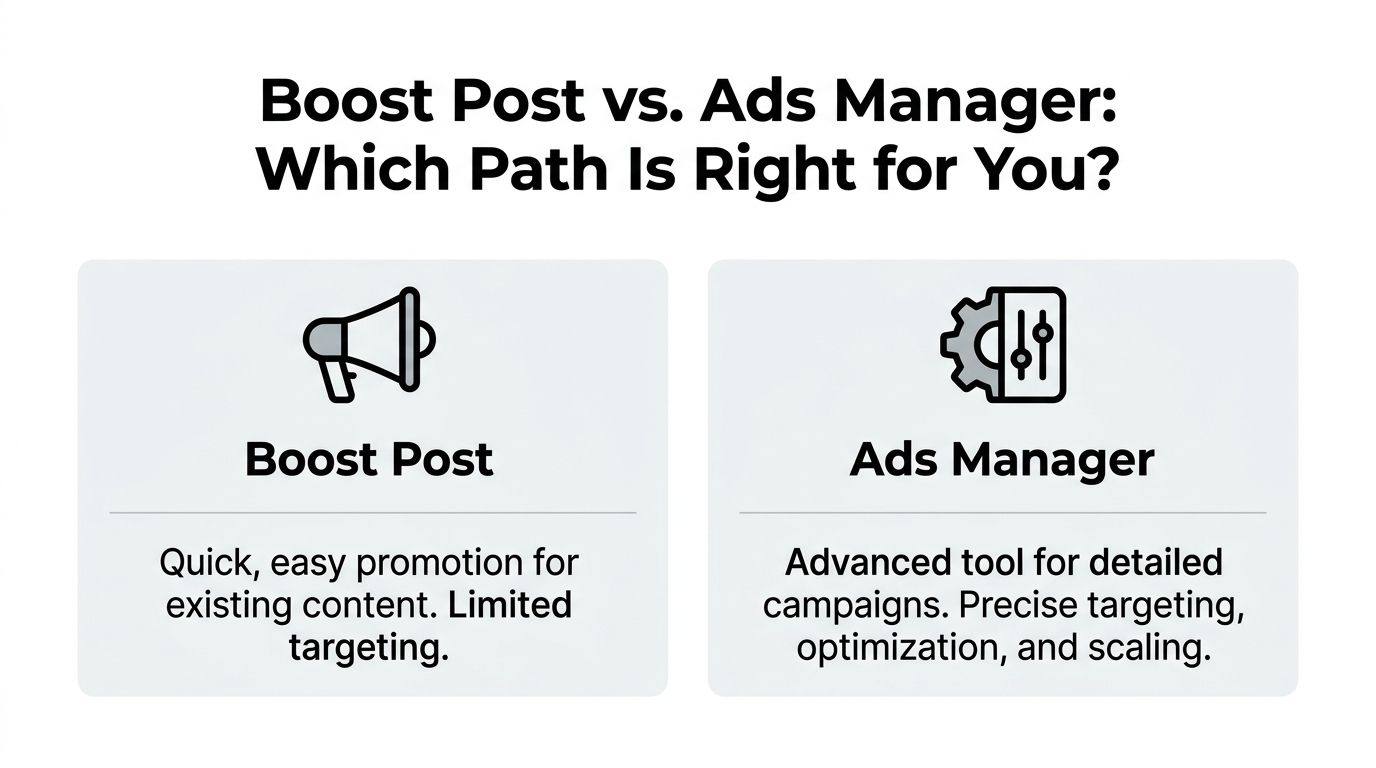
Over 8 million active advertisers use Facebook in 2026, and 27% of campaigns are optimized for conversions, while 26.94% focus on post engagement, according to WeCanTrack’s Facebook ads statistics. That split tells you a lot. Some advertisers want simple engagement. Others want harder business results.
Boost Post works when speed matters
Boost Post is fine when you already have a post on your page and want to push it farther.
Use it when:
- You’ve posted something that’s already resonating. A testimonial, offer announcement, event reminder, or product demo can be worth amplifying.
- You care most about visibility or engagement. Likes, comments, shares, and basic awareness are the main win.
- You don’t want to build from scratch. You’re paying to extend an existing post, not architecting a full campaign.
This is the low-friction option. It’s useful when you need movement, not complexity.
Ads Manager works when the result matters
Ads Manager is the better tool when the ad needs to do a job beyond “get seen.”
Use it when:
- You need leads or conversions. Bookings, form fills, purchases, and website actions usually belong here.
- You want tighter targeting. Different audiences, placements, and creative variants are easier to manage.
- You plan to test. If you want to compare angles, offers, or formats, this is the workspace.
Boost Post vs Ads Manager at a glance
| Feature | Boost Post | Ads Manager |
|---|---|---|
| Setup speed | Faster | Slower at first |
| Best use | Promote an existing post | Build a campaign around a business goal |
| Creative control | Limited | High |
| Targeting depth | Basic | More detailed |
| Optimization | Simpler | Stronger for structured testing |
| Good fit for | Visibility and engagement | Leads, traffic, conversions |
There’s also a mindset difference.
Boosting is often reactive. “This post is doing well, let me push it.”
Ads Manager is proactive. “I need five qualified leads for this offer, so I’ll build toward that.”
If you’re still fuzzy on paid posts versus sponsored distribution in general, this explainer on what a sponsored post is helps clarify the terminology.
Don’t use Ads Manager because it feels more “professional.” Use it when your goal needs the extra control.
Plan Your First Winning Ad Campaign
Most bad Facebook ads fail before they’re written.
They fail in the planning. The audience is too broad. The offer is weak. The ad asks for too much too soon. Or the business skips research and starts paying to learn what competitors are already showing in public.
That last mistake is common, and it’s avoidable.

Start with one outcome
Pick one action that matters.
Good first-campaign goals for a solopreneur usually look like this:
Get inquiries
Good for service businesses, consultants, coaches, and freelancers.
Drive website visits
Good when your site already explains the offer clearly and has a clear next step.
Promote a limited offer
Useful for events, seasonal promos, waitlists, or new product drops.
Weak goals sound like this:
- “Get my name out there”
- “See what happens”
- “Try Facebook ads”
Those aren’t campaign goals. They’re hopes.
Build a simple audience profile
You do not need a giant customer avatar document.
You need a workable sketch:
- Who are they really? Local parents, first-time homebuyers, gym beginners, founders, pet owners.
- What are they trying to solve? Save time, reduce stress, get more customers, feel healthier, fix a problem fast.
- What would make them stop scrolling? A clear outcome, a relatable pain point, or a strong local hook.
A local bakery, for example, might not need clever targeting language. “Custom birthday cakes ready for weekend pickup” is already sharper than generic “Order from our bakery today.”
Use the Meta Ad Library before you spend a dollar
This is the free move most beginner guides barely touch.
The Meta Ad Library lets you see live ads from competitors and adjacent businesses. Not estimated data. Not theory. Actual creatives running right now.
According to AdEspresso’s angle-focused guide, using the Meta Ad Library for research can help small businesses discover proven messaging and may save 20% to 50% on initial testing costs by reducing waste in early experiments.
That’s the overlooked edge for small operators. You don’t need a bigger budget. You need better starting angles.
How to research with the Ad Library
Search like a practitioner, not like a fan.
Look for direct competitors
Search businesses in your city or niche.
If you run a yoga studio, search nearby studios, online yoga brands, and fitness pages selling beginner programs. If you’re a bookkeeper, search local accounting pages and finance service brands.
Study:
- Headline style
- Offer framing
- Visual format
- Call to action
- Whether they use video, static image, or carousel
Look for adjacent markets
Sometimes your direct competitors are weak marketers.
If you’re a dog groomer, nearby spas, salons, and boutique pet brands may show stronger ad patterns than other groomers. You’re not copying the service. You’re borrowing structure.
Save patterns, not just examples
Make a simple note file or spreadsheet.
Track things like:
| Pattern | Example note |
|---|---|
| Offer type | First visit discount, free consult, limited-time bundle |
| Hook style | Problem-first, outcome-first, testimonial-led |
| Creative format | Talking-head video, before-and-after image, product close-up |
| CTA | Book now, send message, learn more |
The goal isn’t to clone another ad. The goal is to spot recurring angles that the market already understands.
Turn research into your own angle
A few examples:
- Local cleaner sees competitors pushing “same-day quotes.” Their version becomes “Message us a photo of the room and we’ll tell you what’s realistic.”
- Tutor sees everyone talking about grades. Their angle shifts to parent stress: “Stop the nightly homework battle.”
- Handmade seller notices product photos dominate the niche. They test creator-on-camera packaging videos instead.
That’s how you keep your budget from becoming a research budget.
A Practical Walkthrough of Facebook Ads Manager
Ads Manager is organized into three levels: Campaign, Ad Set, and Ad. Each level answers a different question.
- Campaign sets the result you want.
- Ad Set controls audience, placements, budget, and schedule.
- Ad is the creative and copy people see.
If you did the Ad Library research from the earlier section, this part gets much easier. You already know which offers, hooks, and formats show up repeatedly in your market. Ads Manager is just the place where you turn that research into a live test.
A real example
Use a local yoga studio with an intro offer.
The goal is not general awareness. The goal is to get nearby beginners to book a first class or claim the offer. That changes how the campaign should be built from the start.
Campaign level
Choose the objective based on the action you want after the click.
If the studio is sending people to a landing page where they can book, Traffic can work for a simple first test. If the studio wants lead forms inside Facebook or wants Meta to optimize harder for a form submission or booking event, choose the objective that fits that setup.
A lot of first-time advertisers pick engagement because it feels safe. That usually buys likes, comments, and cheap activity instead of inquiries.
Ad set level
The campaign gets specific here.
Audience
For the yoga studio, start with the local area and keep the targeting grounded in the actual customer.
That usually means:
- A tight service radius around the studio
- Beginner-friendly wellness or fitness interests, if you need them
- An audience broad enough to deliver, but local enough to stay relevant
For many solopreneurs, location does more work than clever interest stacking. A bakery, cleaner, tutor, or salon usually gets better results from being close and relevant than from chasing overly detailed targeting.
There is a trade-off here. Narrow targeting can feel efficient, but it can also restrict delivery and raise costs. Broad targeting gives Meta more room, but weak messaging gets exposed fast. For a first campaign, I prefer a clear local audience and a clear offer over twenty layers of targeting.
Placements
New advertisers usually do best with placements Meta can distribute across, as long as the creative fits.
A square image might look fine in Feed and awkward in Stories. A vertical phone-shot video usually gives you more flexibility. Before you publish, preview every placement you plan to use and remove the ones that make the ad look sloppy.
Budget and schedule
Set a budget you can afford to learn with.
The first campaign is not about squeezing profit out of every dollar on day one. It is about finding out whether your angle, audience, and offer deserve more spend. If your Ad Library research showed that similar businesses keep running beginner offers, testimonials, or founder videos, use that as a clue for what deserves your first test budget.
A weak setup is one ad, one vague audience, and a budget too small to generate useful clicks.
A stronger first setup looks like this:
- One clear offer
- One local audience
- One or two ad variations based on patterns you already spotted
- A budget high enough to produce real feedback
Ad level
Now build the ad itself.
For the yoga studio, a practical first ad could use:
- A short vertical video showing the space, instructor, and what a beginner class feels like
- Copy aimed at beginners who feel intimidated or out of practice
- A direct CTA to book the intro offer
This is also the point where your Ad Library notes pay off. If you saw that nearby wellness brands keep using calm walkthrough videos, testimonial hooks, or first-visit offers, test your own version of that structure. Do not copy their ad. Use the pattern and write it in your own voice.
Your ad should answer three questions quickly:
- What is this?
- Who is it for?
- What should I do next?
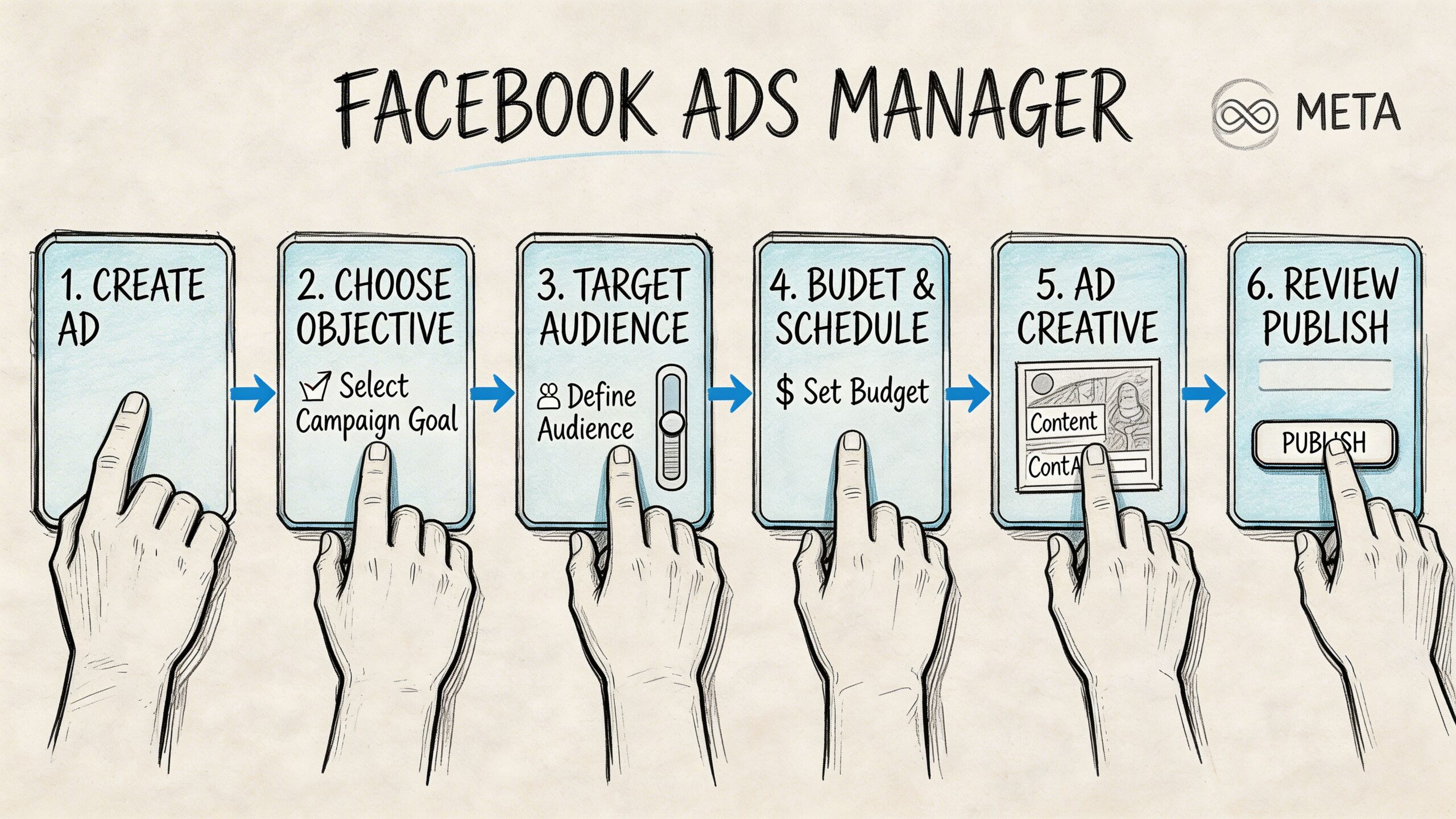
The workflow inside Ads Manager
A simple build process keeps the account readable and makes troubleshooting easier later.
Create a new campaign
Pick the result you want. Do not choose based on the ad format.
Name everything clearly
Use names you will understand next week, such as “Yoga Intro Local Video A.”
Set location, audience, and placements
Keep the setup tight enough to stay relevant, but not so restrictive that the campaign struggles to spend.
Choose budget and schedule
Give the campaign enough room to collect useful data before you judge it.
Build the ad
Upload the creative, write the copy, add the CTA, and check that the landing page matches the promise in the ad.
Preview before publishing
Check mobile first. That is where many small business ads are seen.
The video below is a helpful visual companion if you want to see the interface in action.
What tends to work
- Simple offers people can understand in a second
- Local relevance that makes the ad feel timely and specific
- Angles borrowed from market research and rewritten for your business
- A small number of clean tests instead of a cluttered setup
What usually wastes budget
- Sending people to a homepage that does not match the offer
- Targeting too broadly before the message is proven
- Using generic stock images when competitors are showing real people, real spaces, or real products
- Changing settings every few hours before delivery has settled
A first campaign should be easy to read. If you cannot tell what variable you are testing, you will not know what to improve.
Crafting Ad Creatives and Copy That Convert
Bad creative burns budget unnoticed.
You can choose the right objective, pick a decent audience, and still get weak results if the ad itself doesn’t earn attention. On Facebook, creative does a lot of the heavy lifting.
The visual side
Your ad should look like it belongs in a real person’s feed, but still feel intentional.
That usually means:
- Use authentic visuals. Real workspace, real product, real service moment, real face.
- Match the format to placement. Vertical creative is a better fit for Stories and Reels than a horizontal image squeezed into a mobile slot.
- Show the offer fast. If someone has to decode the ad, they’ll scroll.
The strongest small-business ads often look simpler than expected. A clean phone-shot video of a cake being finished, a therapist speaking directly to camera, or a handyman showing a before-and-after can beat polished but generic brand art.
The copy side
Most ad copy needs three parts.
Hook
The first line earns the next second.
Examples:
- Struggling to keep up with bookkeeping every month?
- New to yoga and not sure where to start?
- Need a custom cake this weekend without the usual back-and-forth?
Value
Explain the benefit in plain language.
Don’t say “premium, full solution.” Say what changes for the customer. Faster setup. Less stress. Clearer skin. More walk-ins. Fewer admin hours.
CTA
Tell people what to do next.
Use one action. Book. Message. Learn more. Apply. Download. Don’t make the user guess.
A quick before-and-after
Weak version:
“Transform your wellness journey with our premium studio experience.”
Better version:
“New to yoga? Start with a beginner-friendly intro class at our local studio. Book your first visit today.”
One sounds like marketing. The other sounds usable.
What to test first
If you only have time to test a few things, test these:
- The opening line
- The image or video
- The offer framing
Keep the changes meaningful. Don’t test tiny wording edits when the underlying issue is that the offer isn’t compelling.
Good ad creative isn’t about sounding bigger. It’s about sounding clearer than everyone else competing for the same scroll.
After You Hit Publish Measuring Results and Troubleshooting
Publishing isn’t the finish line. It’s the start of the useful part.
Once the ad is live, your job is to decide whether to keep it running, improve it, or kill it. Most solopreneurs get stuck here because Facebook shows a lot of metrics. You do not need all of them to make a smart decision.
Watch a short list of metrics first
Start with the basics:
CTR
This tells you whether people are clicking at all. Weak CTR usually points to a creative or message problem.
CPC
This shows what you’re paying per click. If it feels high for the quality of traffic you’re getting, your audience, creative, or offer may need work.
Your actual business result
Leads, bookings, messages, purchases, or form submissions matter more than vanity engagement.
If you want a broader framework for measuring marketing campaign effectiveness, that guide is a solid companion once you’re beyond the first-pass numbers.
What to do when the ad underperforms
Don’t rewrite everything at once. Change the most likely bottleneck.
If people aren’t clicking
The issue is often the hook, creative, or offer.
Try:
- A sharper first line
- A more specific audience angle
- A clearer image or short video
- A stronger promise or more concrete benefit
If people click but don’t convert
The ad may be fine. The destination may be the problem.
Check:
- Does the landing page match the ad?
- Is the next step obvious?
- Are you asking for too much too soon?
If the ad is getting engagement but weak business results
That usually means the campaign is attracting curiosity, not intent.
Objective choice matters here. If the campaign was built for engagement, Facebook will often find people who engage. That doesn’t always mean they buy.
Plan around review delays
Facebook ads do not go live instantly.
After submission, ads enter review, and that process can take up to 24 hours according to Buffer’s Facebook ads beginner guide. If your promotion is tied to a weekend sale, event, or deadline, submit it at least a day early.
That delay gets expensive when you’re trying to launch something time-sensitive and the ad is still pending.
Keep a small buffer of backup creatives ready. If one gets rejected or delayed, you won’t lose the whole window.
If your ad gets rejected
Don’t panic and don’t keep resubmitting the same thing blindly.
Work through this:
- Read the rejection reason carefully
- Check the ad copy, headline, and image for anything that could trigger policy review
- Edit the specific issue
- Resubmit with enough time for another review cycle
For cleaner reporting while you test links and campaigns, it also helps to use Google Analytics UTM parameters so you can see what each campaign is driving beyond Meta’s dashboard.
The practical rhythm is simple. Launch. Check early signal. Fix the biggest bottleneck. Don’t fall in love with a weak ad because you made it.
If you want to spend less time drafting posts, remixing ad angles, and keeping your social channels active between campaigns, Postful is worth trying. It’s built for small business owners, side-hustlers, and solo operators who need help turning ideas into publishable content, scheduling across networks, and turning their work into more business. It’s currently in early access and free to use during early access.