
Your day probably does not feel slow. It feels fractured.
You answer a customer email, switch to Instagram, remember an unpaid invoice, open Canva, get a Slack message, reply to a lead, then sit down to write a post and realize your brain is already tired. By lunch, you have touched fifteen things and finished almost none of them.
This is why so many small business owners feel “busy” while still falling behind. The issue is not effort. It is the cost of switching gears all day long. What is batching about? It is a way to stop paying that cost over and over.
The Myth of Multitasking and the Power of Focus
A lot of solopreneurs wear multitasking like a badge of honor. In practice, it usually looks like constant interruption.
A typical morning goes like this. You draft two lines of a caption, check your inbox, jump into a client request, remember you still need to schedule next week’s posts, then lose your original train of thought. You are working the whole time, but your attention never settles.

That pattern has a measurable cost. A 2023 study by RescueTime found that freelancers who switch tasks 83 times daily lose 28% of their productive time to context-switching (softwarecrafter.substack.com).
A common oversight is that context switching is not just a time problem. It is a quality problem. Every time you move from writing to admin to customer support to posting, your brain has to reload the rules of the next task.
Busy is not the same as effective
Small business owners often confuse responsiveness with progress.
Responding instantly feels productive because it is visible. Deep work feels slower because the payoff shows up later. But the tasks that grow a business usually need uninterrupted thought. Writing a week of social content, planning a campaign, reviewing offers, or mapping out client follow-up all improve when you stay in one mode long enough to get traction.
If you need help building that broader discipline, these ideas on small business growth through setting direction and tracking progress pair well with a batching workflow.
The shift that changes everything
Batching is the opposite of reactive work.
Instead of doing one caption, one email, one invoice, and one customer reply whenever each appears, you group similar tasks and handle them in one focused session. You write all captions together. You process invoices together. You answer emails together.
Practical takeaway: If your day feels chaotic, do not start by optimizing tools. Start by reducing task switching.
That is why batching works so well for busy operators. It is simple. It does not require a complicated system. It just asks you to stop mixing every kind of work into every hour of the day.
What Is Batching From a Productivity Standpoint
The easiest way to understand batching is to think like a baker.
If you make one cookie from start to finish, then wash up, then start the next cookie, you waste time on setup and cleanup every round. If you mix all the dough first, portion it all at once, and bake trays together, the process gets faster and cleaner. The work is similar. The workflow is better.
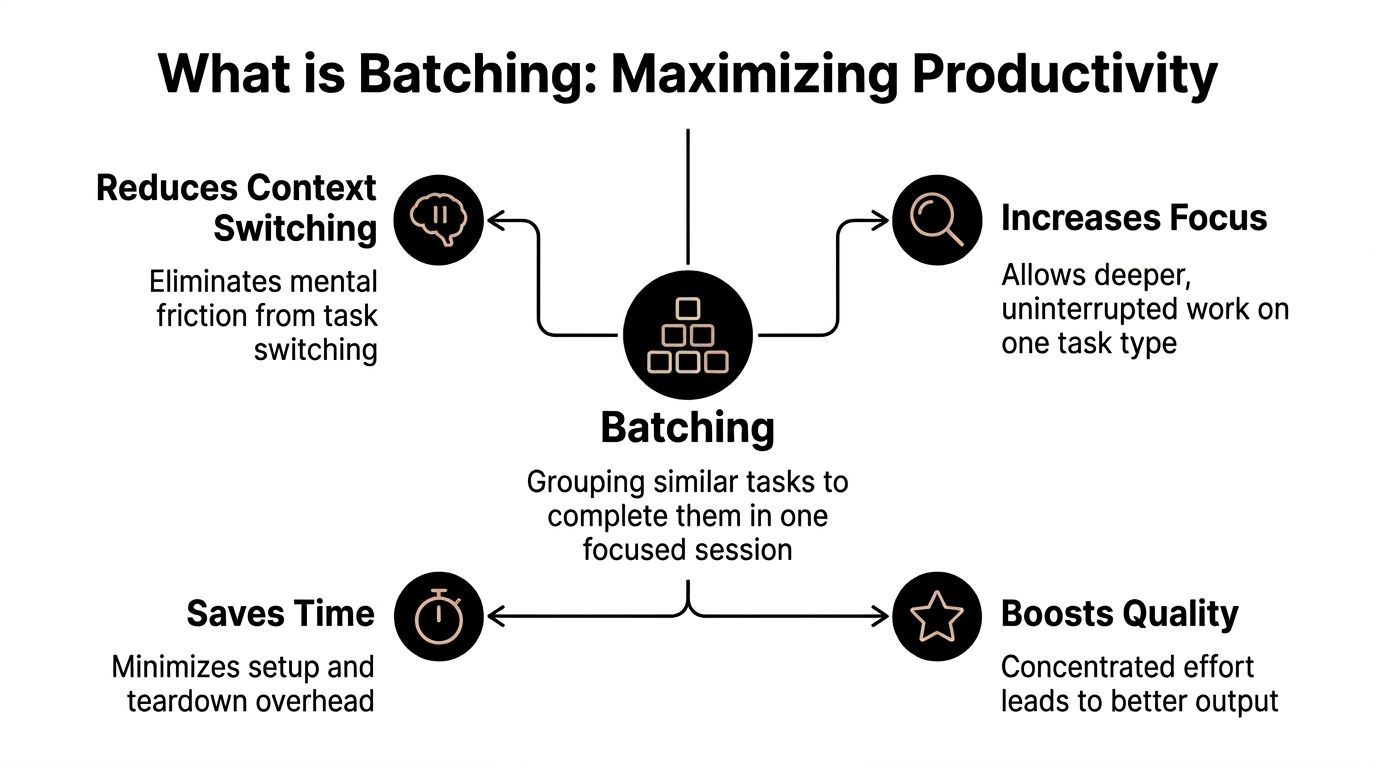
That is the core answer to what is batching. It means grouping similar tasks and completing them in one focused session so you spend less time restarting and more time finishing.
A practical definition that helps
From a productivity standpoint, batching is not about cramming more into your calendar.
It is about reducing the friction around recurring work. You create fewer starting points, fewer transitions, and fewer moments where you have to decide what comes next. That matters most for tasks with repeated steps, such as:
- Content work: Writing captions, outlining posts, resizing graphics
- Admin tasks: Sending invoices, reconciling expenses, updating records
- Communication: Replying to emails, following up with leads, answering DMs
- Planning: Reviewing metrics, mapping promotions, setting weekly priorities
When done well, batching builds momentum. Once your brain locks into one task type, each additional item tends to get easier.
Why this idea has lasted
Batching is not a trendy internet trick. It comes from operating systems and production environments that needed to get more output from limited resources.
Batch processing originated in the 1950s to optimize mainframe efficiency. By 1968, these systems processed up to 90% of workloads in major data centers, reducing CPU idle time from over 50% to under 10% (NIST historical note).
You do not need to run a data center for that lesson to matter. The principle is the same. When switching is expensive, grouping similar work improves throughput.
What batching is and what it is not
A lot of people try batching once, hate it, and assume the concept failed. Usually they were forcing the wrong tasks into the same block.
Use this quick filter:
| Approach | Works well when | Fails when |
|---|---|---|
| Task batching | The task follows a repeatable process | The task needs fresh strategy each round |
| Time blocking | You need a protected window for one work mode | You overpack the block |
| Themed workdays | You wear many hats and need fewer switches | Your business requires constant real-time response |
A useful companion to batching is a broader set of time management strategies that help you decide which work deserves protected focus and which work can wait.
Rule of thumb: Batch the predictable work. Leave room for the work that depends on live information, judgment, or real-time interaction.
Key Benefits of Batching for Small Business Owners
The biggest benefit of batching is not neatness. It is advantage.
A small business owner rarely has a labor problem first. They have an attention problem first. Too many work types compete for the same hour. Batching gives each category its own lane.
You get time back by cutting setup costs
Every repeated task has a startup cost.
Writing one social post is not just writing. It is opening notes, deciding on an angle, finding the right tone, checking the calendar, maybe choosing an image, then getting into writing mode. When you do that once for twenty separate posts across twenty separate moments, the setup cost multiplies.
When you batch, you pay that cost once and keep moving.
This is why a dedicated hour for invoicing often beats “doing invoices when I get a minute.” The same logic applies to customer follow-ups, expense entry, podcast outreach, and content creation.
The quality improves because your brain stays in one mode
Many owners notice the time savings first. I usually see the quality shift right after.
When you stay in one work mode long enough, your decisions get more consistent. Your voice stays steady across a week of posts. Your offers line up better in your emails. Your client onboarding feels smoother because you review all the moving pieces together.
There is also less room for careless mistakes. Automated batch processes reduce errors by 70-90% compared to manual execution by minimizing human touchpoints (Wikipedia on batch processing). The same principle applies to everyday productivity. Fewer handoffs and fewer mode switches usually mean fewer errors.
Stress drops because decisions stop piling up
The hidden tax in a fragmented day is decision fatigue.
If you decide what to post every morning, what email to send every afternoon, and what admin task to tackle whenever guilt spikes, your brain is doing planning work all day. Batching moves those decisions into a smaller number of focused sessions.
That changes the emotional feel of the week. Instead of carrying ten half-open loops in your head, you know when each category gets handled.
Tip: Your calendar should answer “when will I deal with this?” before your anxiety tries to answer it for you.
It makes consistency realistic
Consistency matters in marketing, client service, and operations. But consistency is hard when every task depends on motivation in the moment.
Batching lowers that dependency. You do not need to feel inspired every day if your work is already prepared. That is especially useful for social media, where many owners disappear for days and then scramble to post three times in a rush.
A few examples:
- Email management: Answer messages in one or two planned windows instead of checking all day.
- Finance admin: Group invoices, receipts, and reconciliations into one recurring session.
- Content creation: Draft multiple posts while your ideas are warm instead of trying to invent one fresh post daily.
- Client communication: Review follow-ups and proposals together so no lead falls through the cracks.
It protects your best hours
Not all work deserves your peak energy.
One of the smartest uses of batching is defensive. Put repetitive work into a contained block so it does not spill into your strongest thinking hours. Then reserve your sharpest time for strategy, sales, service delivery, or creative work that moves the business.
That is how batching stops being a small tactic and starts becoming a control system for your week.
Exploring Different Types of Content Batching
Many people hear “batching” and think of one thing: making a pile of Instagram posts in advance. That is one use case, but it is not the only one.
Content batching works best when you choose a method that matches the kind of work you do and the way your energy behaves during the week.
Choosing Your Batching Method
| Method | Best For | Example | Primary Goal |
|---|---|---|---|
| Task batching | Repetitive tasks with similar steps | Write all captions for the week in one sitting | Reduce switching |
| Theme batching | Campaigns or recurring content pillars | Create a full set of educational posts for one topic | Improve coherence |
| Time-based batching | Admin and smaller tasks | Use one afternoon block for email replies, approvals, and uploads | Contain shallow work |
| Energy-based batching | Owners with predictable high-focus windows | Write thought leadership in the morning, do scheduling later | Match task difficulty to energy |
Task batching works when the process repeats
This is the most straightforward method.
You group the same type of action together. Write all captions. Design all graphics. Record all short videos. Schedule all finished posts. Task batching is usually the easiest starting point because the boundaries are clear.
It is a strong fit if you tend to lose time on repeated setup.
Theme batching helps your content feel more connected
Some businesses create stronger content when they stay inside one topic for a stretch.
A fitness coach might batch all posts related to beginner habits. A bookkeeper might batch a week of tax-season reminders. A consultant might prepare a run of client education posts around one common objection.
This method helps when your content feels random or disconnected. Instead of asking, “What should I post today?” you ask, “How many useful angles can I create around this topic?”
Time-based batching prevents admin from taking over
Not every task deserves a full creative session. Some just need a firm container.
A time-based batch might be a Friday finance block, a daily email window, or a weekly 45-minute content scheduling session. The point is not that the tasks are similar in substance. The point is that they belong to the same class of work and should stop leaking into the rest of the week.
This method works well for owners who are drowning in maintenance tasks.
Energy-based batching is often the missing piece
This is the method many people skip, and it matters more than they expect.
Do not batch your hardest creative work into the hour when your brain is already fried. If you write best early, use that window for ideas, scripts, and messaging. Save scheduling, formatting, uploading, and approvals for lower-energy periods.
Practical rule: Batch by task type first. Then refine by energy so the right work lands at the right time.
You do not need one method only
The best systems usually blend these.
A simple version looks like this:
- Monday morning: Theme batch for monthly topics
- Tuesday morning: Task batch for writing captions
- Wednesday afternoon: Task batch for graphics and uploads
- Friday afternoon: Time-based batch for approvals and analytics review
That is why batching works as a system. It is flexible. You can use one style for content, another for admin, and a third for communications without forcing your whole business into one rigid template.
A Step-by-Step Workflow for Batching Social Media
Social media is where batching becomes obvious fast. Done reactively, it eats attention every day. Done in batches, it becomes a repeatable operating rhythm.
The simplest way to manage it is to split the work into four separate batches: planning, creation, scheduling, and engagement.
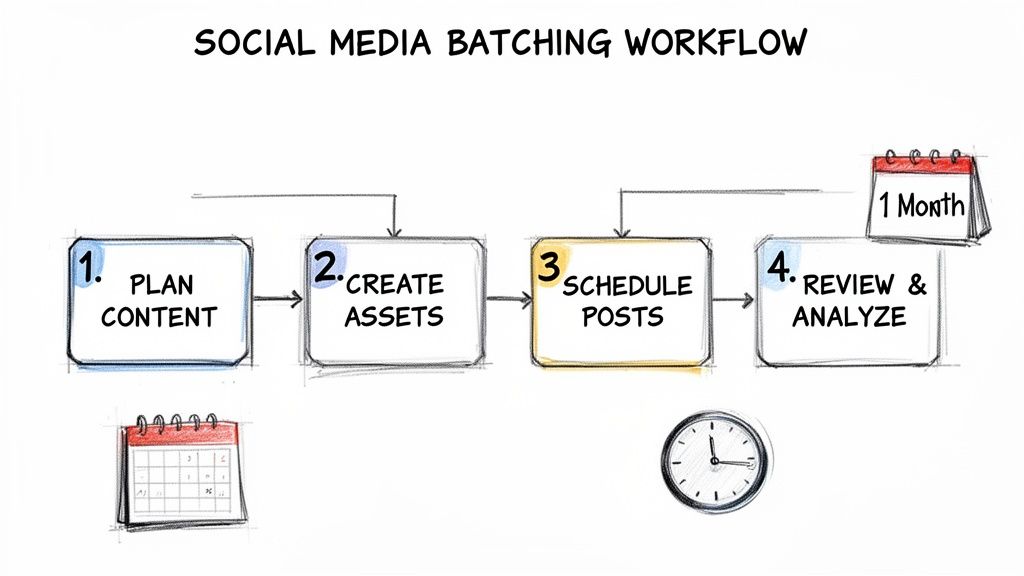
Batch one, ideation and planning
Start with the calendar, not the caption.
Look at the next few weeks and identify what the business needs to support. Product pushes, seasonal moments, client FAQs, objections, testimonials, educational topics, and behind-the-scenes moments all belong here.
A good planning session answers four questions:
- What are we promoting?
- What does the audience need help with?
- Which content pillars matter this month?
- What can be repurposed from existing material?
At this stage, volume is not the goal. Clarity is.
If you want a more detailed planning framework, this guide on how to plan a month of social media content in just one afternoon is useful for turning rough ideas into a workable calendar.
Batch two, writing and asset creation
Once the topics are set, stay in creation mode until the written pieces are done.
Do not switch back and forth between writing one caption, designing one graphic, checking analytics, then writing another caption. That approach kills momentum. Draft all the copy first, or at least all the copy for one content pillar.
Here, batching sharply lowers friction. In distributed systems, batching can reduce per-task overhead by 50-90% by amortizing fixed costs over a larger group of tasks (GeeksforGeeks explanation). The same thing happens in creative work. When you write 20 posts in one session, you cut the repeated mental setup cost that comes from starting from zero every single time.
A practical creation order:
- Draft hooks first: Write opening lines for all posts
- Fill in body copy: Expand the strongest hooks
- Add calls to action: Save, comment, reply, click, or DM
- Create visuals last: Match each design to a finalized message
Tip: Repurposing beats reinventing. One client question can become a short post, carousel, email intro, and video script.
Batch three, scheduling and syndication
Now move into publishing logistics.
This is when you assign dates, adapt copy for each platform, upload media, and queue the content. Keep this as its own session if possible. Scheduling uses a different kind of attention than writing, so it helps to separate it.
Useful checks during this stage:
- Platform fit: A LinkedIn post may need a different opening than an Instagram caption
- Cadence: Make sure posts are spaced in a way you can maintain
- Formatting: Review hashtags, line breaks, links, and image dimensions
- Redundancy: Avoid publishing the same wording everywhere without light adaptation
If you are comparing platforms before committing to one workflow, a detailed social media scheduler comparison can help you assess features and fit.
A short walkthrough can help make the process tangible:
Batch four, engagement and review
Many owners forget this step and assume batching means disappearing after scheduling.
It does not. You still need a lightweight engagement block. Keep it separate from content creation so you do not slide back into all-day reactive posting. A short recurring session for comments, DMs, and quick response content is enough for most small teams and solo operators.
Use this block to review:
- Which posts sparked replies or saves
- Which messages confused people
- Which topics should be expanded next
- Which posts can be remixed into new formats
What works and what does not
Some batching habits help immediately. Others create new problems.
What works
- Creating from a short list of approved topics
- Reusing proven ideas in new formats
- Separating writing from scheduling
- Keeping a small space for timely posts
What does not
- Trying to create an entire quarter of content in one exhausting marathon
- Designing each post from scratch
- Ignoring engagement because posts are “done”
- Overfilling the calendar with content that has no business purpose
The best social media batching system is not the biggest one. It is the one you can repeat without dread.
Tools and Common Pitfalls in Your Batching Workflow
A good batching system needs support. Otherwise it turns into a pile of intentions.
The right tools do not create discipline for you, but they remove enough friction that discipline becomes easier to maintain.
Build a tool stack around the workflow
Many owners do well with one tool in each category.
- Planning tool: Notion, Trello, or Asana for themes, ideas, and content calendars
- Writing tool: Google Docs or Notion for drafting and organizing post copy
- Design tool: Canva or Adobe Express for templates and quick asset reuse
- Scheduling tool: A dedicated social media scheduler for queueing and cross-platform publishing
If you are still choosing a scheduler, this list of the best free social media schedulers is a practical starting point.
Buffer is also a solid option with a clean interface and a long track record in social scheduling. Pricing: see the Buffer website for details.
The first mistake is making the batch too big
People often fail at batching because they start with an unrealistic scope.
A month of content sounds efficient until you are three hours in, your ideas get thin, and the quality drops. A smaller repeatable batch almost always beats an ambitious batch you avoid.
Start with one week. Then extend only when the process feels stable.
The second mistake is batching incompatible tasks
Not every task belongs with every other task.
Writing, design, analytics review, and community engagement all pull on different mental muscles. If you jam them into one oversized “content block,” you recreate the same context switching problem inside the session.
A better pattern is to separate by mode:
- Creative mode: Brainstorming, writing, scripting
- Production mode: Designing, formatting, resizing
- Publishing mode: Scheduling, tagging, checking links
- Response mode: Comments, DMs, customer replies
The third mistake is becoming too rigid
A batch is a structure, not a cage.
If a useful trend appears, or your audience starts asking the same question, leave room to respond. Good batching systems create consistency without making the brand feel robotic.
Keep an 80 percent plan, not a 100 percent lock. The goal is to reduce chaos while preserving some flexibility.
The fourth mistake is treating perfection as part of the process
Perfection ruins batching because it slows repetition.
If you rewrite every caption six times, rebuild every graphic from scratch, and second-guess every post date, the system collapses under its own weight. Batching works best when you use templates, clear decisions, and fast review criteria.
A simple approval checklist can help:
| Check | Question |
|---|---|
| Clarity | Does the post say one useful thing clearly? |
| Relevance | Does it support a real audience need or business goal? |
| Format | Is it adapted for the platform where it will appear? |
| Action | Does it invite the next step? |
That is usually enough. You do not need a masterpiece every time. You need a system that keeps showing up.
From Overwhelmed to In Control Your Batching Journey
Many small business owners do not need more motivation. They need fewer switches.
That is the core promise of batching. It replaces a scattered workday with a more stable rhythm. You stop inventing the plan every morning. You stop bouncing between content, admin, customer communication, and planning every few minutes. You give similar work a home, and your brain spends less time resetting.
The shift is practical, not flashy.
You plan in one sitting. You create in one mode. You schedule in one block. You engage on purpose instead of all day. That pattern works for social media, but it also works for invoicing, lead follow-up, email, and weekly operations.
Start smaller than you want to
The strongest batching systems usually begin with one repeated win.
Choose a category that drains attention every week. For many owners, that is social media. Block one session to plan and create a small set of posts. Do not worry about building the perfect machine. Build a version you can repeat next week without resistance.
Then expand.
Control creates momentum
Once batching starts working, the benefit is not just saved time. It is calmer execution.
You know what is going out. You know when admin gets handled. You know when to ignore your inbox and stay with the task in front of you. That sense of control compounds because it frees up energy for higher-value work.
And when batching is applied to social media, the payoff can be substantial. Early Postful users report significant efficiency gains when managing their weekly posts, which can mean several hours reclaimed for the rest of the business.
If your current system feels improvised, that is your signal. Do not wait for a quieter month. Create one batch. Then create another. Momentum usually starts there.
Postful helps small business owners turn scattered social media work into a repeatable system. You can brainstorm ideas, turn them into posts, schedule across networks, and reuse past content without rebuilding everything each time. It is currently in early access and free to use during early access. If you want a practical way to start batching your social workflow today, try Postful.