
Sharing other people's content to your Instagram Story isn't just about filling a gap in your schedule. When done right, it's one of the smartest, most productive ways to grow your brand.
You can do this using Instagram's built-in "Add to Story" feature when you’re tagged, or you can go the manual route with a quick screenshot if you're not. Let's dig into why this is a core strategy for so many successful small businesses and how to build an efficient workflow around it.
Why Reposting Stories Is Your Secret Weapon For Growth
It’s easy to dismiss reposting as a lazy shortcut. But in reality, it’s a powerful strategy for building an engaged community without burning yourself out trying to create new content from scratch every single day.
Every time you share a customer’s tag or mention, you’re showcasing real-world social proof. It’s an authentic testimonial that builds a layer of trust that even the most polished ad campaign can't buy. For a busy entrepreneur, this is a productivity hack that also builds your brand.
Not sure when to share or when to ask? This quick flowchart breaks down the decision-making process.

The main takeaway here is simple: if you’re tagged, you’re generally good to share. If not, always ask for permission first. It's not just good etiquette; it's a critical step in a professional workflow.
Amplify Your Community and Stay Visible
Sharing user-generated content (UGC) is one of the best ways to get your brand in front of new eyes. Each time you feature a customer's post, you’re not just filling your content calendar—you’re celebrating your community and inspiring others to share their own experiences. This creates a positive feedback loop that generates even more content for you down the line.
For solopreneurs and small teams, this is a game-changer. It means you can maintain a consistent presence and keep your brand top-of-mind even on days when you don't have new content of your own to publish.
With over 500 million daily Story users globally, you can’t afford to ignore this format. Brands that post 1-7 Stories a day tend to see completion rates around 87%, but be careful—posting too many can cause people to swipe away. It's all about finding that sweet spot with strategic, bite-sized content.
Choosing Your Reposting Method
There are a few different ways to repost content to your Stories, and each one works best in specific situations. Knowing your options helps you move quickly and efficiently.
To give you a clear overview, here’s a quick comparison of the most common methods.
Quick Guide to Instagram Reposting Methods
| Method | Best For | Key Consideration |
|---|---|---|
| Native "Add to Story" | Sharing Stories where you've been tagged directly. | The original creator's account must be public, and they must have sharing enabled. |
| Story-to-Story Share | When you want to share someone else's public Story, even if you're not tagged. | This adds the Story as-is; you can't edit it. The original creator is always credited. |
| Screenshot/Screen Record | Capturing content you can't share directly (e.g., from a private account or a post). | Always get permission first! Credit the creator clearly and manually in your Story. |
| Reposting Apps | Bulk reposting or when you need more formatting options. | Can be less personal and may add a watermark. Choose a reputable app. |
Understanding these approaches will help you make the right call in the moment. For more strategies on growing your account, check out our guide on how to increase your reach on Instagram.
The Golden Rule of Reposting: Permission and Credit
Before you even think about hitting that share button, let's talk about the single most important part of any ig repost story strategy: doing it the right way. This isn't just about avoiding trouble; it’s about building a brand that people actually trust and want to be a part of.
Think of another creator’s work as their intellectual property. You wouldn't just take their product off a shelf without asking, and their content deserves that same respect.

Here's the simple guideline I live by: if you were not explicitly tagged in the Story or post, you must ask for permission before sharing it. A tag is basically implied consent, since Instagram’s native share feature is designed around it. Sharing without a tag means you’re taking someone's work, and that can really hurt your reputation.
How to Ask for Permission (Without Being Awkward)
A quick Direct Message (DM) is the best way to go. Just keep it simple, be genuine, and make it super easy for them to say yes. A vague request gets confusing, so be specific about why you love their post and what you want to do with it.
You can adapt these templates I use all the time:
- For a customer photo: "Hi [Name]! We absolutely love this photo you took of [our product]. Would you mind if we shared it to our Instagram Story? We’ll be sure to give you full credit!"
- For an artistic post: "Hey [Name], this is incredible work! Your post about [topic] really resonated with us. We'd love to feature it on our Story for our audience to see. Would that be okay with you?"
This small act of respect can turn a casual fan into a loyal advocate. It shows you value their effort, which is how real communities are built.
What Great Credit Actually Looks Like
Giving proper credit is so much more than a tiny, hidden tag. Your goal should be to send traffic and appreciation back to the original creator. When you repost, make their username impossible to miss and easy to tap.
Pro-Tip: Never, ever just screenshot and post. Not only does this murder the image quality, but it strips away the direct link to the creator's profile that you get with Instagram’s built-in share feature. Always use the native tools when you can.
Here’s how to give credit that actually counts:
- Visible Tagging: Use Instagram's
@mentionsticker and place it front and center. Don’t hide it in a corner or make the text color blend into the background. - A Clear Shout-Out: Add a text overlay that says something like, "Amazing shot by @[creator's handle]!" or "Go check out more from @[creator's handle]!"
By making credit a non-negotiable step in your workflow, you're not just protecting your brand—you’re creating a supportive space where people want to create content with you and for you. That's the real win.
How To Repost Using Instagram's Built-In Tools
The easiest way to create an ig repost story is by using the tools Instagram gives you right in the app. These built-in features are your fastest option, especially when a happy customer or a brand partner tags you in their content.
Think of getting a mention as a green light to share. When someone tags you, Instagram is basically handing you an invitation to repost their content, and they make it incredibly simple to do so.
Sharing A Feed Post You Are Tagged In
When another account tags you in a feed post or Reel, sharing it to your Story only takes a few taps. It's the perfect way to showcase user-generated content (UGC) and give a shout-out to your community.
- Find the post you want to share.
- Tap the paper airplane icon (the share button) right below the post.
- From the menu that pops up, choose "Add to Your Story."
This pulls the original post into your Story editor as a tappable sticker. You can resize it, move it around, and add your own branding or commentary. For example, a local bakery could repost a customer’s beautiful pastry photo, then add a "Thanks for the love!" GIF and a link sticker to their online menu.
Sharing A Story Where You Have Been Mentioned
This is just as easy. If someone mentions your account in their Story, you’ll get a notification straight to your Direct Messages (DMs).
Open that DM, and you'll see a button that says “Add to Your Story.” Just tap it. Instagram will immediately open the Story editor with their content ready to go. It even automatically adds a sticker crediting the original creator, which is a great way to drive traffic back to their profile.
Pro-Tip: Don't just hit "share." Add your own touch to it. You could use the Quiz sticker to ask your followers what they love about the shared post, or run a Poll to see if they'd like to see more content like it. This turns a simple repost into a real conversation.
These native tools are great because they keep the content quality high and handle the attribution for you, which is key to building good relationships on the platform.
Manual Methods When Native Options Fail
But what if you see a post or Story you love, but you weren't tagged in it? You won't see that "Add to Story" button. This is where you have to go manual with a screenshot or screen recording.
- For static posts: Simply take a screenshot.
- For videos or animated Stories: Use your phone’s built-in screen recording tool.
Just remember, when you use these methods, you're working outside of Instagram's built-in permission system. It is absolutely critical to get direct permission from the original creator via DM before you post their work. Once you get the green light, make sure you manually tag their account with the @mention sticker and place it somewhere obvious.
Did you know that the average reach for Instagram Stories is a focused 0.91 users per follower? This makes Stories a powerful tool for retention, not just discovery. High back-tap rates show strong interest, and accounts that post daily have seen 23% higher follower retention. This means your IG repost story strategy is perfect for building loyalty with the audience you already have.
You can learn more about the nuances of this process in our detailed guide on how to share a Story on Instagram.
Using Third-Party Apps For A Cleaner Repost
Let's be honest: sometimes Instagram's built-in sharing tools just don't give you that polished, on-brand look. A messy screenshot or a funky crop can throw off your whole aesthetic. When you need a clean ig repost story, this is where third-party apps really shine.
These tools are built from the ground up specifically for reposting. Many let you download the media directly, which is a massive upgrade from the blurry mess a screenshot can sometimes become. If you want a full rundown of sharing content, this guide on how to repost an Instagram post is a great resource covering all the different methods.
Why Consider A Third-Party Tool?
The biggest win here is presentation. Most of these apps automatically add a small, clean attribution overlay with the original creator’s username. It solves that annoying problem of trying to manually type and place a tag that’s both visible and doesn't clutter your Story's design.
For anyone running a business solo or with a small team, the efficiency is a game-changer. Instead of juggling screenshots, edits, and manual tags, you can get a repost ready in just a few taps. That’s time you can put back into engaging with your audience instead of wrestling with visuals.
The process is designed to be fast, letting you quickly grab content you have permission to share and prep it for your own Story.
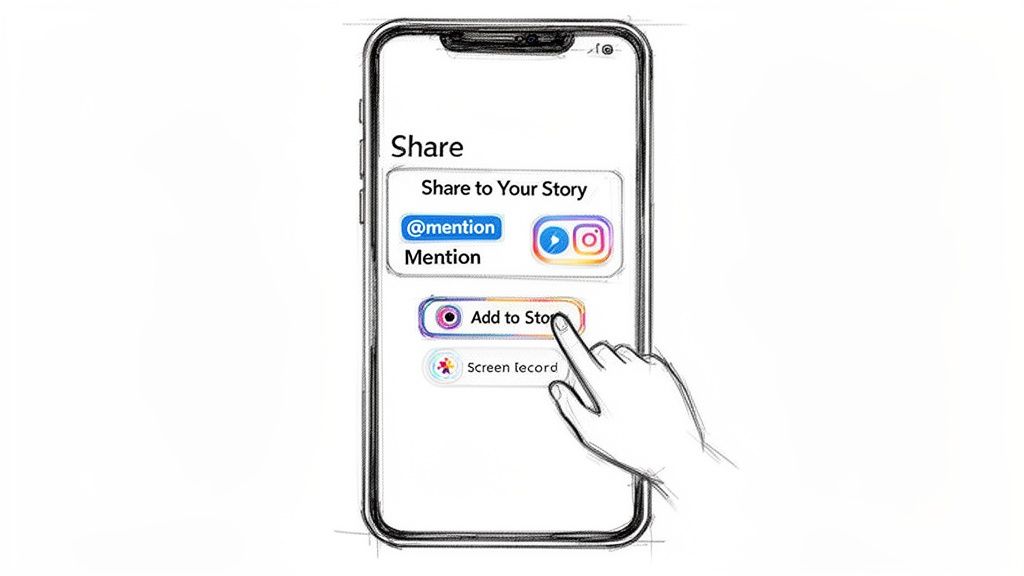
This kind of workflow is built for speed, helping you keep your content calendar full without the extra hassle.
Popular Apps and What They Do
One of the most recognized tools is Repost: For Instagram. This app is known for its straightforward workflow: copy the post's link, open the app, and it prepares the content for sharing. It adds a discreet watermark crediting the creator, which helps maintain a clean and professional look while ensuring proper attribution.
Remember, even with an app that automates attribution, the golden rule still stands: always get permission from the original creator before sharing their work, especially if they didn't tag you. These apps are for execution, not for skipping basic etiquette.
For brands building a cohesive image, these apps are a fantastic tool.
- Better Quality: You avoid the blurriness of screenshots by downloading media in its original resolution.
- Automatic Credit: Most apps add the attribution for you, saving a step and making sure the creator gets their due.
- Time Savings: The simple workflow means sharing user-generated content or partner posts is way faster.
If you frequently feature customer photos or work with other accounts, adding a reposting app to your toolkit is a smart move. For specific plans and features, it's always best to check out the app's official website. Pricing: see website for details.
Building an Efficient Content Repurposing Workflow
Turning a one-off ig repost story into a repeatable content system is where the real time-saving begins. If you're a busy solopreneur or run a small business, efficiency is the name of the game. A solid workflow transforms user-generated content (UGC) from a happy accident into a reliable part of your marketing machine.
This is all about working smarter. The idea is to take one fantastic piece of content—like a glowing customer photo—and squeeze every drop of value from it across your channels, without starting from scratch every time.
From One Post to a Full Content Pipeline
It all starts with getting organized. Stop letting screenshots of great content get buried in your camera roll. You need a dedicated system—this could be as simple as a "UGC Ideas" folder in Google Drive or a specific board in Trello or Asana.
Once you have a piece of content and, crucially, permission to use it, the repurposing can begin. A single customer post isn't just a post. It's raw material for a half-dozen different assets.
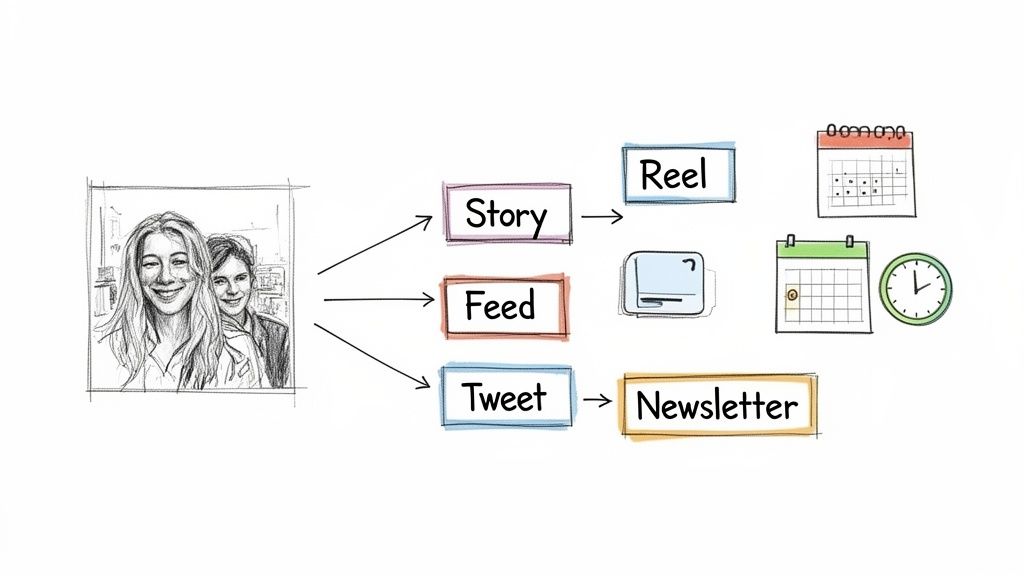
Think about it: a customer shares a photo of themselves using your product. That one image can become a quick thank-you Story, a more detailed feed post, a short video for Reels, and even a highlight in your next email newsletter.
This approach ensures you get maximum mileage out of every bit of positive feedback. To really get this system humming, checking out a practical guide to automatic crossposting can give you some great ideas for automating distribution.
Using AI to Fuel Your Repurposing Engine
This is where a tool like Postful really shines. Instead of staring at a blank page wondering how to say the same thing differently, you can use AI to kickstart your brainstorming and creation.
Let’s walk through a real-world scenario. A customer tags your coffee shop in a beautiful photo of their latte art.
First, you save the post and get the creator's permission to share it. That's non-negotiable.
Next, you can use a tool like Postful to brainstorm. Take that original photo and caption and ask the AI to generate five different ways to spin it. In moments, you'll have a list of content pieces ready to go:
- IG Story: A quick repost with a "Thank You!" sticker and a poll asking, "What's your favorite drink?"
- Feed Post: A more detailed caption telling the story behind that specific drink or shouting out the customer.
- Reel: A simple video that animates the static photo, paired with some trending audio.
- Tweet: A short, punchy text post like, "Our customers have the best eye for detail! ☕ Thanks for the love, [Creator's Handle]."
- Newsletter Snippet: A feature in your weekly email under a "Community Spotlight" section.
With this system, that one customer photo just became a full week of engaging content. You can dive deeper into this concept in our guide to mastering the art of content repurposing.
By scheduling all of this from a single platform, you're building a powerful, time-saving engine that consistently drives business from the social proof you already have.
Common Questions About Instagram Story Reposting
Even after walking through all the methods, a few questions about the ins and outs of the ig repost story process always seem to pop up. Let's clear up some of the most common points of confusion so you can share content with total confidence.
Think of these as quick answers to help you handle different reposting scenarios the right way—protecting your brand’s reputation as you go.
Is It Illegal to Repost an Instagram Story?
This one is a bit tricky. While it’s probably not going to land you in a courtroom, it can absolutely violate copyright law and Instagram's Community Guidelines. The original creator owns the rights to their photo or video, period.
Posting their work without getting permission first could trigger a copyright infringement claim. The result? Instagram might take your content down, or worse, flag or suspend your account if it happens repeatedly.
The bottom line is simple: asking for permission and giving clear, prominent credit isn't just good manners—it's your safest bet to avoid any trouble. It keeps you on the right side of both etiquette and platform rules.
By always asking first, you’re showing respect for other creators, which is the foundation of building a great community online.
Can I Repost a Story If I'm Not Tagged?
Nope. You can’t use Instagram’s native “Add to Story” feature if the original poster didn't tag you. That button simply won’t show up. This is intentional—a tag is Instagram's way of confirming there's implied permission to share.
Your only workarounds are the manual methods: taking a screenshot or screen recording the Story. But this makes getting explicit permission from the creator even more important. Since you’re sidestepping the built-in sharing system, a direct “yes” from them in a DM is non-negotiable.
How Do I Get More People to Repost My Content?
Getting others to share your stuff is one of the best ways to grow your reach without spending a dime. You can't force it, but you can definitely encourage it by creating content that people genuinely want to share.
Here are a few strategies that have always worked for me:
- Create Share-Worthy Content: Think about what gives people instant value. Things like sharp infographics, relatable quotes, helpful checklists, or just beautiful photos are all highly shareable. They make your audience look good for sharing them.
- Add a Clear Call-to-Action (CTA): Honestly, sometimes you just have to ask. Adding a simple text overlay like, "Share to your Story if you agree!" can make a huge difference in your repost numbers.
- Run a UGC Campaign: Encourage followers to post their own content with your product or brand. Ask them to tag you for a chance to be featured. This not only generates incredible social proof but also makes reposting a central part of the campaign itself.
When you make your content valuable and easy to share, you’ll naturally see more people amplifying your message for you.
Ready to turn one piece of content into a full week of engagement? Postful uses AI to help you brainstorm, create, and schedule posts across all your networks, turning your work into more business. Get started for free on Postful.ai.