

Figuring out how to add a link on Instagram can feel like a bit of a puzzle. The simplest ways are to pop a URL into your profile bio, slap a link sticker on your Stories, or set up an action button if you have a business profile.
Even though you still can’t just drop a clickable link in a regular post caption, these key spots are your ticket to driving traffic off the app.
Your Guide to Adding Links on Instagram
Instagram is a visual powerhouse, no doubt. But turning all that beautiful engagement into actual website visits or sales? That’s where things get tricky.
The main hurdle has always been Instagram’s tight grip on where you can place clickable links. For a long time, the only place you could put a live link was in your bio. That single spot became incredibly valuable real estate, which is why you still see the phrase “link in bio” everywhere.
But things have changed. A huge shift happened in 2022 when Instagram replaced the exclusive ‘swipe-up’ feature (which you needed 10,000 followers for) with the link sticker, opening the door for pretty much everyone. If you’re curious about how platform trends like this are playing out, this data report has some fascinating insights.
Before we dive into the “how-to” for each method, let’s get a quick overview of what’s possible. It helps to see all your options in one place.
Where You Can Add Clickable Links on Instagram
| Location | Clickable Link Supported? | Best Use Case |
|---|---|---|
| Profile Bio | Yes | Your main website, shop, or “link hub” page. |
| Post Captions | No | Use a call-to-action like “Link in bio!” instead. |
| Instagram Stories | Yes (with the link sticker) | Time-sensitive promos, new blog posts, event sign-ups. |
| Instagram Ads | Yes | Driving traffic to specific landing pages or products. |
| Direct Messages (DMs) | Yes | Sharing personalized links with individual followers. |
| IGTV Descriptions | Yes | Linking to products or resources mentioned in the video. |
| Reels Captions | No | Drive people to your bio link with a clear CTA. |
As you can see, while you still can’t put a live link in a standard feed post, your options are more varied than ever. For small businesses, knowing when and where to use each one is a game-changer for growth. We cover a ton of these strategies in our guide on using Instagram for small businesses.
Here are the main tactics we’re going to walk through:
- The “Link in Bio” Hub: This is your permanent, central home for your most important link.
- Dynamic Story Links: The link sticker is perfect for timely, temporary links that grab immediate attention.
- Direct Message Engagement: Sending links directly in DMs is a great way to offer a personal touch.
By mastering these methods, you can turn your Instagram from a simple photo gallery into a powerful tool that sends your audience exactly where you want them to go. This guide will give you the actionable steps for each one.
Mastering Your Link in Bio for Maximum Clicks
Your Instagram bio is the most valuable piece of digital real estate you own on the platform. Think of it as your digital storefront’s main entrance—it’s the one place a user can always go to find a clickable link. Because of this, learning how to add a link to Instagram effectively starts right here.
But just pasting a URL into your profile is only step one. The real goal is to turn that single link into a powerful hub that sends your audience exactly where you want them to go. This takes a compelling call-to-action (CTA) that gives people a reason to click. A great CTA is short, direct, and tells users what they’ll get.
An e-commerce brand, for example, might write something like, “Shop our new spring collection now! 👇” while a creator could say, “Grab my free weekly planner here! 👇” These CTAs create a clear, unmissable path from your profile to your destination. Nailing the CTA is a core part of crafting an effective social media bio.
Going Beyond a Single URL with Link-in-Bio Tools
What happens when you have more than one thing to share? This is where link-in-bio tools come in handy. Platforms like Linktree, Later, and Beacons let you build a simple, mobile-friendly landing page that holds multiple links. Instead of swapping out your bio link every time you have a new blog post or product drop, you just point everyone to one central hub.
This workflow is a huge time-saver. Imagine you’re a creator with a new YouTube video, a blog post, and affiliate products to promote. With a link-in-bio tool, your bio link leads to a page with clean buttons for each of those destinations. Your followers can easily find what they’re looking for, and you don’t have to constantly update that single URL.
Key Takeaway: Link-in-bio tools transform your single bio link from a one-way street into a multi-lane highway, giving your audience more choices and giving you more opportunities to drive traffic.
Real-World Scenarios and Workflows
Let’s look at how different profiles actually put these tools to work.
- E-commerce Brands: A fashion boutique can use a tool like Later’s Linkin.bio to create a clickable version of their Instagram feed. When they post a photo of a new dress, their bio link takes users to a page where they can tap that exact photo and go straight to the product page. It removes all the friction and can seriously boost conversion rates.
- Content Creators: A food blogger might use a tool like Beacons to set up a mini-landing page. Their links could include things like “Latest Recipe,” “My Cookbook on Amazon,” “Kitchen Tools I Use,” and “Join My Newsletter.” This setup keeps their different content streams organized and gives their audience a full menu of options.
The real power of these tools, though, is in their analytics. Most link-in-bio platforms show you exactly which links get the most clicks. This data is gold.
If you see that 70% of your clicks are going to your blog posts but only 5% to your affiliate shop, you know where to focus your promotional energy. It lets you make data-driven decisions to optimize your link placement and CTAs for maximum impact. To go deeper on this, check out these further insights into Instagram’s Link in Bio and how it can be optimized.
Using Instagram Stories to Drive Clicks
Your bio link is your permanent address, but Instagram Stories are where the real-time action happens. Because they disappear in 24 hours, Stories create a natural urgency that’s perfect for getting people to act now. This is your game plan for using the link sticker to turn story viewers into website visitors.
Adding the link is simple enough. You just tap the sticker icon in your Story, pick the “Link” sticker, and paste your URL. But just dropping a link in a story is like shouting into the wind—you need a strategy to make people actually want to tap.
This whole process is a loop: you create a compelling call-to-action, use the right linking tool, and then analyze the results to see what worked.
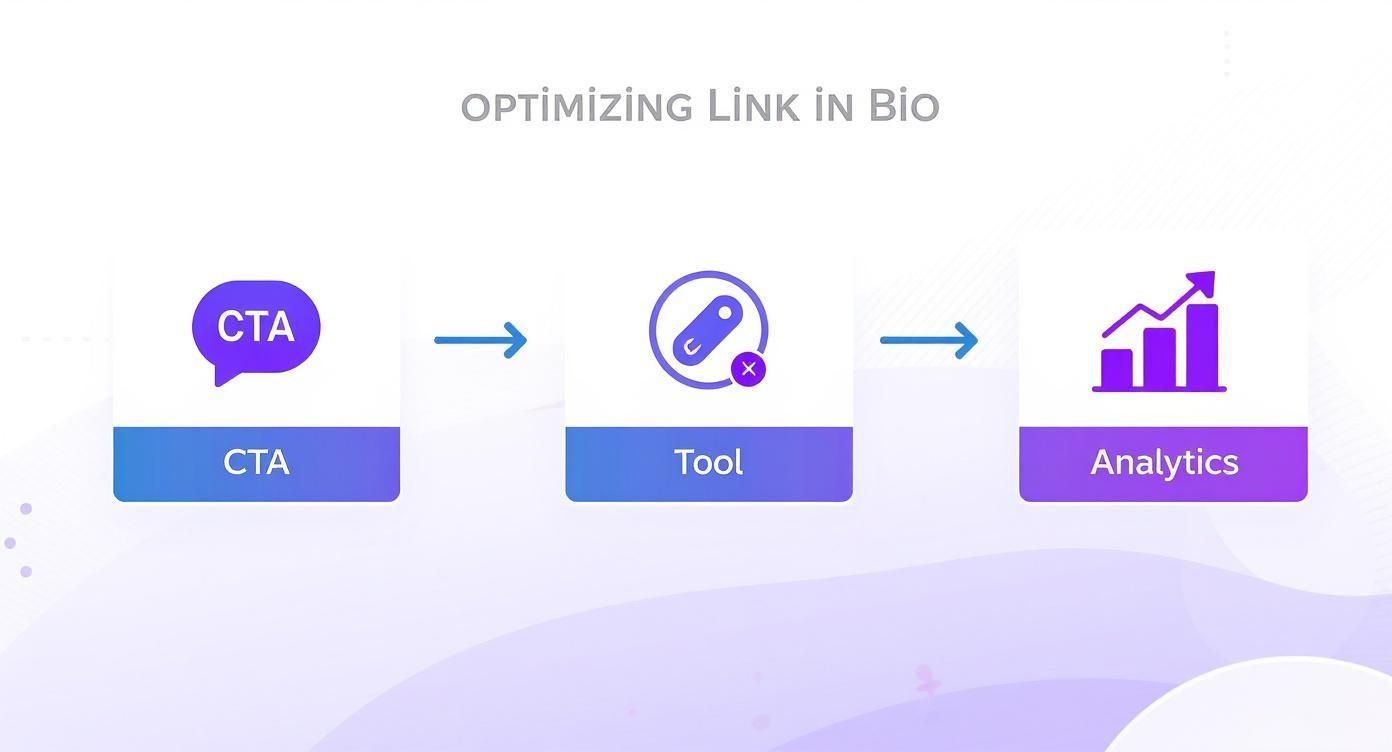
Rinse and repeat. That’s how you get better.
Creative Ways to Get More Taps on Your Links
To get people clicking, you need to build a little momentum. Instead of posting a single, random Story with a link, think in sequences. A few stories that build curiosity or give context first will warm up your audience, making them far more likely to tap when the link finally shows up.
I’ve seen these workflows work again and again:
- Warm Them Up with a Poll: Before you drop a link to your new blog post, run a poll. Something like, “Struggling with content ideas? Yes / I have too many!” Then, the very next Story can say, “For everyone who said ‘Yes,’ I wrote this for you,” followed by the link sticker.
- Run a Quick Quiz: Launching a new product? Create a short quiz about the problem it solves. After a couple of interactive questions, the final Story reveals the answer and gives them a link to the product page with a CTA like “Get the solution here.”
- Use the “Add Yours” Sticker: This one is great for community engagement. A travel blogger could start an “Add Yours” chain like, “Show me your best sunset photo.” Later, they can add their own photo to the chain and include a link to their new guide on “How to Photograph the Perfect Sunset.”
The goal is to make the link feel like a helpful next step in a conversation, not a random ad. When you engage people first, the click-through feels natural.
The Power Combo: Reels + Stories
One of the most effective traffic-driving tactics I use is pairing a high-reach Reel with a conversion-focused Story. Reels are incredible for getting discovered by new people, but you can’t put a clickable link in them. Stories, however, are built for it.
Here’s how you connect the two:
- Make a Teaser Reel: Create a short, punchy Reel that introduces a topic but doesn’t give everything away. A fitness coach might make a Reel showing “3 common workout mistakes.”
- Point Them to Your Stories: In the Reel’s caption and with on-screen text, give a clear call-to-action: “For the full guide on how to fix these, tap over to my Stories right now!”
- Post the Linked Story: As soon as the Reel is live, post a Story (or a few) that goes deeper into the topic and includes the link sticker to your full blog post, video, or product page.
This interplay is everything. Data from Socialinsider.io shows that smaller accounts post around 12 stories per month on average, while bigger accounts might post up to 80. Every single one is a chance to add a link. By using a high-visibility Reel to funnel new viewers to an actionable Story, you create a seriously effective path to get people off Instagram and onto your site.
More Ways to Share Links on Instagram
Your bio and Stories are the workhorses of Instagram linking, but they’re not the only game in town. A few other tactics can turn your followers into website visitors, and they’re often the most overlooked. Knowing where to add a link in these less obvious places opens up new, direct pathways for people to engage with your brand off the platform.

For e-commerce brands, the most powerful tool in the arsenal is easily Instagram Shopping. It basically turns your feed from a simple photo gallery into an interactive storefront. Once you set up an Instagram Shop, you can start tagging products directly in your posts, Reels, and Stories.
When someone taps on a tagged product, a product page pops up right inside the app. From there, they’re just one tap away from a link to buy it on your site. It’s a nearly frictionless path from discovery to purchase, which can do wonders for your conversion rates.
The Power of DMs
Never underestimate the power of a Direct Message. While you can’t manually DM a link to every single person who shows interest (who has that kind of time?), you can build a super-efficient system using a simple call-to-action combined with Instagram’s Quick Replies.
Here’s a practical productivity workflow for business coaches:
- Create a Teaser Reel: Post a short video hinting at a new group program, focusing on the benefits.
- Add a Clear CTA: In the caption and on-screen text, say, “Comment ‘INFO’ below if you want to learn more.”
- Set up a Quick Reply: Go to Settings > Business > Quick Replies. Create a new reply with a shortcut like
info. The message could be: “Hey! So glad you’re interested. You can find all the details and sign up for the program right here: [your link].” - Deploy Efficiently: For every comment, go to your DMs, type
info, and your pre-written message will pop up. Just hit send.
This strategy feels personal to the user but is incredibly efficient for the creator. Plus, all those comments give the post an engagement boost.
To keep those DM links tidy and trackable, using a link shortener is a no-brainer. It gives you great data on who’s actually clicking. You can learn more about the benefits of a link shortener in our guide.
Don’t Forget Instagram Video Descriptions
Here’s a spot most people miss: the description box on your long-form Instagram Videos (what used to be called IGTV). Unlike the captions on your regular feed posts or Reels, the description field for these videos actually supports clickable URLs.
Productivity Tip: Batch-produce a month’s worth of tutorial videos. As you upload each one, have a document with pre-written descriptions and the corresponding resource links ready to copy and paste. This saves time and ensures you never miss a linking opportunity. If you’re doing a tutorial, link to the full blog post. If you’re reviewing a product, drop an affiliate link right in there.
By mixing these methods into your strategy, you move beyond the basics. You start creating multiple, context-specific opportunities for your audience to take that next step, turning every piece of your Instagram profile into a potential traffic driver.
How to Measure Your Instagram Link Performance
Adding links is just the first step. To really drive growth, you need to understand what actually resonates with your audience. Dropping a URL without tracking its performance is like driving with your eyes closed—you need data to see what’s working, what isn’t, and where to focus your energy next.
The easiest way to start is with the built-in analytics inside your link-in-bio tool. Platforms like Linktree or Beacons offer straightforward dashboards that show you exactly which of your links are getting the most clicks. This immediate feedback is invaluable for seeing if that new blog post or product drop is actually grabbing attention.
Digging Deeper with UTM Parameters
While link-in-bio analytics are great for a quick overview, they don’t tell the whole story. What happens after someone clicks? That’s where UTM parameters come in.
These are just simple tags you add to the end of your URL that send detailed information back to your Google Analytics account. They turn a generic click into a specific data point.
For instance, a UTM-tagged link can tell you not just that someone came from Instagram, but that they came specifically from a Story promoting your summer sale. This level of detail is essential for understanding the true ROI of your efforts.
Creating these URLs is simple with Google’s Campaign URL Builder. Here’s a quick productivity workflow:
- Website URL: Enter the destination link (e.g.,
yourproduct.com/sale). - Campaign Source: Always use
instagram. - Campaign Medium: Use
socialto categorize the traffic. - Campaign Name: Give it a specific name, like
summer-sale-story-2024.
The tool will spit out a new, trackable link. Keep a spreadsheet of all your campaign URLs so you can quickly find and reuse them, ensuring your tracking stays consistent.
By using unique UTMs for different campaigns—one for your bio link, another for a specific Story—you can precisely measure which strategies are driving the most valuable traffic and conversions on your website.
What to Look for in Your Data
Once you have data flowing into Google Analytics, you can move beyond just counting clicks. Start analyzing user behavior. Are visitors from your Instagram Stories bouncing immediately, or are they exploring multiple pages?
Look for patterns. Maybe you’ll find that links shared in the morning get more engagement, or that Reels pointing to a Story link convert better than static image posts. This is where the real insights are hiding.
For those who want to get even more granular, exploring dedicated Instagram integration solutions can streamline this data flow and provide even deeper insights. This kind of data-informed approach transforms how you use links on Instagram, turning it from a guessing game into a repeatable, effective strategy.
Instagram Link FAQs
Got questions about how links work on Instagram? You’re not alone. The rules can feel a bit confusing, so let’s clear up the most common questions people ask.
Why Can’t I Add a Clickable Link in My Post Caption?
Instagram’s design is all about keeping you on the app, immersed in visual content. That’s why they intentionally keep links out of post captions and comments—it prevents the feed from feeling spammy and keeps the experience clean.
Instead of a free-for-all, they’ve corralled linking into very specific spots like your bio and Stories. It’s a deliberate strategy that gives them more control and makes the links you do find feel more intentional and valuable.
How Many Followers Do I Need for the Link Sticker?
This is one of the best updates Instagram has made in years: zero!
Back in the day, the “swipe-up” feature was a privilege reserved for accounts with over 10,000 followers. But Instagram swapped that out for the link sticker, and now every single account can use it. It was a huge move that opened up traffic-driving opportunities for everyone.
The Takeaway: Don’t wait until you hit some arbitrary follower count. You have the tools to drive traffic from your Instagram Stories right now. Start using them.
What Is the Best Type of Link for My Bio?
The “best” link for your bio really boils down to your number one goal at the moment.
If you have a single, massive priority—like a new product drop or a big event registration—a direct link is your best bet. It’s simple, focused, and gets people exactly where you want them to go. A musician dropping a new single, for example, would link straight to Spotify for that first week.
For most creators and businesses, though, a link-in-bio tool is the way to go. It turns that one precious link into a micro-landing page with multiple options. A blogger could link to their latest article, their affiliate shop, and their newsletter sign-up all at once. It just makes that single spot work a lot harder for you.
How Can I Track Clicks on My Instagram Links?
Tracking your clicks is non-negotiable if you want to know what’s working. You have two great options here.
First, almost every link-in-bio tool comes with its own built-in analytics. This is perfect for a quick gut check on which links are getting the most love.
For a much deeper understanding, you need to use UTM parameters. These are just little tags you add to the end of your URLs that feed data directly into your Google Analytics. With UTMs, you won’t just see that traffic came from Instagram; you’ll know if it came from your bio link or a specific Story campaign, giving you a crystal-clear picture of your ROI.
Ready to stop guessing and start creating a consistent, engaging social media presence? Postful provides AI-powered templates and brainstorming tools to help you show up confidently and save time. Join the waitlist today to get early access.