
If you're still wondering how to use hashtags on Instagram for real growth, it's time for a reset. Forget everything you learned about stuffing 30 tags into your posts. In 2026, the game has changed entirely, and the new rule is simple: use a maximum of five hyper-relevant hashtags. Quality has finally, officially, beaten quantity.
The New Rules for Instagram Hashtags
The way we all use hashtags has completely flipped. What used to be a numbers game—cramming in as many tags as possible for a little extra reach—is now an exercise in precision. Instagram doesn't just ignore posts with dozens of tags; it often flags them as spammy, which can hurt your visibility.
This shift forces us to be more strategic. Every single hashtag has to earn its spot.
From Quantity to Quality
Instagram made it official: as of 2026, the platform now recommends using just five hashtags per post. This is a huge change from the old days of using up to 30. The algorithm now penalizes overuse, making each choice more critical than ever.
If you want to dig deeper into the "why" behind this, we've broken down the new 2026 hashtag strategy here.
This is great news, especially for busy small business owners, as it streamlines the content creation process. It levels the playing field. Instead of trying to shout over the noise in a sea of generic tags, you can now focus on reaching a smaller, more interested audience. The algorithm uses your five specific hashtags to figure out exactly what your content is about and who wants to see it.
Key Takeaway: The goal is no longer to reach everyone. It's to reach the right people. A small set of hyper-relevant hashtags is far more powerful than a long list of general ones.
Practical Example: A local bakery posts a gorgeous shot of a new sourdough loaf. Using #sourdoughbread, #austinbakery, and #artisanbread will connect them with local customers actively looking for specialty bread. Using broad tags like #food, #baking, and #yummy just gets them lost in millions of unrelated posts.
That kind of precision is the new key to getting seen.
Hashtag Strategy Then vs. Now
The approach to hashtags has changed so much, it's worth seeing the old and new strategies side-by-side. It really highlights how much more thoughtful the process needs to be today.
| Aspect | Old Strategy (Pre-2026) | New Strategy (2026) |
|---|---|---|
| Hashtag Count | Use as many as possible (up to 30) to maximize reach. | Use a maximum of 5 highly relevant tags. |
| Primary Goal | Broad reach and visibility. | Niche targeting and audience relevance. |
| Placement | Often hidden in the first comment to avoid a "spammy" look. | Placed directly in the caption for algorithmic context. |
| Tag Selection | A mix of popular, niche, and branded tags. | Hyper-specific, descriptive tags that define the content. |
| Algorithm's View | Saw tags as a way to cast a wide net. | Sees tags as precise labels for content categorization. |
This table makes it clear: the days of "copy, paste, and pray" are over. Today's strategy is all about focus and intent.
Adding Hashtags to Your Posts, Stories, and Reels
Alright, so you've nailed down your five perfect hashtags. Now, where do you actually put them?
The mechanics are pretty straightforward, but the "where" changes depending on whether you're creating a feed post, a Story, or a Reel. Let's break down exactly how to add them to each format.

For Feed Posts
When it comes to a standard photo or carousel post, you have two spots to place your hashtags.
In the Caption: This is the most direct and efficient method. As you write your post copy, just add your five chosen hashtags at the very end. For example, a local bakery might wrap up its caption with
#DailyBread #LocalBakery #HandmadeSourdough #FreshlyBaked #AustinEats. Simple.In the First Comment: Some brands prefer a cleaner look for their captions. If that's you, you can post your hashtags in the first comment immediately after the post goes live. The algorithm treats them the same, so this is purely a visual choice.
A neat productivity trick is to use Instagram's auto-suggestions. Start typing # and a keyword (like #local...), and a list of related tags with their post counts will pop up. It's a quick way to find relevant hashtags without ever leaving the app.
Productivity Tip: Always add hashtags directly to the caption. It’s one less step to worry about, especially when scheduling content. This guarantees your hashtags are attached to the post the second it goes live, giving the algorithm immediate context to start working with.
For Stories and Reels
The process for Stories and Reels is a little different, but just as simple. Getting your hashtags right on these formats is essential for getting in front of new people. If you're looking to get better at this format, our guide on how to share a story on Instagram is a great place to start.
For Instagram Stories:
You can add hashtags to your Story in a couple of ways.
- The easiest is the Hashtag Sticker. After you take your photo or video, just tap the sticker icon at the top of the screen and choose the
#HASHTAGsticker. Type in your tag, and you can drag it anywhere you want. - You can also use the regular Text Tool. Simply type the
#symbol followed by your tag, and Instagram will automatically turn it into a clickable hashtag.
For Instagram Reels:
Hashtags on Reels work exactly like they do for feed posts. You'll add your five targeted hashtags right into the Reel's caption before you share it. This is a crucial step that helps Instagram understand what your video is about and show it to users who are actually interested in your niche.
Finding the Right Hashtags for Your Business
The real secret to making hashtags work isn't just knowing how to add them—it’s picking the right ones. This is where a little bit of research turns a standard post into a magnet for the exact people you want to reach.
Think of your five hashtag slots as a small, specialized toolkit. To get the most out of them, you need to mix and match tags that connect with different parts of your audience and the broader Instagram ecosystem.
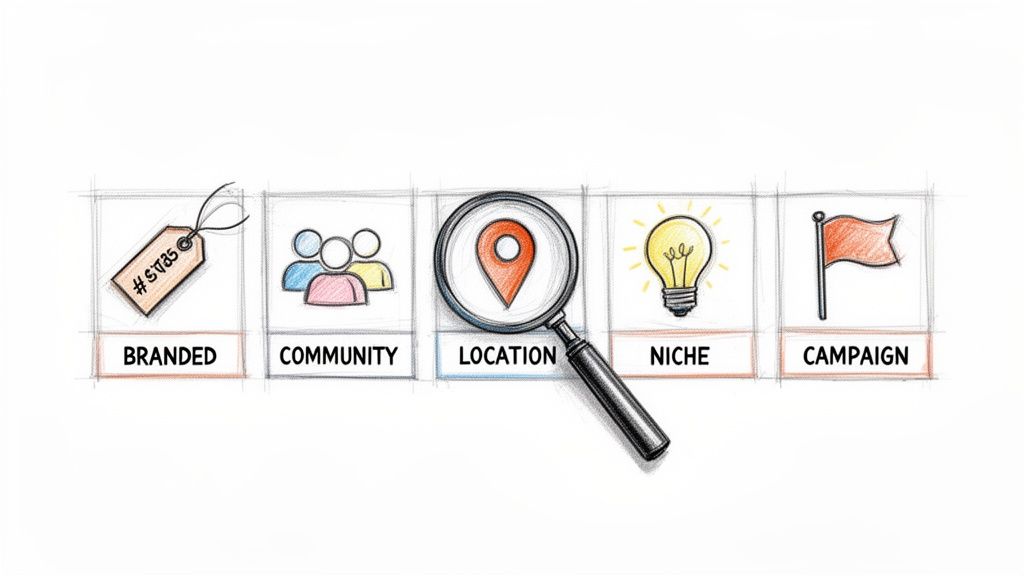
The Five Pillars of Hashtag Strategy
A great hashtag set does more than just describe your photo. It plugs your business into relevant conversations, communities, and even physical locations. Here are the five types of hashtags to consider for every post.
Branded Hashtags: This is a tag that’s all yours. If your business is called "Oak & Anvil," your tag might be
#OakAndAnvilMade. It’s perfect for building brand recognition and collecting user-generated content.Community Hashtags: These are the tags that connect you with your people. For a local coffee shop, something like
#BaristaLifeor#CoffeeCommunitybrings you into a conversation with peers and enthusiasts.Location Hashtags: Absolutely essential if you have a physical storefront or serve a specific area. A bakery in Brooklyn would get huge value from
#BrooklynBakeryor#WilliamsburgEats, helping locals find them right when they’re hungry.Niche Hashtags: These are the super-specific tags people use when they’re looking for something particular. That bakery posting a croissant photo would use
#SourdoughCroissantor#LaminatedDoughto attract true pastry fans. These tags often bring in your most engaged followers.Campaign Hashtags: Got a sale, event, or special launch? Create a unique tag for it. If our bakery is running a holiday special, they could use
#OakAndAnvilHolidays2024to group all the related posts together.
By blending these five types, you give the algorithm a crystal-clear picture of who needs to see your content. For a deeper look at how hashtags fit into a complete Instagram plan for small businesses, check out The Complete Guide To Instagram For Small Business 2025.
How to Vet Your Hashtag Choices
Okay, so you have a list of potential hashtags. Now you need to make sure they’re actually good. Not all tags are created equal, and the goal is to find that sweet spot—not so popular that you get buried in seconds, but not so obscure that nobody ever sees it.
Your best tool for this is Instagram’s own search bar. It’s simple. Type in a hashtag and look at the number of posts. A tag with 5 million posts is probably a waste of your time. One with only 50 posts is a ghost town. The best results often come from tags in the tens of thousands to low hundreds of thousands range.
Even with Instagram’s latest changes, hashtags remain a key tool for getting discovered. My own analysis shows they can still drive 10-20% of a post's total reach. For smaller accounts (under 1,000 followers), posts with at least one hashtag get 29% more interactions on average than posts with none.
Those numbers prove it: making smart choices with your five hashtags directly impacts your growth. This is especially true for service businesses, where local and niche tags are everything. If that sounds like you, take a look at our guide to the top hashtags for contractors, cleaners, and home service professionals.
Advanced Tips to Maximize Your Hashtag Strategy
So, you've got the hang of finding and adding your five hashtags. That’s a great start, but just using hashtags isn’t the whole game. You need to know if they’re actually working for you. It's time to stop guessing and start analyzing.
The best habit you can build is regularly checking your Instagram Insights. This is your built-in command center for understanding how your hashtags are performing.
Analyze Your Hashtag Performance
Instagram gives you all the data you need to see which tags are pulling their weight. When you dig into the analytics for an individual post, you can see exactly how many impressions came directly from your hashtags. This is the clearest sign of whether your choices are paying off.
Here's a quick workflow to find that data:
- Go to a recent post on your professional or creator account.
- Tap View Insights right below your image or video.
- Scroll down to the Impressions section. You'll see a breakdown of where your views came from, including a line for From hashtags.
If you see a healthy number there, you know your strategy is working. But if that number is consistently low—or worse, zero—it’s a clear signal to rethink your hashtag selection for future posts. Don't be afraid to ditch the underperformers and try out new ones.
A smart hashtag plan works even better when paired with other growth tactics. For more ideas, it's worth exploring proven strategies to increase Instagram engagement that complement what you're doing with hashtags.
Productivity Pro Tip: I keep a simple spreadsheet to track my posts and their hashtag-driven impressions. Over time, you’ll start to see powerful trends, like which niche tags consistently bring in more views than the broader ones for your audience. This data-driven workflow takes the guesswork right out of it.
Avoid Banned and Broken Hashtags
One of the biggest hidden traps on Instagram is the "banned" or "broken" hashtag. These are tags that Instagram has flagged, usually because they got flooded with spam or content that violates community guidelines.
Here’s the scary part: using just one of these broken tags can make your entire post invisible on the Explore Page and hashtag search results for anyone who doesn't already follow you. It completely kills your post's chance at discovery, and you might not even realize it’s happening.
This is exactly why you need to do a periodic hashtag audit.
How to Check for Banned Tags
Thankfully, checking if a hashtag is restricted is pretty straightforward.
- Head to the Explore page and search for the hashtag you want to check.
- If the tag is active and healthy, you’ll see a grid of "Top" posts and a "Recent" tab.
- If the tag is banned, you'll usually see a message at the top saying that recent posts are hidden because the community reported content that may not meet Instagram's guidelines. Sometimes, the "Recent" tab is just gone entirely.
If you find a tag is restricted, delete it from your saved lists immediately and find a replacement. A great hashtag strategy is always a moving target. The tags that work today might not work tomorrow, which is why ongoing analysis is the key to long-term success. Understanding how Instagram categorizes your content is also a big piece of the puzzle. For more on that, check out our deep dive into the Instagram Reels algorithm and how it uses your cues.
A Productivity Workflow for Managing Your Hashtags
If you're a busy founder or creator, your time is your most valuable asset. Spending 20 minutes hunting for hashtags every time you want to post something just isn't sustainable. To stay consistent without the constant time-suck, you need a repeatable workflow.
The real game-changer here is creating pre-made "hashtag sets." These are just small, curated groups of about five hashtags that you build for each of your main content pillars. For instance, a freelance copywriter might have one set for client testimonials, another for writing tips, and a third for behind-the-scenes posts.
This simple system turns a time-consuming task into a quick copy-and-paste action.

The graphic above gets it right—a solid workflow isn't a one-and-done deal. It's about creating a cycle where you analyze, refine, and confirm your tags to make sure they're still working for you.
Build Your Hashtag Sets
First, think about the main themes you cover. What are the core topics your audience expects from you? For each of those themes, create a dedicated set of five hashtags.
Let’s look at a practical example for a personal trainer:
- For workout tutorials: #AtHomeWorkout #FitnessForBeginners #BodyweightTraining #WorkoutMotivation #GetFitWithMe
- For client transformations: #FitnessJourney #ClientSuccess #TransformationStory #PersonalTrainingResults #ProudTrainer
- For nutrition tips: #HealthyEatingHabits #MealPrepIdeas #NutritionForLife #EatCleanFeelGood #BalancedDiet
You can keep these sets in a notes app or a simple spreadsheet. When it's time to post, you just grab the set that fits, and you're good to go. This system has saved me countless hours and a ton of mental energy.
Productivity Takeaway: The goal is to make hashtagging a nearly thoughtless part of your process, not a creative roadblock. By preparing your sets in advance, you remove the guesswork and make your content creation far more efficient.
Automate Your Workflow with Tools
To take your productivity a step further, you can use a content scheduler to manage your hashtag sets.
A tool like Postful, for example, lets you create and save your hashtag sets right in its content library. When you schedule a post, you can add your chosen set with a single click. This integrates your hashtag strategy directly into your posting system, so it happens automatically without demanding extra time.
Other popular scheduling tools like Later offer similar features for managing hashtag lists. Later is well-regarded for its visual planner and analytics. Pricing: see website for details.
By building out a library of hashtag sets, you create a powerful system that drives consistency and frees you up to focus on the parts of your business that actually move the needle. You're no longer just posting—you're executing a pre-built strategy every single time.
Common Questions About Instagram Hashtags Answered
Even with a solid plan, a few hashtag questions always seem to pop up. The shift to the five-hashtag rule has definitely shaken up old habits, so it's totally normal to have some lingering doubts.
Let's walk through the most common questions to ensure your hashtag strategy is on the right track.
Should I Put Hashtags in the Caption or the First Comment?
As of 2026, Instagram has confirmed there is no algorithmic difference between putting hashtags in the caption or hiding them in the first comment. The decision is now purely aesthetic.
Placing them directly in the caption is straightforward and efficient, especially if you’re using a scheduling tool. But some brands prefer the cleaner look of tucking them away in the comments.
Productivity Tip: Just pick the method that fits your workflow. Putting them in the caption is one less thing to worry about after a post goes live. Consistency is what matters, not the location.
Does the 5-Hashtag Rule Apply to Reels and Stories?
Yes, it absolutely does. The five-hashtag guideline is now the universal best practice across every Instagram format—Reels, Stories, and regular feed posts. The algorithm's goal is always the same: clear, consistent categorization.
Using a small handful of hyper-relevant tags helps Instagram understand your content, whether it's a Story that vanishes in 24 hours or a Reel that lives on your profile forever. Resist the old urge to stuff in more; focus on finding the five most powerful tags for every single piece of content you post. That focus is what gets you found by the right audience.
What Are Banned Hashtags and How Do I Avoid Them?
Banned hashtags are tags Instagram has flagged because they’re associated with content that violates its community guidelines. Using just one of them can make your post invisible to anyone who doesn't already follow you, completely killing its reach.
Checking if a tag is safe is simple. Just search for it on the Explore page.
- If you see a full grid with "Top" and "Recent" posts, the tag is good to go.
- If you see a message that posts are hidden or the "Recent" tab is missing, that hashtag is likely banned or restricted.
It’s a smart habit to audit your core hashtags every so often—maybe once a quarter—to make sure they're still active and safe. A quick check can save you from a major, and mysterious, drop in visibility.
Ready to turn your hard work into more business? With Postful, you can build a library of pre-approved hashtag sets, schedule your content, and get AI-powered ideas to keep your audience engaged. Start simplifying your social media for free.