Category: Product Updates

  • Postful Is Now Open: No Invites, No Waitlist

    Postful is officially open to everyone.

    If you’ve been waiting for an invite—or you’ve been curious but skeptical about yet another social media tool—you can now sign up and try Postful for yourself.

    Why We Built Postful

    Social media is one of those things most small business owners know matters—but struggle to keep up with.

    Not because they don’t care. Not because they’re lazy.

    But because social media is time-consuming, inconsistent, and often feels disconnected from the real work of running a business.

    Most tools are built for:

    • Marketing teams
    • Agencies
    • Influencers
    • People who already love posting

    Postful is built for all-in-one doers: founders, solopreneurs, and small business owners who do the work and the marketing.

    What Postful Helps You Do

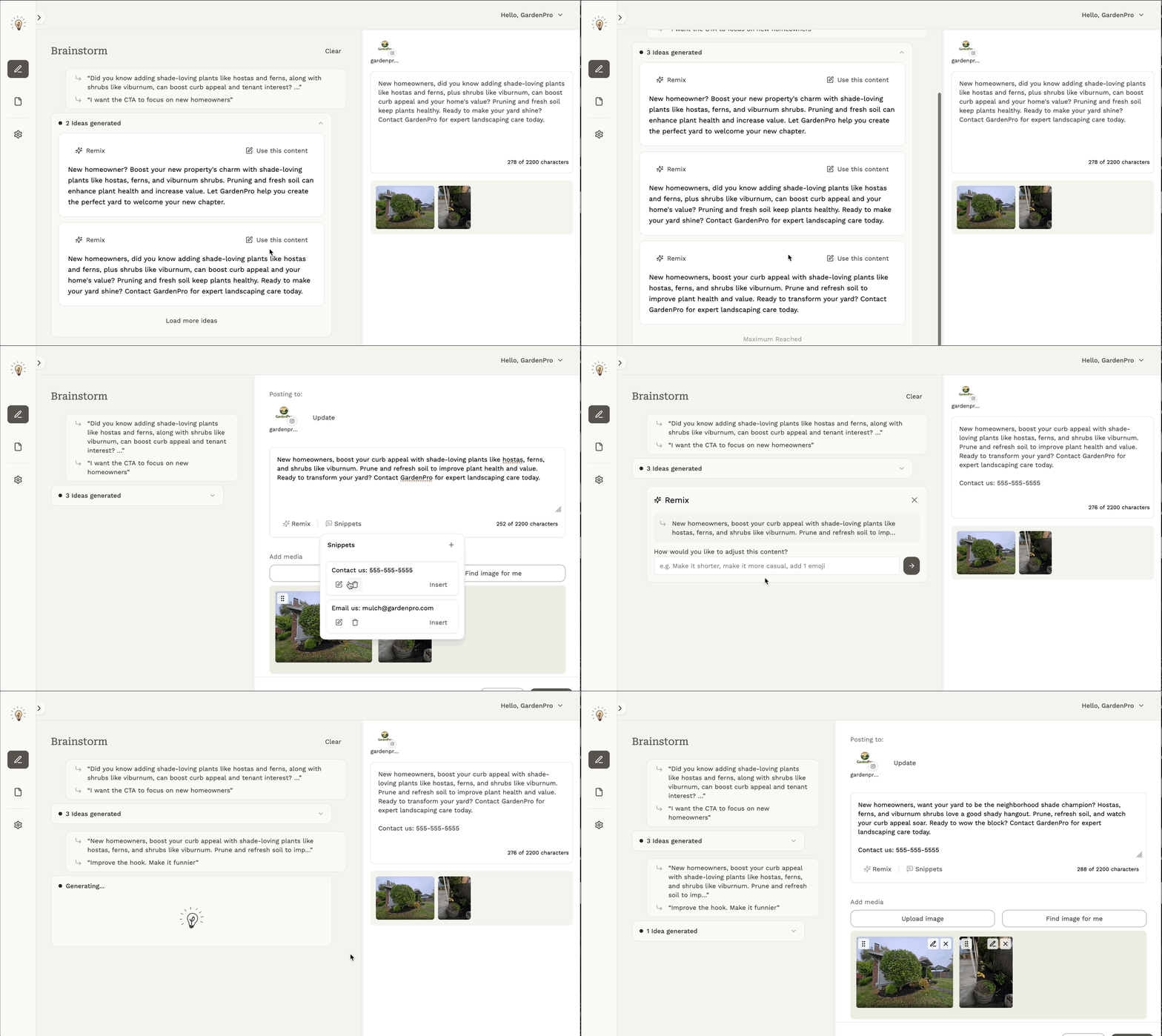
    Postful helps you turn what you already know and do into post-worthy content—without becoming a social media expert.

    With Postful, you can:

    • Brainstorm posts based on your business and audience, not generic prompts
    • Draft and refine posts with AI that supports your voice instead of replacing it
    • Reuse past content so you’re not starting from zero every time
    • Schedule and publish across multiple social networks from one place

    The goal isn’t to flood the internet with content. It’s to help you post consistently and authentically, in a way that fits into your actual workflow.

    What “Open Access” Means

    Until now, Postful was invite-only while we tested and refined the product with a small group of users.

    Starting today:

    • Anyone can sign up
    • No invite codes required
    • Log in with Google or email (passwordless)
    • Self-serve onboarding, and get started in minutes!

    This is still an early product, but it’s ready to be used—and shaped—by more people doing real work.

    If Other Tools Haven’t Stuck, That’s Okay

    Maybe you have tried Buffer, Later, or Hootsuite, and bounced off.

    We’ve heard a few common reasons:

    • Too many features, not enough guidance
    • Feels optimized for teams, not individuals
    • Makes posting possible, but not easier

    Postful is intentionally different:

    • Fewer distractions
    • More help getting started
    • A focus on momentum, not dashboards

    What’s Next

    Opening access is a big step, but it’s not the finish line.

    Over the coming months, we’re focused on:

    • Making it easier to get started and stay consistent
    • Expanding supported networks and media types
    • Helping users get “over the hump” from draft → post → habit

    Your feedback directly influences what we build next.

    Try Postful

    If social media has felt like something you should be doing—but haven’t found a tool that fits how you work—Postful is worth a look.

    And if you have feedback, questions, or get stuck, just reach out. We’re building this with you.

  • AI-Powered Authoring Meets Planning: Postful v0.6.5 Adds Scheduling for Social Media Posts

    AI-Powered Authoring Meets Planning: Postful v0.6.5 Adds Scheduling for Social Media Posts

    We’re excited to announce that Postful v0.6.4–0.6.5 introduces one of our most requested features: post scheduling. You can now plan posts ahead of time in addition to using AI to supercharge your authoring and editing. Scheduling social media posts helps you stay consistent, save time, and stay on top of your actual business.

    With Postful’s simple scheduling workflow, you can draft posts in advance, choose your publish time, and let Postful handle the rest. This release also brings performance improvements, updated email notifications, and refinements to the Posts page for better organization.


    What’s New

    🗓️ Scheduling Posts

    You can now schedule posts to publish up to 60 days in advance.

    • Choose your preferred time in 15-minute increments.
    • Schedule posts across LinkedIn (profile & page), Threads, Instagram, and X (Twitter).
    • Edit or reschedule any post before it goes live.
    • View and manage all scheduled content from the updated Posts page.

    ✏️ Editing Scheduled Posts

    Need to make a last-minute change? You can edit both the post content and its scheduled time directly from the Posts page. Postful keeps your edits in sync,. so your post will always go out exactly as you want it.

    Post Now

    If you’re ready to publish immediately, the Post Now option lets you skip the schedule and send your post live instantly.


    Why It Matters

    Scheduling social media posts transforms how small businesses and creators manage their social media:

    • Consistency: Stay active even when you’re busy.
    • Efficiency: Batch-create content and let Postful post for you.
    • Control: Adjust timing to reach your audience at the best moments.
    • Focus: Spend less time posting and more time creating.

    Other Improvements in v0.6.4–0.6.5

    • Refined Posts page filters for Drafts, Scheduled, and Published posts.
    • Improved email notifications for scheduled and failed posts.
    • General performance and reliability updates.

    Try Scheduling Social Media Posts Today

    Scheduling is now live for early access users on try.postful.ai.
    If you’re on the waitlist, reply reach out to support (support@postful.ai) or sign up at postful.ai to join the waitlist today.

  • Postful v0.6.3: Publish Directly to Your LinkedIn Pages

    Postful v0.6.3: Publish Directly to Your LinkedIn Pages

    We’re excited to roll out Postful v0.6.3, which adds a highly requested features from our alpha testers: LinkedIn Page publishing.

    With this update, users can connect a LinkedIn Page via their LinkedIn Profile, enabling direct publishing to business or organization pages, all from within Postful.

    For small business owners, consultants, and creators using LinkedIn to grow their audience or attract clients, this release expands how and where you can show up online.

    What’s New

    With Postful v0.6.3, you can now:

    • Authenticate your LinkedIn profile and one (1) LinkedIn Page.
    • Publish posts directly to those business Pages

      Note: the authenticated LinkedIn profile must have sufficient permissions to publish to a Page. These permissions are granted within LinkedIn by a Page administrator.
    • Easily identify networks and channels with avatars and usernames in the composer
    • Manage multiple social connections in an updated settings modal
    • Experience smoother onboarding and general performance improvements

    How to Use It

    To publish to a LinkedIn Page:

    1. Go to Settings → Your Networks
    2. Connect or Re-authenticate your LinkedIn account
    3. Select the Page you want to post to (sufficient) access required)
    4. Start creating and publishing posts directly to those Pages from your Postful dashboard

    We’ve also improved network visibility throughout the app, so you’ll always know which accounts you’re posting to.

    Visit LinkedIn Page publishing support page for more information.

    Why It Matters

    LinkedIn continues to be one of the most valuable platforms for small business owners and creators building professional visibility. This release makes it simple to extend your reach — from your personal profile to your business page — without switching tools or re-uploading content.

    What’s Next

    Up next:

    • Information architecture improvements to simplify navigation and editing
    • Post scheduling — plan and automate content in advance

    You can track upcoming features and releases anytime on our Releases page.


    Want to try LinkedIn Page publishing today? Sign up for our waitlist!

    (🤫 Or reach out to hello@postful.ai and we can give you early access)

  • Multi-Image Posting Is Here!

    Multi-Image Posting Is Here!

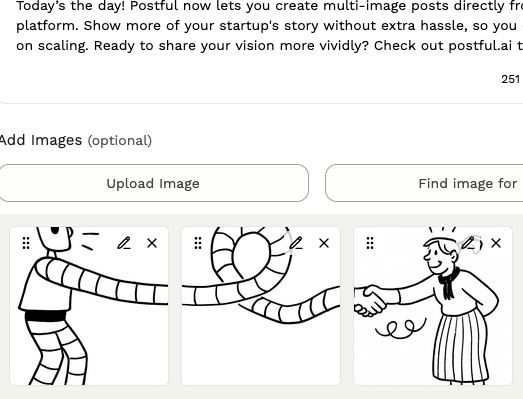
    You asked, and we’re excited to deliver. As part of v0.6.2, Postful now supports multi-image carousels across all supported networks:

    • X (Twitter): up to 4 images
    • Instagram: up to 10 images
    • Threads: up to 20 images
    • LinkedIn: up to 20 images

    This update lets you share richer, more visual stories right in Postful. Whether you’re sharing a product lineup, a tutorial, or a behind-the-scenes look, you can now bring your posts to life with multiple images, all in one go.

    Multi-image posting works just like single-image posts: simply upload multiple images in the Compose page, and you’ll see them displayed in your post preview for each network. You can drag-and-drop to reorder, edit each image individually, and even combine your images and stock images quickly.

    We’re continuing to expand Postful’s publishing capabilities in coming releases. Visit our release notes for both past and upcoming release information.

  • Announcing the Alpha Release of Postful

    Announcing the Alpha Release of Postful

    An AI Social Media Tool for Small Businesses, Side Hustlers, & All-in-One-Doers

    We’re excited to announce that Postful is launching its alpha release in mid-September — and we’re inviting a select group of early users to join.

    What is Postful?

    Postful is an AI-powered social media management tool designed for those who want to grow their reach without spending hours drafting content. Whether you are a small business owner, or promoting your side-hustle after-hours, or just sharing your thoughts online, Postful can help. With Postful, you can:

    • Brainstorm post ideas with AI so you’re never stuck on what to say.
    • Draft and adapt posts for different platforms and audience segments.
    • Stay consistent across LinkedIn, Instagram, Threads, and X without extra effort.

    In short: Postful helps you do more with less time — making social media posting easier and more effective.

    Why Join the Alpha Release?

    As an early participant, you’ll:

    • Get early access to Postful’s AI-assisted authoring workflow.
    • Test new features before anyone else.
    • Shape the product with your feedback — your input will guide what we build next.

    During the alpha, Postful is completely free to use without limits.

    Who Can Join?

    To participate, you’ll need to:

    • Be based in the U.S. (non-US access is coming soon).
    • Sign in with a Google account (other login options are on the way).

    We currently support LinkedIn, Instagram, Threads, and X (Twitter), with more networks planned as we expand.

    How to Join the Alpha

    👉 To request access, email thomas@postful.ai and we’ll get you set up.

    We’d love for you to be part of the group shaping the future of AI social media posting for small businesses.