Author: Thomas

  • The Productivity Boost: Set Direction and Track Progress for Small Business Growth

    The Productivity Boost: Set Direction and Track Progress for Small Business Growth

    Move Beyond Overcommitment to Build a Sustainable System for Consistent, Measurable Results

    January rolls around, and if you’re like me, you sit down to set those big goals for the year.

    • Find more customers.
    • Post more consistently.
    • Grow faster.

    Then, Q4 hits—or maybe even Q1 is over—and you look back and wonder “what happened?”. The motivation was real. The intentions were good. But the finish line still feels far away.

    This post is in a series about rethinking growth and operations for small business owners. The premise is simple: outcomes don’t come from good intentions; they come from practical, repeatable actions. “Practical repeatable actions” means systems that increase focus, decrease drag, and adjust when needed to meet productivity and growth targets. 

    This isn’t about setting better goals. As James Clear puts it, “Goals are good for setting a direction, but systems are best for making progress”. And research backs up the gap between intention and results if you don’t have a solid system in place.

    By the end of this post, you’ll have a small set of techniques you can use immediately to these ends:

    • A way to choose one clear direction (The One-Goal Filter)
    • A method for narrowing effort to 1–2 real priorities (MoSCoW Method)
    • A way to protect focus instead of fighting distraction (The Not-This-Year List)
    • A simple feedback loop to keep progress on track (The Weekly Check-in)

    You can use these techniques together or on their own. The point isn’t to prescribe a perfect system (<whispers> it doesn’t exist). The point is to help you work differently instead of hoping things work out.

    Finding Your Primary Direction: The One-Goal Filter

    It sounds obvious, but the first step to making progress is defining what success actually looks like. And by defining I mean getting specific about what outcome you want and why.

    If you can’t clearly define what success is, you’ll default to “doing your best.” Research shows that “specific, difficult goals consistently [lead] to higher performance than urging people to do their best.” In other words, setting a specific target is more helpful than trying hard.

    But don’t worry: you don’t need a huge metrics dashboard or KPI tree. You just need one sentence that you can stand behind.

    Ultimately, your sentence should address this prompt:

    What outcome would make this year feel meaningfully better, both in results and in day-to-day stress?

    Examples:

    • “Get consistent inbound leads so I’m not scrambling each month.”
    • “Build an audience that understands what I sell, so sales aren’t always an uphill battle.”
    • “Become reliably visible so I’m not rebuilding demand from zero every quarter.”

    This technique is called the One-Goal Filter. The purpose is to be clear, concise, and actionable with your sentence. If your sentence sounds plucked from a slippery corporate transcript, try again.

    How the One-Goal Filter works

    This is a clarity exercise, not a commitment for life.

    1. Set a timer for 10 minutes. Write down as many possible outcomes as you can. Keep them short.
    2. Set the timer again for 10 minutes. Now eliminate everything that wouldn’t materially change your business or life.
    3. Repeat 1 & 2 until you’re left with one sentence.

    You’ll know this is working when decisions start feeling easier instead of heavier.

    And, yes, you can change this later. (That’s what the feedback loops introduced in the Weekly Check-ins are for.)

    Illustration of a person with a light bulb above their head surrounded by notes, checklists, and a pencil, representing business goal setting, strategic thinking, idea generation, and planning.

    Choose fewer priorities than you think you need

    The cost of “more goals” isn’t just time; it’s attention.

    When you try to pursue multiple priorities at once, part of your mind stays stuck on the previous task. This is known as attention residue. Research on attention residue describes this core problem: “People need to stop thinking about one task in order to fully transition their attention and perform well on another.” Task-switching studies show transitions come with real overhead costs that hurt your decision-making and productivity by siphoning mental resources away from what is right in front of you.

    The takeaway is simple: focus isn’t a personality trait; It’s an efficiency choice. As such, it can be developed as a skill to maximize your rate of success.

    A simple rule that works well for solo operators and small teams:

    • One primary outcome (see One-Goal Filter)
    • One to two priorities that drive that outcome
    • Everything else becomes “later,” not “never” (see the Not-This-Year List)

    By doing this you are protecting throughput and minimizing attention residue.

    From MoSCoW with love (and priorities)

    If you have a clear goal and now need to choose what to work on, the MoSCoW method is an excellent way to force clarity. It relies on sorting tasks into four categories:

    • Must-have: These are essential for successfully reaching the outcome. No compromises.
    • Should-have: Important, but not absolutely essential. They are secondary priorities.
    • Could-have: Nice to have, but not essential. If they negatively impact your cost or deadlines, they should be dropped.
    • Won’t-have (this time): Not essential and can be excluded without jeopardizing the outcome. Put them on the back burner.

    This method is especially useful when you have many competing demands and can’t do everything at once, and it’s perfect for determining the highest priority tasks that will actually lead to your outcome.

    How to use MoSCoW (without turning it into a process)

    1. List competing priorities: Projects, channels, improvements, experiments (and, yes, non-work obligations that affect capacity.)
    2. Sort quickly: Must / Should / Could / Won’t (this time). Don’t overthink it.
    3. Pick one or two Musts: These should directly drive your primary outcome.
    4. Reality check your scope: MoSCoW breaks when everything becomes a Must. A good rule of thumb is keeping Musts to “typically no more than 60% Must Have effort”. This leaves room for operations, surprises, and life.
    5. Move Won’t items into a Not-This-Year list. Could-haves may also belong on the Not-This-Year list (you’ll have to make a call).

    You’ll know this is working when your plan survives a bad week.

    Protect Your Focus: The Not-This-Year List: 

    A Not-This-Year list isn’t a sign of pessimism; it’s focus protection. This method is a tool you can use anytime you feel overwhelmed or distracted.

    Unfinished goals don’t just sit quietly in the background. Research shows that “unfinished goals caused intrusive thoughts” when you don’t make a plan to finish them. When something remains unresolved, it keeps consuming (some of) your mental bandwidth.

    The purpose of this technique is to leverage externalization, a common technique in design and design thinking for making ideas into shared concepts. Think sticky notes, prototypes, and models. Externalization in the context of tasks offloads a portion of executive function by providing a location of where tasks live (a wall or a notes app) and a visual means of remembering what they are. For tasks you don’t or can’t do, the same principles apply: putting these tasks somewhere offloads them for later and ensures they aren’t forgotten.

    How to use a Not This Year list

    1. Create a simple note or section on a wall titled “Not This Year.”
    2. Move every non-priority idea into it.
    3. Add a one-line reason next to each item.
    4. Add a revisit date (quarterly is plenty).
    5. When a new idea pops up midweek, park it there.

    You’re not deleting good ideas. You’re freeing attention so you can execute.

    Illustrated octopus multitasking with a laptop, checklist, documents, pencil, and password, representing business goal management, productivity, and juggling multiple work priorities.

    Know Your Progress: Define and Track Signals

    A signal is just a way of knowing whether the activity that leads to your outcome is actually happening. Some folks prefer the term metric or indicator.

    Defining a signal is a critical step to making progress on any outcome, big or small. Research supports that tracking a signal improves goal attainment. (Bonus points: make it public and physically record it—that further increases your rate of success according to the same study).

    What makes a signal useful is that it points to where change is happening (or breaking down). As such, ratios are useful signals more often than raw counts: they show conversion, not just volume. Regardless of the type of signal, here is how to evaluate it:

    A signal should be:

    • Easy to check weekly
    • Hard to rationalize away
    • Clearly connected to your outcome
    • Actionable when it moves (or doesn’t)

    Signals of Change: More About Ratios

    Raw counts tell you what happened. Ratios tell you where friction lives.

    For example, knowing that 500 people saw a post isn’t very helpful on its own. Knowing how many of those people clicked a link or signed up for a newsletter gives you something you can improve. Ratios turn outcomes into adjustable systems.

    Instead of asking, “How do I get more?” you start asking:

    • Where is the drop-off?
    • Which step is weakest?
    • What’s the smallest lever I can pull this week?

    Examples

    OutcomeSignal to track (weekly)
    Increase revenueRatio of items added to cart → completed purchases
    Generate more leads from socialRatio of post views → link clicks
    Improve lead qualityRatio of qualified inquiries → total inquiries
    Grow trust and engagementRatio of thoughtful replies → total posts
    Post consistentlyRatio of drafted or scheduled posts → published posts

    Each of these signals does the same thing: it highlights where momentum turns into drop-off. When the ratio improves, your system is working. When it worsens, you know where to look.

    How to tell if a signal is “real”

    A quick test:

    • If this number doubled, would I know what changed?
    • If it dropped to zero, would I know where to intervene?

    If the answer is no, it’s probably a vanity metric, or just an output rather than a signal.

    Making Signals Work: The Weekly Check-In

    You don’t need a complicated review process for signals. You need a small loop that keeps you honest. This is the Weekly Check-In.

    Once a week, spend no more than 30 minutes answering these questions:

    1. Did the signal move?
    2. If not, what’s the smallest change I can make?

    If you want to really keep yourself on track, create a spreadsheet with the following headers and track week-over-week:

    • Outcome
    • Signal
    • This week’s number
    • Did it move? (Yes / No)
    • One adjustment for next week

    That’s enough to prevent drift without turning reflection into a whole project.


    The techniques and approach introduced in this post—picking one clear direction, determining a couple of priorities, choosing what not to do, and tracking progress with a simple signal—is how you move from hoping for success to building a reliable system for it. To transform ambition into actionable productivity is work, but work that should make your work easier.

    Once your focus is secure, the next step is truly understanding who is paying attention. In our next post, I’ll dive into simple, practical techniques for gaining a deeper Customer Understanding—specifically, how to gather the right insights into who your customers or clients are, and why others aren’t (yet).


    Cheat Sheet

    Skill / MethodWhy to Use ItWhen to Use It
    One-Goal FilterForces trade-offs so you stop optimizing for everything at once.When your plan feels crowded or you need to set a single direction.
    MoSCoW PrioritizationCreates clear expectations and prevents constant renegotiation.When you have multiple “important” initiatives competing for attention.
    Not This Year ListReduces intrusive thoughts from unfinished goals and protects focus.When the same ideas keep resurfacing and distracting you.
    One Signal Per PriorityTurns goals into feedback instead of guesswork.When effort feels high but progress feels unclear.
    Weekly Written Check-inRecording progress strengthens self-regulation and follow-through.Weekly, at a consistent time.

    Follow Along & Try Postful

    If this approach resonates with you,

    Follow us on social media for shorter ideas and examples from the series and to find out about upcoming posts.

    Try Postful today to make planning, scheduling, and staying consistent with your content easier once you know what you want to say

  • Momentum Beats Mastery: A Better Way to Start Posting and Scheduling on Social Media

    Momentum Beats Mastery: A Better Way to Start Posting and Scheduling on Social Media

    A lot of people say they want to post more on social media.

    What they usually mean is: “I want social media posting to feel easier than it does right now.”

    For many small business owners, founders, and creators, the challenge isn’t a lack of ideas. It’s the friction that shows up at the starting line. Social media management tools like Buffer, Later, and SocialBee are powerful, but they often assume you already know what to post, how to say it, and when to schedule it.

    That’s where momentum breaks down.

    Drafts pile up. Content calendars stay empty. Weeks go by without publishing a single post.

    We’ve seen this pattern repeatedly, and we’ve lived it ourselves.

    That’s why this Postful release (v0.7.1) is focused on one thing:

    Helping small businesses get past first-post friction and build real momentum with social media scheduling.

    Momentum beats mastery in social media marketing

    Most social media tools focus on optimization: hashtags, timing, analytics, and performance metrics.

    But for most people, the hardest part of social media marketing isn’t fine-tuning a caption or managing a content calendar.

    It’s answering one simple question:

    “What should I post right now?”

    And then actually hitting publish.

    Postful isn’t trying to turn you into a social media expert. It’s designed to help you make progress consistently.

    This release is built around the moment when motivation is fragile, time is limited, and your goal is simply to get a post scheduled and out the door.

    A more supportive social media starting point

    We redesigned the early Postful experience around a clear, practical flow:

    From “What should I post?” to “I have posts scheduled.”

    That flow shows up in three connected parts, each designed to reduce friction in social media planning and scheduling.

    See progress instantly with Recent Activity

    When you log into Postful, you’ll now see a Recent Activity view that highlights what matters most:

    • Drafts you’ve already started
    • Posts you’ve scheduled across platforms
    • What content is coming up next

    This makes social media management feel lighter:

    • You don’t have to remember where you left off
    • You don’t have to rebuild context every time you log in
    • You can simply continue where you stopped

    Visible progress—even partial progress—makes it easier to keep posting consistently.

    Postful dashboard showing a ‘Recent Activity’ section. A card on the left says ‘You have 2 drafts’ with a link labeled ‘Drafts.’ A card on the right says ‘You have 2 scheduled posts,’ with the next post scheduled for January 23, 2026 at 12:00 PM and a link labeled ‘Scheduled posts.’ Below, a help prompt reads ‘Stuck on what to post? We can help,’ with buttons for ‘Dismiss’ and ‘Get help with my posts.’

    Clear onboarding guidance when you need it

    New Postful users now see a short onboarding checklist designed specifically for first-time social media scheduling.

    The checklist:

    • Highlights the key steps to create and schedule your first posts
    • Stays visible while you’re working so you know what to do next
    • Can be dismissed at any time

    Once dismissed, it’s replaced by Recent Activity, so Postful naturally shifts from guidance to momentum.

    The goal is structure early, autonomy later.

    Introducing Postful Jumpstart: hands-on help to schedule your first posts

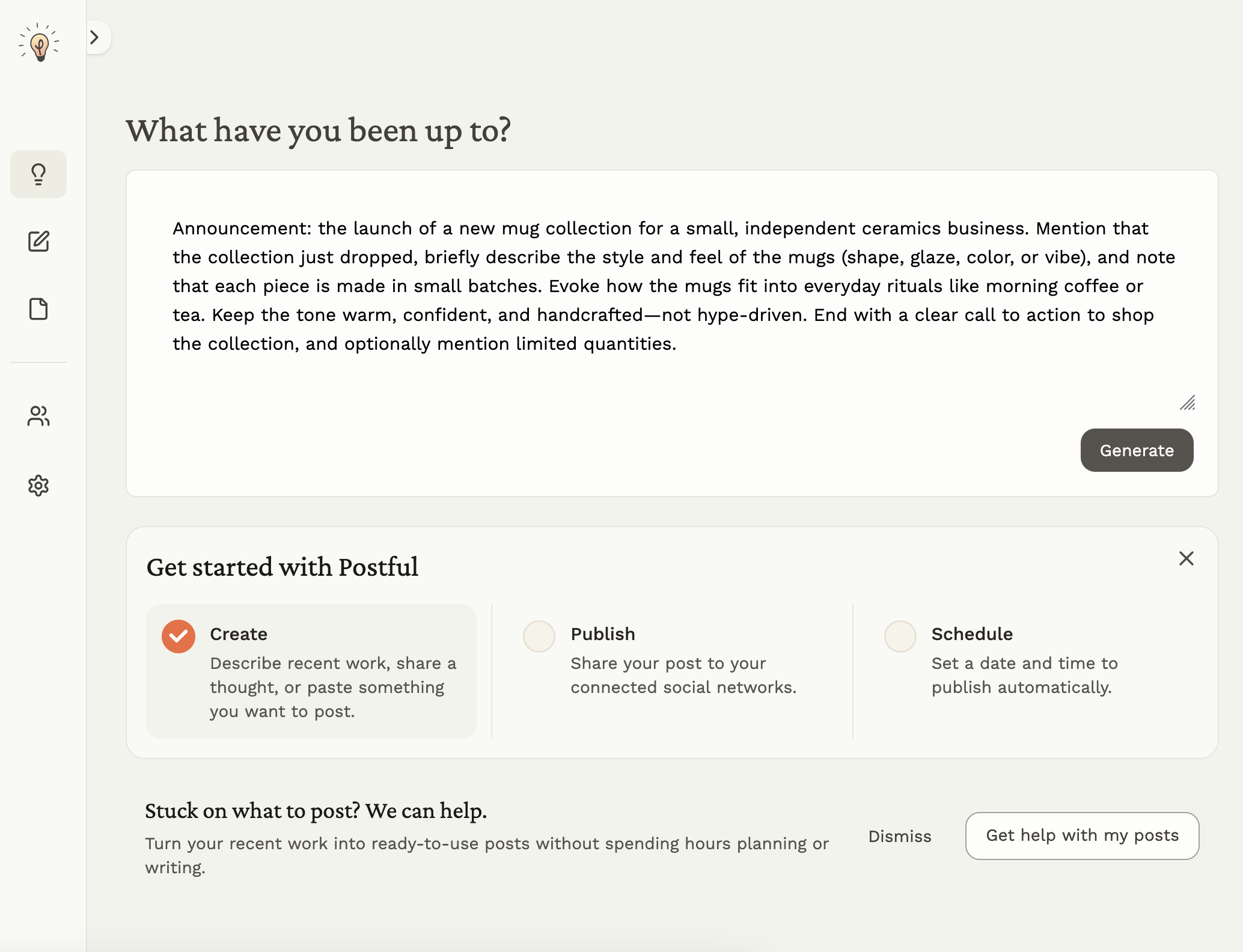
    A help prompt reads ‘Stuck on what to post? We can help,’ with buttons for ‘Dismiss’ and ‘Get help with my posts.’

    Some people don’t need more features. They need a running start and wind at their back.

    That’s why we’re introducing Postful Jumpstart.

    Jumpstart is a guided, hands-on experience designed to help you go from zero to your first set of scheduled social media posts using your real business, your real goals, and your real constraints.

    How Jumpstart works

    • A 30-minute call with the Postful team
    • We talk through:
      • What you’ve been working on
      • What you want to promote or share
      • Your social media goals and limitations
      • Where posting feels hardest
    • Based on that conversation, we generate your first batch of posts (up to 10)

    After the session, you’ll receive your drafts as a PDF you can:

    • Copy directly into Postful
    • Edit and schedule using our social media scheduling tools
    • Reuse as a foundation for future content

    Jumpstart is designed for people who want momentum without spending weeks learning a complex social media management platform.

    Early access note

    For early users, one Jumpstart consultation is included at no cost.

    For now, Jumpstart is focused on a single goal: helping you clear the first hurdle and move from intention to published posts.

    The outcome isn’t perfection, but confidence, clarity, and content you can actually ship.

    👉Check out Jumpstart by signing up or logging into Postful.

    Why we built this

    During early access, we noticed a consistent pattern.

    Many people signed up for a social media management tool with good intentions. Some explored the interface. But too many never scheduled their first post.

    That’s not a motivation problem—it’s a product problem.

    So instead of adding more advanced features, we focused on:

    • Reducing cognitive load in social media planning
    • Making progress visible
    • Offering human guidance when tools alone aren’t enough

    This release is the result.

    What’s next for Postful

    This is one step in a broader effort to make social media posting feel lighter, more human, and more connected to the work you’re already doing.

    We’ll continue refining the experience—and listening closely to feedback.

    If social media posting has felt like a hurdle in the past, we hope this helps you clear it.


    Ready to get started?

    Try Postful and see how it feels to turn your work into posts—without the overwhelm.

  • New Year’s Resolutions for Small Businesses That Actually Stick

    New Year’s Resolutions for Small Businesses That Actually Stick

    Every January, people running small businesses set resolutions with the best intentions.

    • Grow revenue.
    • Be more productive.
    • Get more customers.

    And every year, most of those resolutions quietly fade by February or March, not because the goals were wrong, but because they weren’t connected to how the business actually runs day-to-day.

    This blog series is about doing something different.

    Instead of setting vague resolutions or chasing growth tactics that don’t last, we’re going to focus on practical, repeatable ways to grow your business—your audience, your visibility, and your momentum—without burnout, busywork, or performative goal-setting.

    If you’ve ever searched for “how to grow my business” or “ways to post more on social media” and felt overwhelmed by the advice, this series is for you.

    What This Series Is (and Isn’t)

    This series is designed for those juggling real work and growth without the help of a big staff or big budget:

    • solopreneurs
    • service providers
    • local and small businesses
    • owner-operators

    It’s not about:

    • overnight growth hacks
    • doing everything at once
    • setting goals you’ll forget in a few weeks

    It is about:

    • choosing what actually matters
    • paying attention to real signals
    • building habits that fit real life
    • adjusting as you go instead of starting over

    Over the next several posts, we’ll walk through a simple set of ways to sustain your business and achieve growth. This framework works whether you’re a contractor, consultant, local shop, or small online business.

    A split image showing contrast between overload and focus. On the left, a notebook covered in colorful sticky notes and scribbles lists many competing goals like posting on social media, redesigning a website, and trying new platforms, surrounded by crumpled notes and clutter. On the right, a clean notebook on the same desk lists just two clear goals, with minimal distractions, emphasizing clarity and prioritization.

    Why Business Resolutions So Often Fail

    Most New Year’s resolutions fail for the same reasons, and businesses are no exception.

    1. They’re too vague

    “Grow revenue” or “post more on social media” sounds good, but it doesn’t tell you what to do differently tomorrow or next week. A good goal needs measurable objectives and clear tasks that ladder up to those objectives. By doing so, small actions have big impacts.

    2. They focus on outcomes, not systems

    Wanting more customers or more engagement doesn’t change the way decisions are made day-to-day. Without new habits or systems, nothing sticks. Instead, a focus on repeatable systems helps you act in ways that align to outcomes on a daily basis.

    3. They ignore real constraints

    Time, energy, attention, and cash are limited, especially for small businesses. Most resolutions assume unlimited capacity. Starting with real constraints acknowledges limits, but also helps prioritize effort and resources to achieve big things.

    4. They don’t include feedback

    Many businesses set a goal in January and don’t meaningfully revisit it until the end of the year, when it’s too late to adjust. Building in simple feedback loops allows new information to inform decision-making and increase the likelihood of success.

    5. They’re disconnected from reality

    Advice often assumes full teams, big budgets, or perfect consistency, none of which reflect how most small businesses actually operate. As the adage goes: “perfection is the enemy of progress.” Staying grounded in that which you can actually do makes it possible to move forward.

    This series is built specifically to address those gaps.

    Common Business Resolutions — and What We’ll Focus on Instead

    Rather than telling you to abandon your goals, this series reframes them into workable approaches that actually fit how small businesses grow.

    Common ResolutionWhy It Breaks DownWhat This Series Focuses On Instead
    Grow revenueToo broad, no signal for progressChoosing one outcome that matters and tracking simple signals
    Post more on social mediaUnsustainable, unclear purposeSharing the right things, in the right places, at a pace you can sustain
    Be more productiveLeads to busyness, not progressReducing noise and making the right work easier to do
    Get more customersIgnores fit and timingUnderstanding who hires you, who doesn’t, and why
    Be more consistentRelies on motivationDesigning systems that support consistency
    Reflect on the yearHappens too late to helpShort weekly and monthly feedback loops

    This isn’t about lowering ambition; it’s about changing how ambition shows up in practice.

    What We’ll Cover in This Series

    Each post in this series focuses on one part of a simple growth cycle:

    1. Deciding what actually matters this year
    2. Understanding who hires you (and who doesn’t)
    3. Knowing what people compare you against
    4. Turning clarity into demand and visibility
    5. Making growth easier to execute day-to-day
    6. Learning, adjusting, and sharing progress without disingenuous performance

    Together, these posts replace “New Year’s resolutions” with a way of running your business that compounds over time.

    Inside a flower shop, a whiteboard wall calendar displays repeated weekly tasks marked with simple sticky notes, such as orders and email updates. To the side, three yellow notes under a “This Month” heading list priorities: hosting an in-person event, updating three new items on the web store, and reengaging the mailing list with a discount, with flowers softly blurred in the background.

    Publishing Plan

    We’ll be publishing:

    • One in-depth blog post every other week
    • Each post builds on the previous one
    • Each is designed to stand alone, but works best as part of the full series

    If you want this year to be different—not because you tried harder, but because you worked differently—following along will give you a clear, practical path.

    Follow Along & Try Postful

    If this approach resonates with you:

    • Follow the blog to get each post as it’s released
    • Follow us on social media for shorter ideas and examples from the series
    • Try Postful today to make planning, scheduling, and staying consistent with your content easier once you know what you want to say

    This series isn’t about chasing resolutions.

    It’s about building a way of working that makes growth inevitable.

  • Postful Is Now Open: No Invites, No Waitlist

    Postful is officially open to everyone.

    If you’ve been waiting for an invite—or you’ve been curious but skeptical about yet another social media tool—you can now sign up and try Postful for yourself.

    Why We Built Postful

    Social media is one of those things most small business owners know matters—but struggle to keep up with.

    Not because they don’t care. Not because they’re lazy.

    But because social media is time-consuming, inconsistent, and often feels disconnected from the real work of running a business.

    Most tools are built for:

    • Marketing teams
    • Agencies
    • Influencers
    • People who already love posting

    Postful is built for all-in-one doers: founders, solopreneurs, and small business owners who do the work and the marketing.

    What Postful Helps You Do

    Postful helps you turn what you already know and do into post-worthy content—without becoming a social media expert.

    With Postful, you can:

    • Brainstorm posts based on your business and audience, not generic prompts
    • Draft and refine posts with AI that supports your voice instead of replacing it
    • Reuse past content so you’re not starting from zero every time
    • Schedule and publish across multiple social networks from one place

    The goal isn’t to flood the internet with content. It’s to help you post consistently and authentically, in a way that fits into your actual workflow.

    What “Open Access” Means

    Until now, Postful was invite-only while we tested and refined the product with a small group of users.

    Starting today:

    • Anyone can sign up
    • No invite codes required
    • Log in with Google or email (passwordless)
    • Self-serve onboarding, and get started in minutes!

    This is still an early product, but it’s ready to be used—and shaped—by more people doing real work.

    If Other Tools Haven’t Stuck, That’s Okay

    Maybe you have tried Buffer, Later, or Hootsuite, and bounced off.

    We’ve heard a few common reasons:

    • Too many features, not enough guidance
    • Feels optimized for teams, not individuals
    • Makes posting possible, but not easier

    Postful is intentionally different:

    • Fewer distractions
    • More help getting started
    • A focus on momentum, not dashboards

    What’s Next

    Opening access is a big step, but it’s not the finish line.

    Over the coming months, we’re focused on:

    • Making it easier to get started and stay consistent
    • Expanding supported networks and media types
    • Helping users get “over the hump” from draft → post → habit

    Your feedback directly influences what we build next.

    Try Postful

    If social media has felt like something you should be doing—but haven’t found a tool that fits how you work—Postful is worth a look.

    And if you have feedback, questions, or get stuck, just reach out. We’re building this with you.

  • Social Media Management for Small Businesses, Not Marketing Teams

    Social Media Management for Small Businesses, Not Marketing Teams

    What Makes Postful Different From Buffer, Later, and Other Social Media Tools

    Postful is built for people who run their business—not people whose job is social media.

    Many popular tools in this category, including Buffer and Later, are powerful platforms designed around scheduling, analytics, and team workflows. They work well for marketing teams, agencies, and influencers. But for small business owners and solopreneurs, they can feel complex, fragmented, or overly focused on management instead of creation.

    Postful takes a different approach: it focuses on helping all-in-one doers turn what they already know—their work, services, and expertise—into clear, authentic posts they can publish consistently.

    Who Postful Is Built For

    Postful is designed for small business owners, solopreneurs, and founders who:

    • Run their own marketing alongside everything else
    • Want to post more consistently but don’t know what to say
    • Don’t want to switch between 3–5 tools just to publish a post
    • Care more about growing their business than mastering social media tactics

    If you’re looking for advanced analytics, approval workflows, or influencer-style content planning, other tools may be a better fit. If you want help creating posts and getting them out the door, Postful is built for you.

    What Makes Postful Different (In General)

    Creation Comes First

    Most social media tools emphasize scheduling and analytics. Postful emphasizes creation. The product is designed to help you go from idea → draft → publish in one place.

    AI Built Into the Workflow

    Postful integrates generative AI directly into the Composer and Brainstorm features. You don’t need to open another tool to come up with ideas or rewrite copy—everything happens where you publish.

    Personalized, Not Generic

    Postful uses your business details and audience information to generate posts that reflect what you actually do. This avoids the “soulless” or overly generic AI content common in many tools.

    Fewer Distractions, Fewer Decisions

    The interface is intentionally straightforward. No crowded dashboards, no unnecessary features—just what you need to write, refine, and publish posts.

    Help When You Need It

    Postful offers human support and guidance, including hands-on help for getting started. You’re not expected to figure everything out on your own.

    Postful vs Buffer

    Buffer is a scheduling-first tool. Postful is a creation-first tool.

    Buffer is one of the most well-known social media management platforms, and it works well for users who already know what they want to post. Postful is built for users who need help figuring that part out.

    Key differences:

    • More generous free tier
      Buffer limits free users to 3 connected networks. Postful allows 5, giving small businesses broader reach without upgrading.
    • Built-in brainstorming
      Buffer assumes you bring finished content. Postful helps you generate post ideas and drafts based on your business and audience.
    • Less tool switching
      Many Buffer users rely on external AI tools, docs, or spreadsheets before scheduling. Postful combines ideation, drafting, and publishing in one workflow.
    • Designed for non-marketers
      Buffer is optimized for consistency and management. Postful is optimized for getting unstuck and getting started.

    Postful vs Later

    Later is influencer- and campaign-oriented. Postful is business-oriented.

    Later is popular with creators and brands focused on visual planning and campaigns. Postful focuses on helping small businesses communicate clearly and consistently.

    Key differences:

    • Ongoing free usage vs short trial
      Later offers a 14-day free trial, after which a paid plan is required. Postful offers a free tier with meaningful functionality so you can build a habit over time.
    • Deeper AI support
      Later’s AI features are limited. Postful integrates AI throughout the writing and refinement process, not just as an add-on.
    • Less emphasis on aesthetics, more on clarity
      Postful prioritizes helping you say the right thing to the right audience, not managing influencer calendars or visual grids.

    A Simpler Workflow

    With Traditional Social Media Tools

    You might:

    1. Open ChatGPT or another AI tool to brainstorm ideas
    2. Draft posts in a doc or spreadsheet
    3. Create or edit media in a separate tool
    4. Copy everything into a scheduler like Buffer or Later

    With Postful

    You can:

    1. Brainstorm ideas directly in the app
    2. Generate and refine posts using your business and audience context
    3. Upload or find media quickly
    4. Publish to multiple networks—without leaving Postful

    Choosing the Right Tool

    • Choose Buffer or Later if you already have content ready, need advanced analytics, or manage social media as a dedicated role.
    • Choose Postful if you run your own business, want help turning your work into posts, and need a simpler way to stay consistent.

    Postful isn’t trying to be everything. It’s built to help small businesses show up, sound like themselves, and grow—without becoming social media experts.

  • AI-Powered Authoring Meets Planning: Postful v0.6.5 Adds Scheduling for Social Media Posts

    AI-Powered Authoring Meets Planning: Postful v0.6.5 Adds Scheduling for Social Media Posts

    We’re excited to announce that Postful v0.6.4–0.6.5 introduces one of our most requested features: post scheduling. You can now plan posts ahead of time in addition to using AI to supercharge your authoring and editing. Scheduling social media posts helps you stay consistent, save time, and stay on top of your actual business.

    With Postful’s simple scheduling workflow, you can draft posts in advance, choose your publish time, and let Postful handle the rest. This release also brings performance improvements, updated email notifications, and refinements to the Posts page for better organization.


    What’s New

    🗓️ Scheduling Posts

    You can now schedule posts to publish up to 60 days in advance.

    • Choose your preferred time in 15-minute increments.
    • Schedule posts across LinkedIn (profile & page), Threads, Instagram, and X (Twitter).
    • Edit or reschedule any post before it goes live.
    • View and manage all scheduled content from the updated Posts page.

    ✏️ Editing Scheduled Posts

    Need to make a last-minute change? You can edit both the post content and its scheduled time directly from the Posts page. Postful keeps your edits in sync,. so your post will always go out exactly as you want it.

    Post Now

    If you’re ready to publish immediately, the Post Now option lets you skip the schedule and send your post live instantly.


    Why It Matters

    Scheduling social media posts transforms how small businesses and creators manage their social media:

    • Consistency: Stay active even when you’re busy.
    • Efficiency: Batch-create content and let Postful post for you.
    • Control: Adjust timing to reach your audience at the best moments.
    • Focus: Spend less time posting and more time creating.

    Other Improvements in v0.6.4–0.6.5

    • Refined Posts page filters for Drafts, Scheduled, and Published posts.
    • Improved email notifications for scheduled and failed posts.
    • General performance and reliability updates.

    Try Scheduling Social Media Posts Today

    Scheduling is now live for early access users on try.postful.ai.
    If you’re on the waitlist, reply reach out to support (support@postful.ai) or sign up at postful.ai to join the waitlist today.

  • Postful v0.6.3: Publish Directly to Your LinkedIn Pages

    Postful v0.6.3: Publish Directly to Your LinkedIn Pages

    We’re excited to roll out Postful v0.6.3, which adds a highly requested features from our alpha testers: LinkedIn Page publishing.

    With this update, users can connect a LinkedIn Page via their LinkedIn Profile, enabling direct publishing to business or organization pages, all from within Postful.

    For small business owners, consultants, and creators using LinkedIn to grow their audience or attract clients, this release expands how and where you can show up online.

    What’s New

    With Postful v0.6.3, you can now:

    • Authenticate your LinkedIn profile and one (1) LinkedIn Page.
    • Publish posts directly to those business Pages

      Note: the authenticated LinkedIn profile must have sufficient permissions to publish to a Page. These permissions are granted within LinkedIn by a Page administrator.
    • Easily identify networks and channels with avatars and usernames in the composer
    • Manage multiple social connections in an updated settings modal
    • Experience smoother onboarding and general performance improvements

    How to Use It

    To publish to a LinkedIn Page:

    1. Go to Settings → Your Networks
    2. Connect or Re-authenticate your LinkedIn account
    3. Select the Page you want to post to (sufficient) access required)
    4. Start creating and publishing posts directly to those Pages from your Postful dashboard

    We’ve also improved network visibility throughout the app, so you’ll always know which accounts you’re posting to.

    Visit LinkedIn Page publishing support page for more information.

    Why It Matters

    LinkedIn continues to be one of the most valuable platforms for small business owners and creators building professional visibility. This release makes it simple to extend your reach — from your personal profile to your business page — without switching tools or re-uploading content.

    What’s Next

    Up next:

    • Information architecture improvements to simplify navigation and editing
    • Post scheduling — plan and automate content in advance

    You can track upcoming features and releases anytime on our Releases page.


    Want to try LinkedIn Page publishing today? Sign up for our waitlist!

    (🤫 Or reach out to hello@postful.ai and we can give you early access)

  • Multi-Image Posting Is Here!

    Multi-Image Posting Is Here!

    You asked, and we’re excited to deliver. As part of v0.6.2, Postful now supports multi-image carousels across all supported networks:

    • X (Twitter): up to 4 images
    • Instagram: up to 10 images
    • Threads: up to 20 images
    • LinkedIn: up to 20 images

    This update lets you share richer, more visual stories right in Postful. Whether you’re sharing a product lineup, a tutorial, or a behind-the-scenes look, you can now bring your posts to life with multiple images, all in one go.

    Multi-image posting works just like single-image posts: simply upload multiple images in the Compose page, and you’ll see them displayed in your post preview for each network. You can drag-and-drop to reorder, edit each image individually, and even combine your images and stock images quickly.

    We’re continuing to expand Postful’s publishing capabilities in coming releases. Visit our release notes for both past and upcoming release information.

  • Voice is the New Keyboard: How I Use Voice Input as a Productivity Tool

    Voice is the New Keyboard: How I Use Voice Input as a Productivity Tool

    This article was assisted with AI. We may include links to partners.

    For some of my colleagues, typing has become the last step in their workflow, not the first. More and more, people are turning to productivity tools that use voice input instead of the keyboard. From AI assistants like ChatGPT and Claude to speech-to-text apps like Superwhisper, voice is quickly becoming one of the best productivity tools for work and focus.

    I’ve been moving in the same direction. Over the past year, voice input has become a core part of my productivity stack. It’s faster, it keeps me in the flow of ideas, and it lets me capture more detail than typing ever could. Here’s how I use voice every day, and the productivity apps I recommend.

    Superwhisper: A Private Speech-to-Text Productivity Tool

    The tool I use most often is Superwhisper, which runs speech-to-text locally on my device (or in the cloud if you prefer). Unlike many AI productivity apps, Superwhisper can be fully private: your audio and transcripts never leave your computer.

    I use it to dictate sensitive communications like internal emails, brainstorm rough drafts, and speed through writing tasks. Because it pipes directly into any text field, I use it everywhere—email, Slack, docs, even Spotlight search on my Mac. I have a shortcut key set up so I can start speaking at a moments notice. Superwhisper has become one of my most reliable day-to-day productivity tools.

    ChatGPT for Meeting Notes and Summaries

    After most meetings, I don’t type up notes anymore. Instead, I open ChatGPT (we use the enterprise license) and simply speak what happened. It transcribes, summarizes, and organizes everything into a draft. Then I review, correct, and add details. Because I have a project set up for my work, the notes add additional context for future sessions.

    This workflow turns messy sticky notes and jottings into ordered outlines, complete thoughts, and action items within minutes. It’s one of the best AI productivity tools I’ve found for cutting down meeting fatigue and making notes actually useful.

    Using Voice for Feedback and Testing

    When I’m testing Postful or drafting support docs, I talk through what I’m doing while using the product. ChatGPT or Superwhisper runs in the background, capturing the steps or thoughts in real-time. I am also able to screenshot key steps or record GIFs at the same time rather than after or before the descriptive work.

    Using voice input in this way helps me stay focused on the app instead of juggling testing and writing. It results in richer notes and faster feedback. What used to take hours now takes a fraction of the time.

    Conversations with AI on the Go

    Another way I use voice: ChatGPT and Claude’s voice modes while walking or commuting. Instead of typing prompts, I talk through problems and get real-time responses.

    These conversational loops feel natural because I can clarify ideas, explore options, and even outline plans. At the end, I ask the AI for a written summary, which I can revisit later. For ideation and planning, it’s one of the most underrated productivity apps available right now.

    Other Voice Productivity Tools Worth Exploring

    • WisprFlow: Automates complex workflows on top of Whisper.
    • Carmen (from Mozilla): A blogging tool for small businesses that turns spoken words into posts.

    Both are promising additions to the growing ecosystem of voice-first productivity tools.

    Why Voice Works for Productivity

    I’ve found three big reasons voice outperforms typing in daily workflows:

    • Speed – talking is faster than typing.
    • Flow – it reduces “blank page syndrome.”
    • Detail – spoken thoughts capture nuance typing tends to strip out.

    Voice Input + Postful

    If you want to use voice input with Postful, the easiest way today is to pair it with Superwhisper. Dictate your ideas directly into Postful, then let our AI help refine, draft, and syndicate them.

    We’re exploring native voice input down the line. If that’s something you’d love, let us know at hello@postful.ai.

    Final Thoughts: The Future of Productivity Tools

    Voice isn’t replacing typing completely, but for me, it’s becoming the default way to get ideas out of my head and into action. If you’re curious about trying voice-based productivity apps, start small: dictate notes after your next meeting or draft a blog post out loud.

    Chances are, you’ll find your keyboard is becoming your secondary productivity tool.

  • Announcing the Alpha Release of Postful

    Announcing the Alpha Release of Postful

    An AI Social Media Tool for Small Businesses, Side Hustlers, & All-in-One-Doers

    We’re excited to announce that Postful is launching its alpha release in mid-September — and we’re inviting a select group of early users to join.

    What is Postful?

    Postful is an AI-powered social media management tool designed for those who want to grow their reach without spending hours drafting content. Whether you are a small business owner, or promoting your side-hustle after-hours, or just sharing your thoughts online, Postful can help. With Postful, you can:

    • Brainstorm post ideas with AI so you’re never stuck on what to say.
    • Draft and adapt posts for different platforms and audience segments.
    • Stay consistent across LinkedIn, Instagram, Threads, and X without extra effort.

    In short: Postful helps you do more with less time — making social media posting easier and more effective.

    Why Join the Alpha Release?

    As an early participant, you’ll:

    • Get early access to Postful’s AI-assisted authoring workflow.
    • Test new features before anyone else.
    • Shape the product with your feedback — your input will guide what we build next.

    During the alpha, Postful is completely free to use without limits.

    Who Can Join?

    To participate, you’ll need to:

    • Be based in the U.S. (non-US access is coming soon).
    • Sign in with a Google account (other login options are on the way).

    We currently support LinkedIn, Instagram, Threads, and X (Twitter), with more networks planned as we expand.

    How to Join the Alpha

    👉 To request access, email thomas@postful.ai and we’ll get you set up.

    We’d love for you to be part of the group shaping the future of AI social media posting for small businesses.