

It is usually not the writing that slows a business owner down on Facebook. It is the interruption.
You are in the middle of client work, shipping orders, answering messages, or trying to finish your paid work. Then you remember you have not posted anything today. So you stop, dig through your camera roll, write something fast, post it, and move on. The task gets done, but the process keeps stealing attention.
That is why “can you schedule facebook posts” is such a useful question. The short answer is yes. The more useful answer is that scheduling lets you turn Facebook from a recurring interruption into a system you control.
Yes You Can Schedule Facebook Posts and Reclaim Your Time
Yes, you can schedule Facebook posts in advance.
For most small business owners, that one shift changes everything. Instead of posting when you remember, you post when it fits your audience and your week.
A simple example shows the difference. A local service business might have three solid post ideas on Monday: a customer tip, a before-and-after photo, and a reminder about open appointments. If the owner publishes them manually, each one becomes a separate task later in the week. If the owner schedules them all in one sitting, the same content becomes one focused block of work.
That matters because reactive posting creates three problems at once:
- It breaks concentration: You keep context-switching back into marketing mode.
- It lowers quality: Last-minute captions are often flatter and less intentional.
- It makes consistency hard: Busy days usually mean skipped posts.
Scheduled posting fixes all three.
The other benefit is emotional, not just operational. A scheduled week feels lighter. You are not carrying “I still need to post on Facebook” around in your head all day.
A good scheduling workflow does not just save time. It protects your attention.
Facebook gives you a native way to schedule posts through Meta Business Suite. That is the right starting point for most solopreneurs. If your process gets more complex, third-party schedulers can help you manage multiple platforms, queue content, and keep a cleaner calendar.
The better question is not whether you can schedule Facebook posts. It is how to build a workflow that you can maintain when business gets busy. That is where many either save hours each week or go right back to scrambling at 8 p.m.
How to Schedule Posts Directly on Facebook Using Meta Business Suite
For a Facebook Page, Meta Business Suite is the most direct option. It is built for this job, and for many small businesses it is enough.
A common use case is a bakery planning its weekly specials. On Sunday evening or Monday morning, the owner can prepare posts for the week’s featured items, set them to publish on specific days, and stop thinking about Facebook until it is time to reply to comments.
According to Wisoft Solutions’ guide to scheduling Facebook posts, Meta Business Suite native scheduling can achieve up to 30% higher engagement for small businesses that batch-schedule 7-10 posts weekly during peak audience windows, and its built-in “best times” suggestions from Page Insights can help with timing.
The basic desktop workflow
On desktop, the setup is straightforward:
- Open Meta Business Suite: Go to your business account and choose the correct Facebook Page.
- Find the Planner: Scheduled content lives here and your calendar view becomes useful.
- Create a new post: Select your Facebook Page as the destination.
- Add the post details: Write the caption, upload the image or video, and add any link you want people to click.
- Set a date and time: Turn on the scheduling option instead of publishing immediately.
- Confirm and schedule: Save it, then check your scheduled queue.
If you are promoting a new product, this can be as simple as one product photo, a short caption, and a link to your store. If you are sharing a blog post, use the same process but rewrite the caption for Facebook instead of copying your article headline word-for-word.
What to look at before you click schedule
The technical steps are easy. The part that improves results is choosing a slot with a reason behind it.
Meta Business Suite often surfaces timing suggestions tied to your Page activity. That is useful because it gives you a platform-specific starting point instead of guessing. If your audience tends to engage in the morning, schedule there first and adjust later based on post performance.
A good habit is to review each post before it goes live for these basics:
- Visual fit: Is the image readable on mobile?
- Caption clarity: Does the first line make sense without extra context?
- Link purpose: If there is a link, is the call to action obvious?
- Publishing time: Does the timing match when your audience is likely to be active?
That last point matters more than many owners think. A post scheduled well is not just “posted later.” It is placed where it has a better chance to be seen.
Here is a quick visual walkthrough if you want to see the interface in action:
Managing scheduled posts after the fact
Many schedule once and assume they are done. In practice, you will occasionally need to edit, reschedule, or replace something.
Inside Business Suite, check your scheduled posts regularly. That is especially useful when:
- A promotion changes: You need to update dates or inventory language.
- A post feels off: You notice a typo, broken link, or weak image.
- Your week shifts: You want to move content around without rewriting everything.
The most productive setup is not “schedule and forget.” It is “schedule, then review in one quick check-in.”
For a Facebook-only workflow, Meta Business Suite is efficient and simple. If you also post to Instagram, LinkedIn, or other channels, that is usually when native scheduling starts to feel limiting.
Using Third-Party Tools for Advanced Facebook Scheduling
Once your social workflow extends beyond one Facebook Page, native scheduling starts to show its boundaries.
A founder who posts on Facebook and LinkedIn, or a creator who wants one central calendar for several networks, usually benefits from a dedicated scheduling tool. The main advantage is not novelty. It is consolidation.
Why teams and solopreneurs move beyond native scheduling
Third-party tools help when you want one place to plan, publish, and review content across multiple channels.
That can mean:
- One dashboard for several networks: You write once, customize per platform, and schedule from one calendar.
- A cleaner planning view: It is easier to spot content gaps, repeated themes, or weeks where you are over-posting.
- Workflow support: Queues, drafts, approvals, and reusable post ideas reduce repeated setup work.
For example, if you run a consulting business, you might share the same core idea in different ways: a short Facebook post, a more polished LinkedIn version, and a lighter social variation elsewhere. A third-party scheduler makes that much easier than bouncing between native tools.
What to look for in a tool
Buffer is a solid example of the category. It is widely used, has a friendly interface, and offers a queue-based publishing workflow that many small businesses find easy to maintain. Pricing: see the website for details.
If you want to compare options, this roundup of best free social media schedulers is a practical starting point.
Another option in this category is Postful, which supports simple scheduling, multi-network syndication, and AI-assisted brainstorming for turning rough ideas into ready-to-post content.
What matters most is not the logo on the tool. It is whether the tool fits your workflow.
A useful checklist:
- Cross-platform support: Can you manage the networks you use?
- Calendar visibility: Can you see your week or month at a glance?
- Reuse workflow: Can you adapt previous posts instead of starting from zero?
- Editing speed: Can you tweak each platform version without friction?
If your current process involves copying the same post into multiple tabs, you have already outgrown a single-platform workflow.
Third-party tools are usually worth considering when your time cost becomes larger than the simplicity of staying native.
Native Tools vs Third-Party Schedulers A Side-by-Side Look
Choosing between native scheduling and a third-party tool usually comes down to one question: Are you managing Facebook, or are you managing a content operation?
If Facebook is your main channel and your needs are simple, Meta Business Suite is often enough. If your content process spans multiple networks or involves heavier planning, a dedicated tool usually creates less friction.
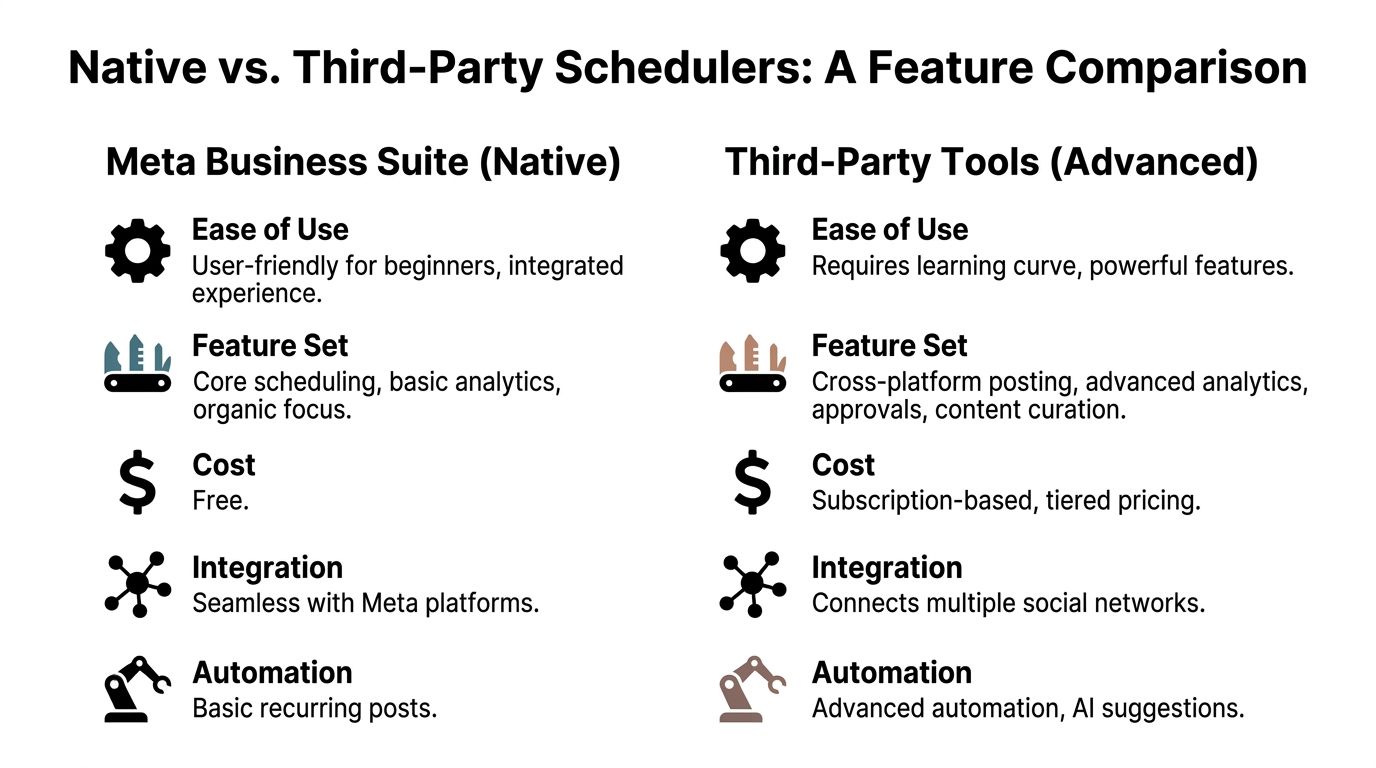
Native tools fit Facebook-centric businesses that want a free, direct workflow. Third-party schedulers fit operators who value centralization, reuse, and multi-platform efficiency.
Where native scheduling wins
Meta Business Suite has three obvious strengths.
First, it is free. For a solo operator trying to keep overhead lean, that matters.
Second, it is integrated with Meta’s own environment. You are not learning a separate system just to publish a post.
Third, it is simple to adopt. A local gym, neighborhood café, or real estate agent focused mainly on Facebook can get started quickly without redesigning their marketing stack.
Where third-party tools pull ahead
Third-party schedulers become more useful as complexity rises.
They help when you need:
- Multi-network management: Facebook plus other social platforms in one place
- Content organization: Shared calendars, queues, labels, and drafts
- Efficiency features: Reworking existing posts, approvals, and broader planning views
A solo creator may not need all of that on day one. A founder publishing across several channels often does.
Facebook Scheduling Methods Compared
| Feature | Meta Business Suite (Native) | Third-Party Tools (e.g., Buffer) |
|---|---|---|
| Cost | Free | Subscription-based, tiered pricing |
| Best fit | Facebook-focused businesses | Multi-platform creators and small teams |
| Ease of use | User-friendly and built into Meta tools | More setup, broader feature depth |
| Platform support | Meta ecosystem | Multiple social networks |
| Planning workflow | Basic scheduling and calendar use | Centralized content calendars and queues |
| Advanced workflow | Core publishing and basic insights | More room for approvals, reuse, and coordination |
If you want a broader primer on the mechanics behind planning and publishing, this guide on what social media scheduling is lays out the core concepts clearly.
The practical choice is usually this:
If you post only to Facebook and want fewer moving parts, stay native.
If your business already repurposes content across channels, use a scheduler built for that workload.
Beyond Scheduling Mastering Your Facebook Content Workflow
Scheduling helps, but the biggest productivity gain comes from building a repeatable content system.
That system starts with two decisions: when you post and how often you post. Then it turns those choices into a weekly routine you can follow.
Pick publishing times that match real behavior
Buffer’s analysis of 14 million Facebook posts found that 9 a.m. on Thursday is the best time to post for peak engagement, with Wednesday as the strongest day overall and weekday mornings from 6 a.m. to 11 a.m. outperforming afternoons, according to Buffer’s Facebook timing analysis.
That does not mean every business should blindly post at one exact minute. It does mean morning publishing is a strong default, especially if you have no historical pattern yet.
A practical rule for a busy operator:
- Start with weekday mornings: Especially if you have no historical pattern yet.
- Favor midweek slots: Wednesday and Thursday are sensible anchors.
- Treat afternoons cautiously: If posts regularly sag later in the day, shift them earlier.
Use frequency as a consistency target
Socialinsider’s 2025 social media benchmarks study found that brands post an average of 24 times per month on Facebook, or about 7 posts per week, with peaks up to 47 posts per month during holiday campaigns, according to Socialinsider’s posting frequency benchmark.
For a small business, that does not mean you need to flood your page. It suggests that steady posting matters more than occasional bursts.
A manageable weekly rhythm often looks like this:
- One anchor post: A stronger post tied to an offer, launch, or core message
- A few lighter posts: Tips, photos, short updates, or audience questions
- A repeatable cadence: Enough to stay visible without improvising daily
Batch your content so Facebook stops interrupting you
This is the part that saves the most time.
Instead of writing one post every day, block one session each week. A Monday morning batch works well for many solopreneurs. In that block, draft the week’s captions, choose the visuals, and load everything into your scheduler.
That turns Facebook into a contained task rather than a daily distraction.
A simple batching routine:
- List your themes: Offers, customer education, proof, and personality
- Draft several captions at once: This is faster than writing from scratch each day
- Attach visuals in one pass: Product photos, screenshots, graphics, or short video clips
- Schedule the full week: Use your chosen morning slots
- Review performance later: Keep the publishing block separate from the reporting block
If you need help structuring that routine, this guide on how to create a content calendar is a good practical companion.
The best workflow is boring in the right way. It repeats, it fits your week, and it keeps running when client work gets hectic.
Common Scheduling Pitfalls and How to Avoid Them
Most scheduling advice assumes everything works cleanly. In practice, a few issues trip people up repeatedly.
Facebook Groups are a different workflow
A big one is Facebook Groups.
According to Buffer’s guide to scheduling Facebook posts, Meta Business Suite does not support auto-publishing to Groups, and even tools like Buffer often rely on a manual “Notify Me” reminder instead of true automation.
That matters for coaches, community-led brands, and local businesses that rely on Groups for conversation and leads. If Groups are part of your strategy, build around that limitation instead of assuming your page workflow will transfer over.
The practical move is to separate Page scheduling from Group engagement in your calendar. Schedule your Page posts automatically, then set a manual reminder block for Group posting and replies.
Failed posts usually come from simple causes
When a scheduled post does not publish, the cause is often boring:
- An account connection needs attention
- A media file has an issue
- The post was never fully saved
- A linked page or permission changed
If something fails, do not just repost and move on. Check the queue, verify the connection, and test a simple post first.
Scheduling without reviewing performance is wasted effort
Another common mistake is treating scheduling as the final step.
If you never check what happened after publishing, you keep repeating weak timing, weak formats, or weak hooks. Even a quick weekly review helps. Look for the posts that got comments, clicks, or shares, then reuse the structure rather than starting from zero again.
A good scheduler saves time. A good review habit prevents you from wasting that saved time on the wrong content.
The Future of Scheduling Turn Your Work Into More Business
The next step after scheduling is adaptation.
Static posting calendars are useful, but they are still fixed plans. The stronger approach is a system that responds to audience activity, content format, and changing platform behavior.
That shift is already visible. According to Brandwatch’s guide to scheduling Facebook posts, video posts scheduled in the evening can outperform morning slots by 35% for certain small business audiences, which is a useful reminder that one universal “best time” does not fit every post type.
That is why more operators are moving toward AI-assisted planning. Not because AI replaces strategy, but because it helps adjust timing, remix content, and keep the calendar moving without starting from a blank page every time.
For a busy founder or side-hustler, the true win is not publishing more. It is building a lighter system:
- you capture ideas quickly,
- turn them into posts faster,
- schedule them across the channels you use,
- and keep refining based on what gets attention.
That is how social stops feeling like extra admin and starts supporting the business.
Postful helps small business owners, creators, and side-hustlers turn ideas into scheduled social content with AI brainstorming, simple publishing, multi-network syndication, and support during early access. It is currently free to use in early access. If you want a lighter way to keep Facebook and the rest of your content workflow moving, explore Postful.