
If you’re a small business owner, you already know social media is a beast. You need to be on Instagram, Facebook, LinkedIn… the list goes on. A social media scheduler is the tool that tames it.
It lets you plan, create, and schedule all your posts in advance, so you can reclaim hours from your week and keep your profiles active without the daily scramble to find something to post.
How a Scheduler Transforms Your Social Media Workflow
For a small business, time is everything. Juggling operations, talking to customers, and actually running the business leaves almost no room for the constant demands of social media. This is where a scheduler stops being "just another piece of software" and becomes a core business asset.
It completely flips the script. Instead of social media being a relentless, daily chore, it becomes a powerful marketing channel you can set and forget.
Imagine this workflow: on Monday morning, you sit down for a focused 90-minute session. You plan, write, and schedule your entire week's worth of content. No more stopping what you're doing at 2 PM on a Thursday because you forgot to post. You batch it all at once, and the tool does the rest. It’s a simple change, but the impact on your productivity is huge.
Reclaim Your Time
Let's be real—the biggest win here is getting your time back. On average, businesses that use these tools save 6-8 hours per week just on planning and posting. That’s a full workday every single month you can pour back into what really grows your business, like following up on leads or improving your products.
A scheduler also makes sure you never miss a chance to connect with your audience.
- Post at Peak Times: Your scheduler can automatically publish content exactly when your followers are most active. For a local café, this might mean posting about your lunch special at 11 AM, even if you're busy with the morning rush.
- Maintain Consistency: It keeps your profiles looking active and professional, which builds trust with both followers and the algorithms, even when you're on vacation.
- Reduce Mental Clutter: Planning ahead gets rid of that daily "what on earth do I post today?" panic. It frees up your mental energy for the bigger picture.
The real change isn't just about saving time. It's about moving from reactive posting to proactive strategy. You finally get the headspace to think about your message, not just the mechanics of getting it published.
This screenshot from Buffer shows a clean, visual calendar where you can see your entire week's content at a glance.
Having this bird's-eye view is a game-changer. You can instantly spot gaps in your schedule or see if you're posting too much of one type of content. To really level up your strategy, think about how the best AI tools for digital marketing can work alongside your scheduler to make your content even smarter.
Choosing the Right Scheduler for Your Business
Picking the right social media scheduler can feel like a chore. There are dozens of options out there, but so many of them are built for massive corporate teams with budgets to match. The trick is to tune out all that enterprise-level noise and laser-focus on the tools that actually help a small, lean operation like yours.
Forget the fancy bells and whistles you'll never use. Your goal is to find something that solves your immediate productivity problems. A cluttered, over-engineered interface will just slow you down, which completely defeats the purpose of getting a scheduler in the first place.
Core Features That Matter Most
At the end of the day, you're trying to save time and keep your social media feeds consistent. That’s it. So, the features you hunt for should directly serve that mission. You want a clean, intuitive platform that makes your job easier, not one that adds another layer of complexity.
Here’s what I’d consider non-negotiable for any small business:
- An Intuitive Content Calendar: You absolutely need a clear, visual map of what’s scheduled. A drag-and-drop calendar is perfect because you can easily move posts around and spot any gaps in your content plan with just a glance.
- Simple Bulk Scheduling: Being able to upload a whole week's—or even a month's—worth of posts from a simple spreadsheet is a game-changer. For example, you can plan 20 posts in a Google Sheet, export it as a CSV, and upload it in minutes. This is how you reclaim huge chunks of your time.
- Key Platform Integrations: Make sure the tool officially supports the platforms where your customers actually hang out. For a local boutique, that means rock-solid integration with Instagram (including Stories and Reels), Facebook, and maybe Pinterest.
- User-Friendly Analytics: You don’t need a data scientist to tell you what's working. You just need simple, actionable insights. Look for a tool that clearly shows you things like your top-performing posts and the best times to publish.
The best social media scheduler for a small business isn't the one with the most features—it's the one you'll actually use consistently. Simplicity and an easy-to-learn interface often provide a better return on investment than a tool packed with advanced functions you'll never touch.
Comparing Top Schedulers for Small Business Needs
It's tempting to start with a free plan, but they often come with tight restrictions on how many accounts you can link or posts you can schedule. For a small business, a modest monthly investment can unlock the features that really move the needle on efficiency.
Here's a quick look at how some of the popular options stack up for a small business workflow.
| Scheduler | Starting Price (Monthly) | Key Features for Small Business | Best For |
|---|---|---|---|
| Buffer | $6 per channel | Clean UI, simple queue, intuitive calendar, basic analytics, free landing page builder. | Solo entrepreneurs and beginners looking for a straightforward, no-fuss scheduling experience. |
| Sendible | $29 | All-in-one dashboard, content suggestions, client management features, solid reporting. | Small agencies or consultants managing a few client accounts alongside their own. |
| Hootsuite | $99 | Advanced analytics, team collaboration, extensive app integrations, social listening tools. | Growing businesses with a small team that needs approval workflows and deep data insights. |
| Sprout Social | $249 | Premium analytics, advanced automation, CRM integrations, robust team and client workflows. | Established businesses with a dedicated social media manager or a team requiring enterprise-level tools. |
For a typical small business owner or a solo founder, a tool like Buffer or Sendible usually hits the sweet spot. They offer powerful scheduling and essential analytics in a clean package that won't break the bank.
You'd really only need to jump to a premium tool like Hootsuite or Sprout Social if you have a dedicated social media manager or a small team that needs to collaborate on posts and dig into complex performance reports. For most of us flying solo, the extra cost just isn’t justifiable.
Alright, you've picked your social media scheduler. Now what? The real magic happens when you build a workflow around it—a system that takes you from chaotic, last-minute posting to a calm, organized process. This is how your scheduler goes from a simple tool to a strategic asset.
The first thing you'll do is connect your social media accounts. All the good schedulers use official APIs from platforms like Facebook or Instagram, so you’ll authorize the connection directly on their sites. It’s secure, and it means you never have to share your login details with the tool itself.
Once you’re connected, it’s time to map out your posting schedule. Most tools are smart enough to analyze when your audience is most active and suggest the best times to post. Trust the data on this one; it’s way better than guessing. We've seen businesses report a 50% jump in engagement just by scheduling posts during these peak hours. It's a small change that makes a huge difference.
This infographic lays out the basic three-step process for getting your scheduler up and running.
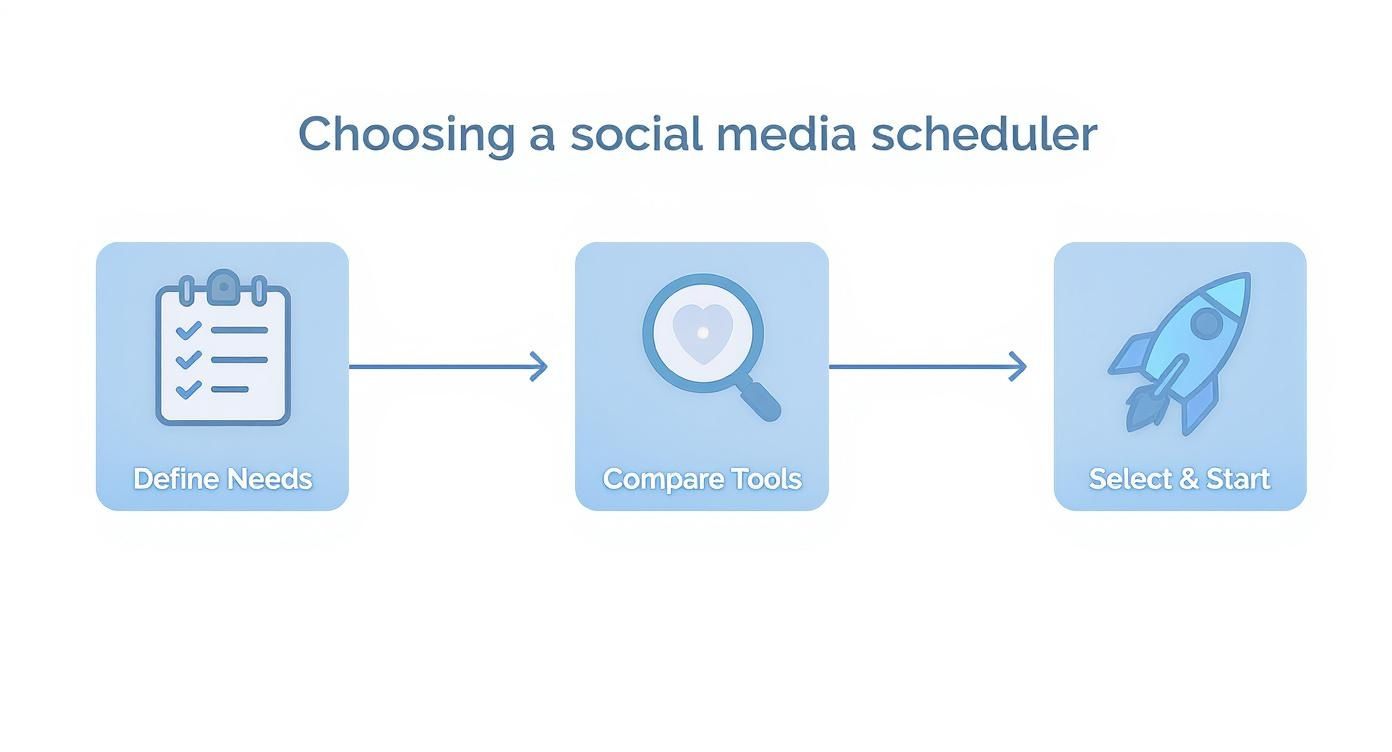
As you can see, choosing the tool is just the start. The real value comes from building a workflow that actually works for you.
From Ideas to a Balanced Feed
With your schedule ready, I highly recommend trying content batching. This is one of my favorite productivity hacks. Instead of scrambling to create a post every single day, you set aside one block of time to get it all done for the week.
Here's a practical workflow example for a Tuesday morning:
- 9:00 AM – Brainstorm & Write: Open a simple document and write all your captions for the week. Don't edit yet, just get the ideas down.
- 9:45 AM – Gather Visuals: Spend the next 45 minutes finding or creating all the images and short videos you need.
- 10:30 AM – Bulk Upload: Load everything into your scheduler, match captions to visuals, pop each post into its time slot, and you're done for the week.
This frees up so much mental space for the rest of the week. You’re no longer waking up thinking, "Ugh, what am I going to post today?" If you need a framework to get started, grabbing a good social media posting schedule template can be a huge help.
A great workflow ensures you're not just posting consistently, but also posting the right mix of content. It prevents your feed from becoming overly promotional or repetitive, which can cause your audience to tune out.
To keep things balanced, I always suggest organizing your ideas around content pillars. These are just the main themes you want your brand to be known for. For a real estate agent, this might be:
- Educational Posts: "3 common mistakes first-time homebuyers make."
- Behind-the-Scenes: A video tour of a new listing before it goes live.
- Promotional Content: "Just sold!" posts or client testimonials.
- Community Engagement: A poll asking followers about their favorite local park.
A lot of schedulers let you add labels or categories to your posts. Use them! Tag each post with its pillar. This gives you a bird's-eye view of your content calendar, making it easy to spot if you're posting too many sales messages or not enough community stuff. If you want to dive deeper, you can learn more about developing your own content pillars and creating a feed people actually want to follow.
Using Analytics to Refine Your Strategy
Getting your posts scheduled is a great first step, but it's really just the beginning. The true power of a social media scheduler for small business comes from digging into the data to see what actually connects with your audience. Guesswork only gets you so far. Your analytics are the roadmap telling you what to create next.
Thankfully, you don't need a data science degree to make sense of it all. Most modern schedulers have user-friendly analytics dashboards built right in. They cut through the noise and show you, in plain terms, which posts are hitting the mark and which ones are falling flat.
Key Metrics to Focus On
It’s easy to get lost in a sea of data. For a small business, a handful of key metrics tell you almost everything you need to know. Forget vanity metrics like follower count and focus on what actually shows you're building a connection.
Here are the essentials I always track:
- Engagement Rate Per Post: This is your most important health metric, period. It shows the percentage of your audience that interacted with a post, telling you exactly what content resonates most.
- Best Times to Publish: Your scheduler's dashboard will analyze when your followers are most active online. Posting during these peak windows is one of the fastest ways to boost your visibility and get more interaction.
- Top-Performing Content Formats: Do your followers love quick video tips? Or are they all about detailed carousel posts? Your analytics will clearly show which formats—video, images, carousels—are getting the most attention.
Your analytics dashboard is your direct line to your audience. It tells you what they want to see, when they want to see it, and on which platform. Listening to this data is the difference between shouting into the void and having a real conversation.
Putting Insights into Practice
Data is completely useless until you do something with it. I recommend a simple monthly review workflow: set aside 30 minutes on the last Friday of each month to look at your scheduler’s dashboard and find one key insight to act on.
For example, your review might show that carousel posts on Instagram detailing a "how-to" process get double the engagement of your single-image posts. The immediate action plan: Create one more how-to carousel next month. Or maybe you notice that behind-the-scenes video clips get the most shares on Fridays. That's a perfect insight to build a repeatable, effective content plan around.
It's also crucial to understand how each platform performs differently for your business. For small business owners, knowing where your efforts actually convert is vital. For instance, Facebook leads as the top platform for direct purchases, with 39% of consumers using it when they're ready to buy. TikTok follows at 36%, with Instagram at 29%. If your goal is sales, that data tells you exactly where to focus your promotional content. You can see more on these trends in this detailed report.
These insights allow you to double down on what works and, just as importantly, stop wasting time on what doesn't. To get a deeper handle on what these numbers mean for your business, check out our guide on how to measure social media engagement.
Advanced Scheduling Tips to Boost Productivity
Alright, once you've got the hang of basic scheduling, it’s time to unlock the features that really turn your tool into a productivity engine. This is where you move beyond just planning posts one by one and start building an automated system that works for you, even when you’re not online. The goal is simple: get more done with less daily grind.
One of the most powerful moves you can make is to set up an evergreen content queue. Think of it as a special playlist for your best, non-time-sensitive posts. This is where you put your FAQs, popular blog articles, core brand messages, and customer success stories.
Instead of posting this killer content once and letting it fade away, you add it to a queue. Your scheduler then automatically recycles and re-shares it over time. This keeps your profiles active and fills any gaps in your calendar, especially during those crazy-busy weeks.
For example, a coffee shop could have an evergreen queue that automatically re-shares a post about its loyalty program every few weeks. A consultant could have a queue that re-shares their top 5 blog posts on a rotating basis. It’s a brilliant way to capture new followers without lifting a finger.
Create a Central Hub for Your Content
Another game-changer is the content library. This is basically a central vault inside your scheduler for all your approved brand assets. No more digging through random desktop folders every time you want to build a post. Everything is right there, ready to go.
Here's a practical example of how a freelance graphic designer might organize their library:
- Pre-approved visuals: A folder with portfolio highlights, headshots, and branded graphics.
- Hashtag groups: Saved lists like
#logodesign #branding #graphicdesignerfor portfolio posts and#designtips #creativeprocessfor educational content. - Caption templates: A template for a case study post that just needs the client's name and project details filled in.
A well-organized content library doesn't just shave a few seconds off your workflow. It removes the friction from your entire content creation process, making it so much faster to build high-quality posts consistently.
This level of organization is how you scale your content efforts without hiring more people. It’s all about working smarter, and this idea ties directly into getting more mileage from your best work. For a deeper dive, check out our guide to content repurposing strategies.
Streamline Team Collaboration and Approvals
What if you have a VA or a team member helping out with social media? This is where an approval workflow becomes your best friend. Instead of messy email chains or confusing shared docs, the entire review process is built right into your scheduler.
Here’s a typical workflow: Your assistant drafts a post and submits it for review. You get a notification, look it over on your phone, and with a single click, you can approve it to be added to the queue or leave a quick comment like, "Great image, but let's rephrase the first line to be more direct." This protects your brand's voice and quality without creating a bottleneck.
Your Questions About Social Media Schedulers, Answered
Jumping into a new tool always brings up a few questions. When it comes to social media schedulers, I've noticed most small business owners circle around the same concerns: engagement, cost, and how on earth to fit another tool into an already packed day.
Let's clear those up so you can move forward feeling confident.
Will Using a Scheduler Hurt My Engagement?
This is probably the biggest myth out there. The short answer? No. The idea that you'll get penalized for using a scheduler is a holdover from the early days of social media.
Today, reputable schedulers are official partners with platforms like Instagram and Facebook. They use approved APIs, which means there's no penalty for using them. In fact, it's the opposite. A scheduler helps you post consistently at the best times, which often improves engagement because more of your audience actually sees your content.
So, I Can Just "Set It and Forget It"?
Not quite. Remember, scheduling is just one piece of the puzzle. Social media is meant to be a two-way street. While your tool handles the publishing, you still need to be the one showing up to chat with your community.
A practical workflow I recommend is letting the scheduler handle all the outgoing posts, then setting aside two 15-minute blocks in your calendar each day—one in the morning, one in the afternoon—just for the "social" part. Use this time to reply to comments, answer DMs, and engage with other accounts. This mix of automated consistency and real, personal interaction is the winning formula.
How Much Should I Budget for a Scheduler?
You can actually get started for free. Most of the best tools have free plans that are perfect if you're just dipping your toes in. They'll typically let you connect a few accounts and schedule a handful of posts.
But a small investment can buy back a huge amount of your time. For most small businesses, a budget between $15 and $30 per month is the sweet spot. That usually unlocks the core features that save the most time, like a visual content calendar, unlimited scheduling, and basic analytics.
What’s the Difference Between Scheduling and Automation?
Good question. Think of it like this:
-
Scheduling is when you manually tell a specific post to go live at a future time. For example, writing a post on Monday and scheduling it for Wednesday at 2 PM.
-
Automation takes it a step further. This often involves creating content queues or "buckets" of your best evergreen content. You can set rules like, "Share one blog post from this queue every Friday afternoon," and the tool handles it without you touching each individual post.
Scheduling is about planning individual posts. Automation is about building a system that runs itself.
Do I Still Need to Log In to My Social Media Accounts?
Absolutely. A scheduler is your content publisher, but you are the community manager.
Your tool does the heavy lifting—getting your content out the door at the right time, every time. Your job is to show up, engage with the people who respond to that content, and build actual relationships. It’s a hybrid approach that keeps your brand both consistent and human.
Ready to stop the daily social media scramble and start building a consistent presence with less effort? Postful is the AI-powered tool built for founders and doers like you. It simplifies content creation with ready-to-use templates and AI brainstorming, so you can show up confidently and reclaim your time. Join the waitlist today to secure early access.