
If you've ever typed "what time to post on Instagram" into Google, you've probably been hit with a wall of articles promising one magic answer. Many point to general windows like weekdays between 11 AM and 1 PM or in the evening from 7 PM to 9 PM. But here's the thing: the real answer is way more personal—and powerful—than any single time slot.
The Myth of a Single Best Time to Post
Too many guides serve up a one-size-fits-all solution, but that approach completely misses the most important piece of the puzzle: your unique audience. The best time for a B2B software company targeting professionals in New York is going to be wildly different from a lifestyle brand trying to connect with college students across Europe.
Relying on generic data is like using someone else’s map to find your own home. It might get you into the right neighborhood, but it won’t lead you straight to your front door. The real key isn't finding a universal "best time," it's about discovering your personal best time.
Why Your Audience Dictates Your Schedule
It’s far more useful to understand why certain times work than to just memorize when to post. Your perfect schedule is a direct reflection of your followers' lives, shaped by a few key factors:
- Daily Routines: When are they commuting to work? Scrolling during a lunch break? Winding down after a long day?
- Time Zones: If you have a global audience, your 9 AM post could land at 2 AM for a huge chunk of your followers.
- Content Habits: Are they looking for quick inspiration in the morning, or are they settling in for a deep-dive into Reels in the evening?
Practical Example: Imagine you run a fitness brand. Your audience is likely to be active early in the morning (around 6-7 AM) before work or in the evening (5-7 PM) for a post-workout scroll. Posting a new workout video at 2 PM on a Tuesday would completely miss their natural routine.
To give you a running start, we've pulled together some widely accepted high-engagement windows based on aggregated data. Think of these as a good hypothesis to test, not a final answer.
General Best Times to Post on Instagram (Starting Points)
The table below summarizes generally recommended posting times from various industry reports. Use these as a jumping-off point for your own experiments.
| Day of the Week | High-Engagement Time Slots |
|---|---|
| Monday | 3 PM – 9 PM |
| Tuesday | 5 AM – 8 AM & 3 PM – 7 PM |
| Wednesday | 5 PM |
| Thursday | 4 PM – 5 PM |
| Friday | 4 PM |
| Saturday | 11 AM & 5 PM |
| Sunday | 12 PM – 3 PM |
Now, let's move past these generalities. This guide will walk you through how to build a personalized, data-driven strategy that’s tailored to your specific followers—helping you create a sustainable, productive workflow that actually gets results.
How the Instagram Algorithm Prioritizes Your Posts
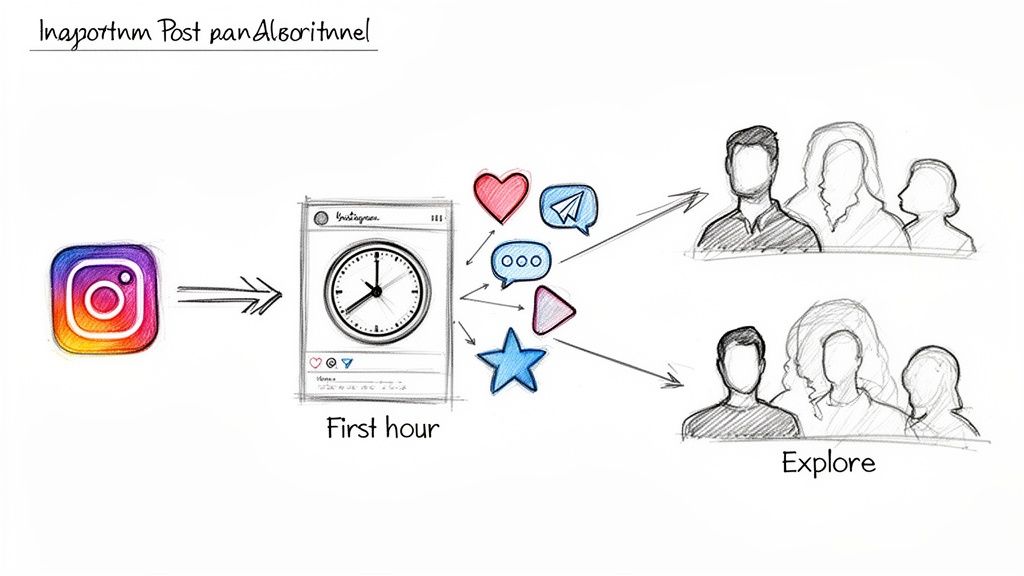
Figuring out when to post on Instagram isn't just about finding an open slot in your calendar. It's your opening line in a conversation with the algorithm.
Think of the algorithm as Instagram’s personal curator for every single user. Its job is to serve up the most interesting, relevant content at any given moment. When you hit "Publish," you kick off a short but critical audition for your post.
For about an hour, the algorithm watches closely to see how your followers react. Good, early engagement sends a clear signal: this content is a hit and deserves a wider audience.
The Power of Initial Engagement Velocity
This first burst of interaction is often called engagement velocity. When your post quickly racks up likes, comments, and shares, the algorithm takes that as a sign of high-quality content people genuinely want to see.
Its reward? It starts showing your post to more of your followers. Your content might even get a prime spot on the Explore page or in hashtag feeds, pushing its reach far beyond your core audience. And of all the signals, generating Instagram saves is a particularly strong indicator to the algorithm that your content is valuable.
The First Hour Rule: The engagement your post gets in its first hour massively influences its total reach. A strong start creates a ripple effect, while a weak one can stop your content in its tracks.
Productivity Suggestion: To make the most of this critical first hour, set a reminder on your phone to engage with comments for 15-30 minutes immediately after your post goes live. This not only boosts your engagement velocity but also builds community. Using a tool like a text expander (e.g., TextExpander, aText) can help you quickly respond to common questions with pre-written, personalized answers, saving you time.
Now, let's say you publish that exact same Reel at 8 AM, right as your followers are starting their morning scroll. It immediately gets likes and comments. That early momentum tells the algorithm, "Hey, people are loving this!" In response, it keeps pushing your content out, giving it the fuel it needs to perform well all day long.
Working With the Algorithm, Not Against It
Ultimately, the goal is to sync your posting schedule with your audience's habits. Timing it right ensures all your hard work gets in front of the right people when they're actually there to see it. That's how you maximize your potential for growth.
If you want to dig deeper into how these systems work, our guide explaining what an algorithm is is a great place to start. Once you get this core concept, you can stop fighting for visibility and start making the algorithm work for you.
Understanding General Peak Posting Windows
While finding your perfect posting time is the ultimate goal, it helps to start with what we already know about user behavior on a massive scale. Think of these general peak windows as well-lit highways for your content. They don’t guarantee you’ll reach your exact destination every time, but they put you right in the middle of rush-hour traffic, dramatically increasing your chances of being seen.
Industry-wide data consistently points to three main windows of opportunity during the day. Each one is driven by a different user mindset, and if you align your content with that psychology, you're already one step ahead.
The Morning Commute (7 AM – 9 AM)
The first wave of activity hits during the morning rush. Between 7 AM and 9 AM, people are just starting their day. They’re scrolling on the train, waiting for their coffee, or taking a quick mental break before diving into work. Their attention is scattered, so they're looking for quick, easily digestible content.
This is the perfect time for posts that are:
- Motivational: A quick quote or an inspiring image to set a positive tone for their day.
- Informational: A brief news update, a quick tip, or a sale reminder works wonders.
- Engaging but Fast: A simple poll or a "this or that" question in your Stories can grab immediate interaction without asking for too much brainpower.
Practical Example: A productivity coach could post a "Top 3 Goals for Today" graphic at 7:30 AM, catching their audience as they plan their workday. It's relevant, timely, and easy to engage with.
The Midday Break (11 AM – 1 PM)
As the workday hits its midpoint, people need a mental escape. From 11 AM to 1 PM, they jump on Instagram for a bit of fun, entertainment, or something to break up the monotony.
As you can see, these midday activity spikes are pretty universal, making this window a golden opportunity for engagement.
This is your chance to post something a little more entertaining or visually compelling. Snappy Reels, behind-the-scenes Stories, or user-generated content can do exceptionally well here. People have a bit more time to watch a video or swipe through a carousel than they did during their morning scroll. If you're managing multiple accounts, our guide on the best time to post on social media offers some broader strategies.
The Evening Wind-Down (5 PM – 7 PM)
The final peak arrives as the workday wraps up. Between 5 PM and 7 PM, users are commuting home or relaxing on the couch. They’re in a much more receptive state of mind, ready to connect, learn, and engage on a deeper level.
This is your prime time for building community. Users are less rushed and more willing to read longer captions, leave thoughtful comments, and share content that truly resonates with them.
Use this window for your most valuable stuff:
- Storytelling: Share a customer success story or a personal narrative.
- In-Depth Value: Post a detailed carousel explaining a process or a longer video tutorial.
- Conversation Starters: Ask open-ended questions that encourage real, meaningful responses.
To see how these trends play out across other platforms, it’s worth checking out these general best times to post on social media. While these three windows give you a solid foundation, think of them as your starting line. The next step is to start experimenting.
How to Find Your Personal Best Time to Post
General advice is a decent starting point, but the real growth happens when you stop relying on industry-wide data and start listening to your specific audience. It’s time to quit guessing and start using the powerful, free analytics tool you already have: Instagram Insights. This is where you find the hard data that will shape a posting strategy with real impact.
Making this shift moves you from being reactive to being strategic. Instead of chasing trends, you'll be making informed decisions that save time and actually boost your results. It’s about creating a smart, repeatable workflow that drives consistent growth.
Use Instagram Insights to Uncover Peak Activity
Think of your Instagram Insights as the command center for all your audience data. It tells you exactly when your followers are most active on the platform, taking all the guesswork out of the equation. To access this goldmine, you just need a Business or Creator account.
Here’s a quick workflow to find what you need:
- Go to Your Professional Dashboard: From your profile page, just tap the "Professional dashboard" button right under your bio.
- Access Your Insights: Inside the dashboard, tap on "Total followers" to get into your audience analytics.
- Find the "Most Active Times" Chart: Scroll all the way down. You'll see a detailed chart breaking down follower activity by both days of the week and hours of the day.
This chart is your new secret weapon. You can flip between the "Hours" and "Days" views to spot patterns. Look for the darkest blue bars—those are the time slots and days when the highest concentration of your followers are online and scrolling.
Practical Example: You might see that while Wednesday at 11 AM is a huge peak, your audience is also surprisingly active on Saturday evenings around 6 PM. That’s a specific, actionable insight that generic advice would never give you.
Manage Time Zones for a Global Audience
If your "Top Locations" in Insights show followers scattered across different countries, posting only on your local time is a recipe for missed opportunities. You need a plan that serves your entire community, not just the people in your time zone.
Start by cross-referencing your "Most Active Times" with your "Top Locations." If you’re based in Los Angeles but have a big chunk of followers in London, a single post at 4 PM PST will completely miss your UK audience—it'll be midnight for them.
Here are a couple of productive workflows to handle this:
- Find the Overlap Windows: Look for times that are reasonable for your top two or three locations. For instance, 9 AM EST is 6 AM PST and 2 PM in London. That one time slot could catch multiple audiences during active parts of their day.
- Schedule Location-Specific Content: Use a scheduling tool to publish your most important posts twice—once for each major time zone's peak hours. This ensures your key content gets seen by everyone who follows you.
The infographic below gives you a solid visual for the common peak engagement windows, which are often a great place to start your own tests.
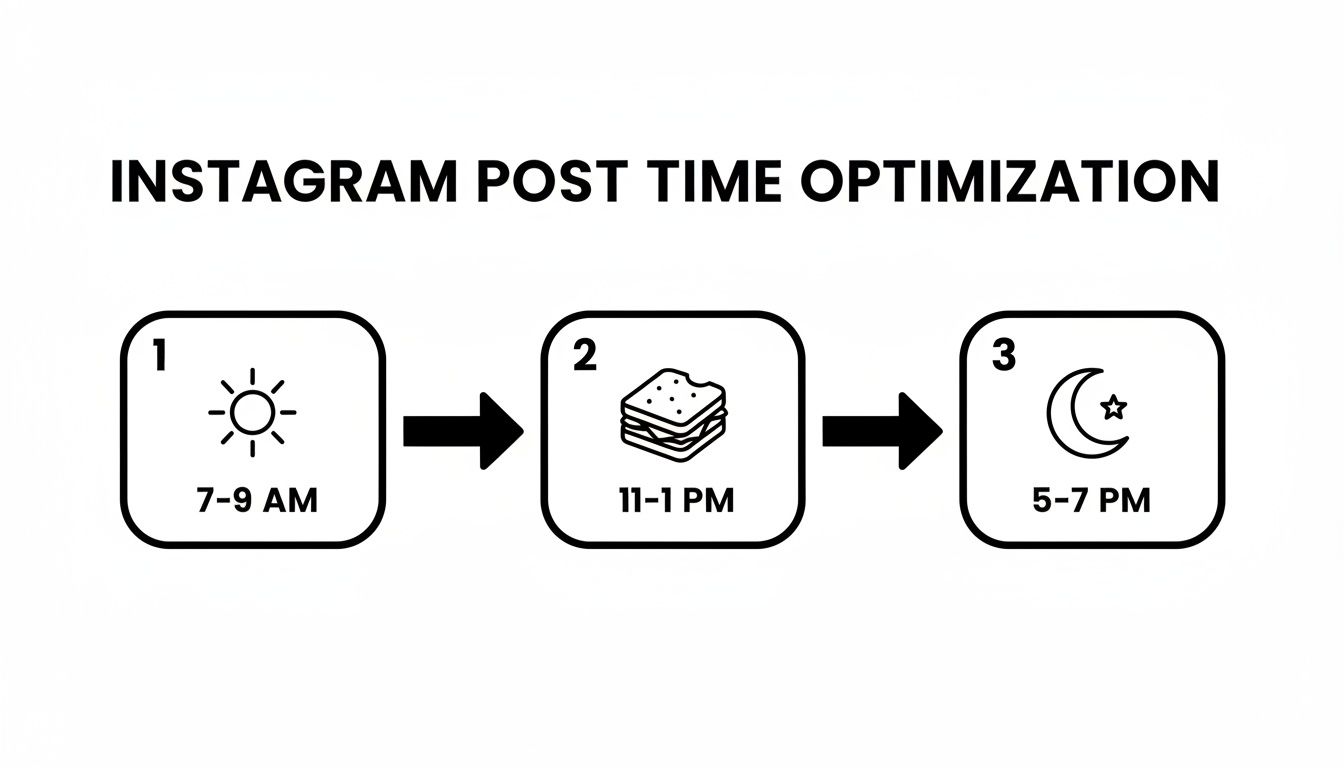
This visual breaks the day into three core blocks that line up with typical user routines: the morning commute, the midday break, and the evening wind-down.
Run Simple A/B Tests to Validate Your Findings
Your Insights data gives you a strong hypothesis, but the final step is to prove it in the real world. A/B testing (or split testing) is just a simple way to compare two things to see which one works better. In our case, we're testing different posting times.
The process is super straightforward:
- Pick Two Time Slots: Choose two different peak times you found in your Insights data (like 8 AM and 5 PM).
- Post Similar Content: For a couple of weeks, post content of similar quality and format at these two different times. You want to compare apples to apples.
- Measure and Compare: Keep an eye on the engagement (likes, comments, saves) for each post within the first two hours after it goes live. This initial rush of activity is what tells the algorithm your post is worth showing to more people.
The lunch hours, from around 11 AM to 1 PM, often turn out to be a powerhouse slot for engagement. This is when people are taking a natural break and looking for a quick scroll. In fact, some studies show these midday weekday slots see a spike in activity, especially for retail brands, where purchase intent can jump by up to 25%. If you want to dive deeper, you can read the full research about Instagram lunch hour engagement.
To keep this process organized and useful, a simple tracking sheet is all you need. It turns random testing into a clear, data-driven workflow that helps you fine-tune your schedule over time based on what actually works for your account.
Simple A/B Testing Template for Instagram Post Times
Here’s a barebones template you can use in a spreadsheet (like Google Sheets or Excel) to track your tests and spot your winning time slots.
| Date | Post Time | Day of Week | Likes (First 2 Hrs) | Comments (First 2 Hrs) | Notes/Observations |
|---|---|---|---|---|---|
| 2023-10-23 | 8:00 AM | Monday | 152 | 18 | Standard carousel post. Good morning engagement. |
| 2023-10-24 | 5:00 PM | Tuesday | 121 | 11 | Reel. Seemed to perform slightly lower than usual. |
| 2023-10-25 | 8:00 AM | Wednesday | 189 | 25 | Strong engagement on a question-based graphic. |
| 2023-10-26 | 5:00 PM | Thursday | 145 | 15 | Carousel again. Evening seems to get more saves. |
| … | … | … | … | … | Continue for 2 weeks to identify a clear pattern. |
After a few weeks of filling this out, you’ll have a clear, data-backed picture of which times consistently deliver the best results for your audience.
Automating Your Schedule for Consistent Growth
Figuring out your personal best time to post on Instagram is a huge win, but it’s only half the battle. The real key to sustainable growth is consistency, and that's where even the most dedicated founders and side-hustlers can get stuck. Let's be honest, manually posting every single day within a specific time slot is exhausting and just not realistic.
This is where you bridge the gap between knowing what to do and actually getting it done. By combining content batching with a scheduling tool, you can flip your social media management from a reactive daily chore into a proactive, strategic system. For anyone short on time, this workflow is a total game-changer.
The Power of Batching and Scheduling
The idea is simple but incredibly effective. Instead of scrambling to create and post content on the fly, you block out a chunk of time once a week to get it all done in advance. Then, you load it into a scheduling tool to automatically publish those posts at the perfect times you've already identified.
The benefits here are massive:
- Huge Time Savings: You'll reclaim hours every week by channeling your creative energy into one focused session instead of constantly switching gears every day.
- Unwavering Consistency: Your account stays active and feeds the algorithm exactly what it loves—a steady flow of content—even when you’re busy with everything else.
- Reduced Burnout: Say goodbye to that daily "what am I going to post?" panic. You'll free up mental space to focus on the bigger picture of growing your business.
This systematic approach is how you maintain momentum without losing your mind. You can dive deeper into the nitty-gritty of setting this up in our complete guide to automating your Instagram posts.
Practical Example: A creator with a full-time job blocks out two hours every Sunday. During this "content batching" session, they use a tool like Canva to create graphics for the week, write all the captions in a Google Doc, and then upload everything to a scheduler like Later or Buffer. Their posts go live every day during peak engagement windows, growing their audience while they're at their day job. That's the power of this system.
Building Your Automated Workflow
Putting this into action is pretty straightforward. Once you have a week's worth of content ready—a mix of Reels, carousels, and maybe a few single-image posts—you just upload it to your scheduling tool. From there, you assign each post to a specific day and time based on the data from your Instagram Insights and A/B tests.
Productivity Workflow:
- Plan (30 mins): On Sunday, use a simple notebook or a tool like Trello to map out your content topics for the week.
- Create (1 hour): Create all your visuals (images, Reels) and write all captions in a single session.
- Schedule (30 mins): Upload everything to a social media scheduling tool and set the exact posting times based on your audience data.
- Engage (15 mins daily): When posts go live, dedicate a short block of time to respond to comments to boost the algorithm.
By automating the whole process, you guarantee you never miss these golden opportunities. You get all the perks of perfect timing without being glued to your phone, effectively turning your Instagram strategy into a well-oiled machine that works for you.
A Few Common Questions About Instagram Posting Times
Even after you've crunched the numbers and built a schedule, a few tricky questions always seem to pop up. Let's walk through some of the most common ones I hear from founders and creators trying to nail down their timing.
Should I Post at the Exact Same Time Every Day?
Not necessarily. The real goal is consistency within your audience's peak windows, not chaining yourself to a single time slot. Your Instagram Insights will probably show you that different days have different high-traffic hours.
Practical Example: Your data might show that followers are most active at 11 AM on Wednesday (lunch break scrolling) but are more engaged at 6 PM on Saturday (weekend relaxation). A productive workflow would involve setting different posting times for weekdays vs. weekends in your scheduling tool to match this behavior.
How Often Should I Post on Instagram?
This is a big one. My advice? Quality and consistency will always win out over sheer volume. For most businesses and creators, aiming for 3-5 high-quality feed posts per week is the sweet spot—it's sustainable and incredibly effective.
It’s so much better to publish three fantastic posts at your best times than to churn out seven mediocre ones at random hours. You can always use Instagram Stories for more frequent, casual updates to keep the conversation going between your main feed posts. This approach keeps your presence strong without leading to burnout.
Productivity Tip: Don't get overwhelmed by the idea of posting constantly. Start by creating one great piece of content and scheduling it for your best time slot. Once that feels easy, use a content repurposing tool (like Repurpose.io) to turn that one post into a Story, a short video clip, or even a tweet. This maximizes your output without creating more work.
Are Posting Times Different for Reels and Stories?
Yes, and the difference is subtle but important. Since Reels are designed to be discovered by non-followers on the Explore page, their success isn't as tightly linked to your followers' immediate activity. It’s more about general platform traffic. So, posting during broad peak times like lunch breaks and evenings is a solid strategy.
Stories, on the other hand, are built for your current followers. To get the most views, you'll want their timing to align perfectly with your audience's peak active hours from your Insights. This gives your Story the best shot at appearing right at the front of their queue the moment they open the app.
Does Posting on Weekends Actually Work?
This one completely depends on who you're talking to. While a lot of B2B brands see their best engagement on weekdays, B2C brands—think food, retail, or entertainment—can have a massive impact on Saturdays and Sundays.
Weekend activity can be a bit less predictable, but it often spikes in the late morning and early afternoon. Honestly, the only way to know for sure is to test it. Use that A/B testing template we talked about earlier to track your weekend posts and see how they stack up against your weekday content.
Ready to stop guessing and start growing? Postful is an AI-powered social media tool designed to make reaching your audience simple. Get ready-to-use templates and curated ideas to jumpstart your content, so you can show up consistently and confidently without the grind. Join the waitlist to secure your early access.