

A content calendar is a schedule that spells out when and where you're going to publish your content. Think of it as a GPS for your marketing—it maps out the journey for every blog post, social update, or newsletter you send. It’s what turns random acts of content into a real, coordinated, and productive workflow.
Your Single Source of Truth for Content
At its heart, a content calendar is your team's single source of truth. It's the central hub where you can plan, create, and schedule everything. This simple system stops the last-minute scrambles and turns your content efforts into a smooth, well-oiled machine.
Even if you're a solo founder, this tool is a game-changer. It gets rid of that daily "What on earth do I post today?" panic and replaces it with a clear, actionable plan. And for small teams, it makes sure everyone is on the same page, so there's no confusion about who’s doing what or when it’s due.
Here’s a quick overview of what a content calendar brings to the table.
Content Calendar Overview
| Element | Benefit | Productivity Example |
|---|---|---|
| Topics & Ideas | Ensures a steady flow of relevant content. | A VA can draft 5 posts at once, knowing the topics are pre-approved. |
| Publishing Dates | Creates a consistent and reliable schedule. | Batch-schedule a whole week's content in one sitting, then forget it. |
| Target Platforms | Helps tailor content for each specific channel. | Write a LinkedIn post and its shorter Twitter version at the same time. |
| Owner/Assignee | Clarifies who is responsible for each task. | The graphic designer gets an auto-notification when a post needs visuals. |
| Status | Provides a clear view of your entire workflow at a glance. | Quickly see what's "In Review" without having to ask in Slack. |
A well-structured calendar doesn't just list tasks—it gives you a strategic advantage by organizing your efforts and keeping everyone aligned.
The Immediate Wins of Using a Content Calendar
You'll feel the benefits of a content calendar almost immediately. Instead of trying to keep scattered ideas and deadlines straight in your head, you get a clear, big-picture view of your entire strategy. That clarity alone helps you be more intentional and a lot more effective.
Key benefits include:
- Reduced Chaos and Stress: When you plan ahead, that constant pressure to create something right now just disappears. You always know what's coming up next.
- Consistent Publishing: A calendar helps you stick to a regular schedule, which is absolutely critical for building and keeping an audience. Consistency builds trust and keeps you top-of-mind.
- Improved Team Alignment: When everyone works from the same document, collaboration feels effortless. Anyone can see a project's status, its deadline, and who's in charge.
A content calendar doesn't just organize your posts; it organizes your thoughts. It forces you to think strategically about your messaging, timing, and goals, turning random updates into a cohesive brand story.
For example, imagine a side-hustler selling handmade jewelry. They use a simple spreadsheet to plan their Instagram posts around holidays like Valentine's Day. By scheduling posts weeks in advance—batch-creating all visuals one Sunday and writing captions the next—they’ll never miss a key sales opportunity just because they got busy making products. That simple act of planning moves them from being reactive to proactive, and that’s what drives real results.
Core Components of an Effective Content Calendar
A great content calendar is so much more than a list of dates. It's a living tool, built from a few key components that bring clarity and order to your entire workflow. Each piece has a purpose, turning your calendar from a simple schedule into the command center for all your content.
I've seen it firsthand. Imagine a two-person startup struggling with missed deadlines. One person writes copy, the other handles visuals, but they’re constantly out of sync on review times. By adding one simple "Status" column to their shared calendar, they cut review delays in half. Why? Because everyone could see exactly where a piece of content was—from "Drafting" to "Ready for Review" to "Published."
That’s the power of building your calendar with intention. Every column you add should solve a problem or make a process smoother.
Key Fields Every Calendar Needs
To build a calendar that actually makes you more productive, start with these essential fields. They answer the who, what, when, where, and why for every single piece of content.
- Publication Date & Time: The most basic building block. Productivity Tip: Include a time zone if your team is remote to avoid confusion.
- Content Title or Topic: A clear, working headline or topic description so you know what the piece is about at a glance.
- Content Format: Is it a blog post, an Instagram Reel, a LinkedIn text post, or a YouTube video? This helps you plan for wildly different creation needs.
- Platform(s): Where is this going? Tagging platforms like "LinkedIn" or "Instagram" ensures you’re tailoring the message for each audience.
- Assigned Owner: This is all about accountability. Who is in charge of getting this from idea to published?
- Status: This is the engine of your calendar's workflow. Simple statuses like "Idea," "In Progress," "In Review," and "Scheduled" are your best defense against bottlenecks.
- Key Performance Indicators (KPIs): What does success look like? Jot down the main metric you'll track, like "Engagement Rate," "Website Clicks," or "Sign-ups."
Your content calendar isn't just for scheduling—it's for strategy. Each component should directly connect your daily tasks to your bigger business goals, making sure every post has a purpose.
Connecting Your Calendar to Your Strategy
These components aren't just a checklist; they work together to give you a complete picture of your content efforts. For instance, including columns for both content pillars and platforms ensures your messaging stays consistent while still adapting to what works best on each channel.
If you need a hand defining your core topics, check out our guide on how to develop your own content pillars. This kind of strategic alignment is becoming non-negotiable as the online world gets more crowded.
By 2025, there will be over 5.42 billion social media users globally. That's a massive audience, but also a massive amount of noise to cut through. A solid content calendar is your best tool for managing it all. The average person will bounce between nearly seven different social networks every month, which makes organized, platform-specific planning absolutely essential. Sprout Social's detailed report has some great insights on this.
A well-structured calendar is what keeps you from feeling overwhelmed by all that complexity.
Choosing The Right Content Calendar Type
Once you know what your content calendar needs to do, the next step is picking the right format. This is key. Not all content calendars are created equal, and the best tool is always the one you’ll actually use.
The perfect system for a solo founder might be too simple for a growing team, while a complex platform could totally overwhelm a side-hustler just trying to get organized. Your choice really boils down to your budget, your team size, and how ambitious your content strategy is.
Let's break down the main options so you can find the right fit.
Simple Spreadsheets and Planners
For a lot of founders and solo creators, the best tools are the simplest ones. Seriously. A basic spreadsheet in Google Sheets or even a physical paper planner can be surprisingly effective for wrangling ideas and mapping out a schedule. They're free, easy to use, and you can get started in minutes.
Productivity Workflow: Create a Google Sheet with tabs for each month. Use columns for Date, Topic, Platform, Status, and Link to Draft. Use color-coding for the Status column (e.g., Yellow for "In Progress," Green for "Scheduled") for a quick visual overview.
Dedicated Project Management Apps
As your team grows, you'll eventually outgrow that simple spreadsheet. This is where project management tools like Trello, Asana, or Monday.com come in. These apps are built for collaboration, letting you assign tasks, set deadlines with automatic reminders, and track content through different stages of production.
They give everyone a shared space to see a project's status at a glance, which is a lifesaver for preventing bottlenecks and miscommunication.
Productivity Workflow: In Trello, create a board called "Content Calendar." Make lists for Ideas, To Do This Week, In Progress, In Review, and Scheduled. Each content piece is a card that moves from left to right. Attach drafts, assign members, and set due dates directly on the card.
All-in-One Social Media Platforms
If you're really looking to scale your social media presence, all-in-one platforms like Buffer or Sprout Social are a powerful choice. These tools are the whole package: they combine a content calendar with scheduling, publishing, and analytics. You can plan, create, and schedule posts across multiple platforms from a single dashboard—a massive time-saver.
Sure, these platforms come with a monthly cost. But the productivity boost from having everything in one place often provides a huge return on investment. They’re designed to be the command center for your entire social media strategy.
If you're focused on a specific platform and just need a starting point, you can access a LinkedIn Content Calendar template to see how a structured plan looks in action. For broader needs, looking into a comprehensive social media scheduler for small business can help you find the right tool for your budget and goals.
This decision tree gives you a quick visual for how team size can guide your choice.

Content Calendar Tool Comparison
To make it even clearer, here’s a breakdown of the different formats to help you choose the best fit for your team and budget.
| Tool Type | Best For | Pros | Cons |
|---|---|---|---|
| Spreadsheets/Planners | Solo founders, side-hustlers, and very small teams. | Free or very low-cost. Highly flexible and simple to set up. | Lacks automation and collaboration features. Prone to human error. |
| Project Management Apps | Small teams (2-10 people) needing collaboration and task tracking. | Centralized workflow, task assignments, and progress tracking. | Can become complex if not set up properly. Not built specifically for content. |
| All-in-One Platforms | Growing teams and businesses focused heavily on social media. | Combines planning, scheduling, and analytics. Saves significant time. | Higher monthly cost. Can be overkill for simple content needs. |
The main takeaway? Don't overcomplicate it. Match the tool to your team's actual needs, and you'll have a system that people actually stick with.
Your Workflow for Building and Using a Content Calendar
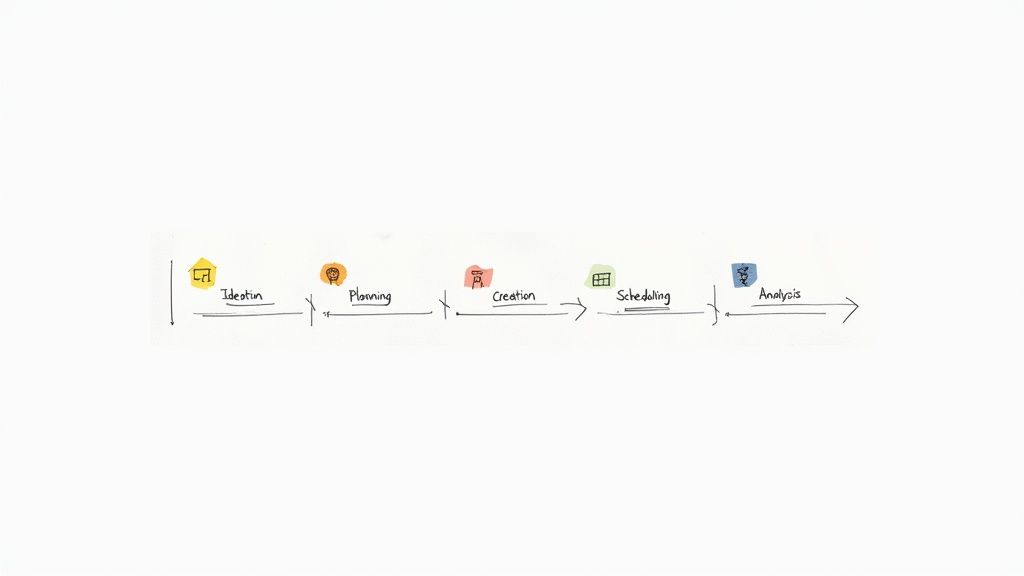
Having a content calendar is one thing; actually using it is another. A great calendar isn’t just a schedule—it’s the engine for a repeatable system that turns a spark of an idea into a published piece of content that actually connects with people.
This process doesn't have to be a grind. By breaking it down into five clear phases, you can build a smooth workflow that saves time, cuts down on stress, and frankly, produces better content. Each phase flows right into the next, creating a loop that helps you get better over time.
Let's walk through how to build and use your content calendar from day one.
Phase 1: Ideation and Brainstorming
This is where it all begins. The goal here is simple: build a backlog of solid ideas you can pull from anytime. Instead of staring at a blank page every week, you'll have a ready-to-go library of potential topics.
A simple but killer technique is to brainstorm around your core content pillars. If you’re a productivity coach, your pillars might be "Time Management," "Focus Techniques," and "Goal Setting." Just dedicate a brainstorming session to each one, and list out every blog title, video concept, or social post you can think of.
Productivity Workflow: Dedicate 30 minutes every other Friday to "Idea Dumping." Use a simple Trello board with a column for each content pillar. Add ideas as individual cards. This gives you a visual "idea bank" you can easily drag and drop when you're ready to plan.
Phase 2: Planning and Prioritization
You've got a bank of ideas. Now what? The next step is deciding what to create and when. This phase turns those raw ideas into real, actionable tasks on your calendar by lining them up with your goals, key dates, and what your audience needs.
Look at your list and ask a few pointed questions:
- Which topics feel most relevant to my audience right now?
- What content could support an upcoming launch or promotion?
- Which idea has the best shot at getting high engagement or traffic?
Productivity Workflow: At the start of each month, drag your chosen ideas from your "Idea Bank" Trello board into your content calendar tool. Assign a date and owner to each. This 1-hour planning session can save you 10+ hours of decision-making during the month.
Phase 3: Creation and Collaboration
Alright, it's time to actually make the thing. This phase covers it all—writing the first draft, designing graphics, or shooting video. For small teams, this is where clear communication is absolutely critical to keep things from getting stuck.
A mini-workflow inside this phase can make all the difference. In a tool like Asana or Trello, you can create a simple checklist for each piece of content:
- Drafting: The initial writing or creation is happening.
- Asset Creation: Graphics, photos, or videos are being made.
- Review: It's ready for a final check.
- Approved: Done and dusted, ready for the next step.
This simple system keeps everyone on the same page without needing constant check-ins.
Phase 4: Scheduling and Publishing
Once a piece of content is approved, the final step is getting it out the door. This means scheduling the post in your blog's CMS, a social media scheduler, or your email platform.
Productivity Workflow: Block out one afternoon a week for "Batching Day." On this day, you schedule all approved content for the coming week across all platforms. This focused work is far more efficient than scheduling one post at a time. This is also the perfect moment to think about making your content work harder. Our guide on content repurposing has some practical strategies for extending the reach of every piece you create.
Phase 5: Analysis and Iteration
Your work isn't over when you hit "publish." The final phase is all about learning from your results to make the next round of content even better. This is the feedback loop that drives real growth.
You don't need a complex analytics setup. A simple dashboard in Google Sheets can track key metrics like:
- Blog Posts: Page views and time on page.
- Social Media: Engagement rate and link clicks.
- Emails: Open rate and click-through rate.
Productivity Workflow: On the last Friday of the month, spend 20 minutes updating your tracking sheet. Add a "Notes" column and jot down one key insight (e.g., "Question posts on LinkedIn did really well"). Use these notes to inform next month's planning session.
Common Content Calendar Mistakes And How To Avoid Them
Even the most elegant content calendar can end up as a forgotten spreadsheet. It starts feeling like busywork instead of a productivity booster.
Most calendars go off the rails because of a handful of predictable slip-ups. Spotting these pitfalls is the first step toward a system you’ll actually use.
Mistake 1: Being Too Rigid
I’ve seen calendars locked down so tightly they snuff out any spontaneity. When every slot is booked months in advance, you lose the chance to tap into a breaking story or a sudden trend.
- The Fix: Use a "parking lot" or "icebox" column in your Trello or Asana board. If a planned post feels stale, move it to the parking lot and pull in a more timely idea. Plan 80% of your content, but leave 20% flexible for reactive posts.
Mistake 2: Overloading The Calendar
It’s tempting to track every detail under the sun—audience, hashtags, spend, engagement forecasts. But when updating the calendar takes longer than actually creating content, motivation tanks.
- The Fix: Start with a Minimal Viable Calendar (MVC)—just the date, topic, platform, owner, and status. Add more columns later if you discover a genuine need. For example, only add a "Hashtags" column after you notice your team is constantly asking which ones to use.
A content calendar should simplify your workflow, not complicate it. The goal is clarity and consistency, and often, the simplest tool is the most effective one.
Mistake 3: Disconnecting From Business Goals
Without linking each post to a bigger objective, your calendar can become a content hamster wheel. And all that effort ends up generating noise—not results.
- Reality Check: Consistent posting can boost engagement by 48%.
- Time Spent: The average person scrolls social media for 2 hours and 28 minutes daily.
- For deeper data on social engagement, see the Sprinklr report.
- The Fix: Add a “Goal” column and map every piece of content to a quarter-end target—like Q3 Launch Support or New Subscriber Growth. When planning, ask: "How does this post get us closer to our goal?" If it doesn't, consider replacing it.
Don’t skip a monthly calendar audit either. A quick 15-minute review with your team reveals what’s clicking and where you can tighten things up.
Frequently Asked Questions
As you start piecing together your own system, a few common questions always seem to come up. Getting these sorted out early will save you a ton of confusion and help you get started on the right foot.
Here are the most common ones we hear from founders and small teams, answered straight up.
How Far in Advance Should I Plan My Content Calendar?
For most small businesses, planning one month ahead is the sweet spot. It gives you enough of a runway to be strategic and batch-create your content, but it’s not so rigid that you can’t jump on a new trend or a last-minute opportunity.
A good rule of thumb is:
- Social Media Posts: Schedule these 2–4 weeks out. This keeps your content fresh while saving you from the daily "what do I post?" scramble.
- Blogs or Videos: For the heavier lifts, think in terms of quarterly planning. Knowing your big-picture topics for the next three months helps you stay tethered to your larger business goals.
The real key is to figure out what feels manageable for you. Start with a month, and if you’re crushing it, try pushing it out further.
What Is the Difference Between a Content Calendar and an Editorial Calendar?
You’ll hear these terms thrown around interchangeably, but there’s a small distinction that’s actually pretty useful. Think of it like this: the content calendar is the big-picture map, and the editorial calendar is the zoomed-in view of specific routes.
A content calendar covers all marketing content across every channel—social media, blogs, emails, videos, you name it. Its job is to orchestrate your entire marketing message. An editorial calendar usually drills down on long-form content like articles and newsletters, tracking drafts, edits, and SEO keywords.
For founders and small teams, the best move is to just merge them. Roll everything into a single, master content calendar. It keeps your workflow simple and guarantees everything is aligned in one place.
Can I Use a Paper Planner as My Content Calendar?
Absolutely. If a physical planner is what gets you to stay organized and consistent, it’s a fantastic place to start. For solo creators who just need a simple, visual way to map out the week without getting lost in digital tools, it’s perfect.
Just be ready to graduate to a digital tool when your strategy starts to grow. The minute you bring on a freelancer or even one team member, a digital calendar becomes a necessity.
Tools like Trello or Google Sheets give you real-time updates, easy file sharing, and automated reminders—things a paper planner just can’t do. Start with what works, but don't hesitate to upgrade when you outgrow it.
Ready to stop guessing and start growing? Postful is the AI-powered social media tool that makes creating and scheduling your content simple and fast. Join the waitlist today to get early access and build a consistent, effective social media presence with less effort. Secure your spot at https://postful.ai.